Demand Gen With a Product Feed for Stores
How do I run Demand Gen with a product feed?
Link Merchant Center to Google Ads, enable Shopping ads as a marketing method, then attach your feed to a Demand Gen campaign. You need at least 4 eligible products, square product images and up to 3 days for a new feed to be approved. Google says regional availability and pricing is not supported.
Demand Gen is where a store reaches people who are not yet searching: on YouTube, Discover and Gmail. A product feed makes those ads shoppable without building an ad per item. It is also where feed quality, usually hidden in Search, becomes visible to the customer. This guide follows Google’s pages, read on 25 November 2026.
What does the feed add?
Google says product feeds turn Demand Gen campaigns into a virtual storefront: you can show browsable product imagery and inspire customers to visit your website. Images and product details from your feed become a large set of creatives surfaced automatically, and Google machine learning anticipates a user’s interests and intent to show relevant products towards your Max conversions, Target CPA or Target ROAS goal. You can pair tailored products with specific audience segments and use image and video formats, short and long form.
Google’s reported figures: established Demand Gen campaigns with large product selections typically see a 33% increase in conversions upon adding product feeds, and on average advertisers see 18% more clicks at a similar cost by adding feeds to campaigns with shallow conversions. They are Google’s averages from its own data, not a promise for your account.
What do I need first?
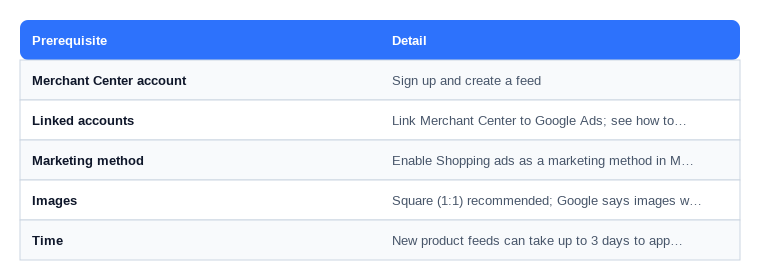
| Prerequisite | Detail |
|---|---|
| Merchant Center account | Sign up and create a feed |
| Linked accounts | Link Merchant Center to Google Ads; see how to link them |
| Marketing method | Enable Shopping ads as a marketing method in Merchant Center |
| Images | Square (1:1) recommended; Google says images within a 0.6 to 1.4 ratio get sufficient coverage |
| Time | New product feeds can take up to 3 days to approve |
| Policies | Follow Google Ads, Shopping ads and product feeds for Demand Gen policies |
Why does my feed not qualify?
Google’s troubleshooting page lists the usual errors. The message that the feed does not have enough eligible products appears when you have fewer than 4 eligible products, either because products violate the feed policies or because your product group filters contain fewer than 4. Add more products or relax the filters. Disapproved products, an insufficient number of eligible products and a suspended Merchant Center account all stop ads; see how to fix Merchant Center disapprovals and why a Shopping campaign gets no impressions. Google also says Demand Gen doesn’t support regional availability and pricing, so a store that uses it should plan a separate setup.
What are the creative specs?
Google’s feed creative specs: a square logo of at least 128x128 (1200x1200 recommended), images from 300x300 square up to 9:16 at 1080x1920 (recommended for YouTube Shorts), and video from 5 seconds minimum, with videos under 10 seconds ineligible for YouTube In-stream. File size limits are 150 KB for the logo, 5 MB for images and 256 GB for video. See Demand Gen creative specs.
How should I target locations?
Google says that if your feed targets several regions but you want a subset, select target locations during campaign construction or in settings; Demand Gen then matches products and users from the targeted country. Make sure the campaign location matches your feed’s countries.
How do I judge results?
Compare cost per conversion and conversion value with a campaign without a feed, using an A/B experiment: Google says A/B experiments support the scenario of Demand Gen with a product feed versus without. See how to run a Google Ads experiment. Give the campaign time: Demand Gen has a learning phase of its own; see Demand Gen learning phase. Check feed quality first with titles and images.
How does it compare with Meta?
Demand Gen is Google’s closest equivalent to Meta’s discovery ads; see Is Google Demand Gen an alternative to Meta ads. The feed makes it work like a catalogue campaign.
What mistakes hurt feed-based Demand Gen?
Weak product images: the feed is the creative, so low-resolution or cluttered images produce weak ads. Stale prices: a price mismatch between ad and page invites disapproval and lost trust; see how to keep Merchant Center in sync. Too few products in a group: a filter that leaves fewer than four eligible items stops serving. Overlap: a Demand Gen feed campaign, a Performance Max campaign and a Shopping campaign can all promote the same products to the same people, so decide which one owns which audience. And no holdout: adding a feed and watching conversions rise proves little without a comparison, so use the A/B experiment Google supports for feed versus no feed.
Where does Bach.ai fit?
Bach.ai is our product. It audits connected Google Ads accounts and, with your store connected, compares ad-reported revenue with real orders. On an active paid plan it can apply a supported Google Ads change after you approve it, by default. It does not build creative.
FAQ
How many products do I need?
At least 4 eligible products. Google shows an error for fewer, or when product group filters leave fewer than 4.
How long does a new feed take?
Google says up to 3 days to approve, so plan before a launch.
What image shape is best?
Square 1:1. Google says ratios between 0.6 and 1.4 get sufficient coverage.
Do the 33% and 18% figures apply to me?
They are Google’s averages for particular cases. Test with an experiment.
Sources
Sources, each opened and read on 25 Nov 2026: Google Help pages, Use a product feed to show your products in Demand Gen campaigns; Troubleshoot product feeds for Demand Gen; About Demand Gen creative assets with product feed specifications. Menu names and limits change, so check the page before you act.