Merchant Center Product Disapproved? 8 Fixes (2026)
How do I fix Merchant Center product disapprovals?
Open Products, then the Needs attention tab, and filter to disapproved items. Match each reason to its fix: add a valid GTIN or mark a custom product, set a real brand, replace placeholder or overlay images, add apparel attributes, and align price and availability with your product page. Then re-upload or request a review.
A disapproved product in Google Merchant Center is a product that cannot appear in Shopping ads or free listings, so it quietly removes revenue without lowering a single bid. The reasons are usually mundane: a barcode that is the wrong length, a brand written as “N/A”, an image with a logo on it, or a price on the page that differs from the price in the feed. This guide lists the eight fixes Google documents most often, with the Shopify admin path where Google gives one.
If you run Performance Max or Shopping, disapproved products are one of the first things to rule out when a campaign under-delivers; compare it with why Google Ads is not spending its budget and Performance Max vs Search for ecommerce.
Where do you find the disapproved products?
- Open Merchant Center and go to Products under “Products & store”.
- Select the Needs attention tab. Under “All products that need attention” you see every product with an issue.
- Use the filter icon to filter by issue impact, labels, status, title or what needs attention.
- Select the download icon for a complete .csv of affected items.
- Open an issue to reach its Issue Details Page, which shows the business impact, such as lost click potential, examples of affected products and the steps to resolve it.
Google distinguishes warnings, where products still show with limited performance, from disapprovals, where products stop showing across Google (Issues in Merchant Center).
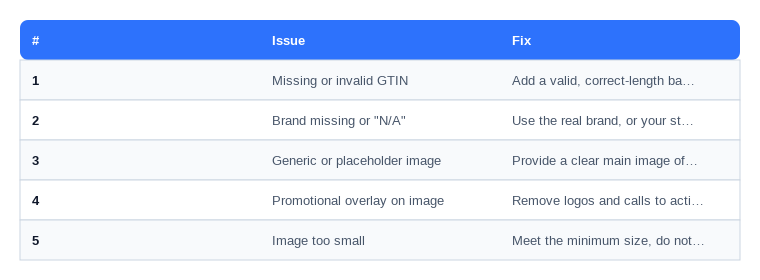
The 8 fixes
| # | Issue | Fix |
|---|---|---|
| 1 | Missing or invalid GTIN | Add a valid, correct-length barcode; mark handmade items as custom |
| 2 | Brand missing or “N/A” | Use the real brand, or your store name if you make it |
| 3 | Generic or placeholder image | Provide a clear main image of the actual product |
| 4 | Promotional overlay on image | Remove logos and calls to action, or turn on image improvements |
| 5 | Image too small | Meet the minimum size, do not upscale or use thumbnails |
| 6 | Missing apparel attributes | Add gender, size, color and age group |
| 7 | Price or availability mismatch | Match the product page; turn on automatic updates |
| 8 | Page blocked or broken | Fix robots.txt, redirects, server errors and slow pages |
Sources: Fixing Merchant Center disapprovals for product data quality violations and Issues in Merchant Center, read 24 Nov 2026.
How do you fix identifier and brand errors?
GTIN. Google says products with an incorrect or missing GTIN are not synced and are disapproved, so assign valid unique product identifiers where they apply. Custom-made products such as art or handmade goods do not need a GTIN. On Shopify, go to Sales channels, click Google, open the Overview page, go to the Product feed section, click Manage Products, set the “Custom product” column to True for those items and click Save.
Brand. In your Shopify admin, put the brand in the Vendor field under Organization. Do not submit values such as N/A, Generic or No brand. Google says that if you make the product yourself or it falls in a generic category, you can submit your store name; if it has no brand, use the manufacturer or supplier name.
If the GTIN does not match the brand, Google reports a conflicting-values warning; provide a GTIN that belongs to that brand.
How do you fix image problems?
- Generic image. The main image must clearly show the principal product. Logos and “No image available” placeholders are not allowed and stay disapproved until replaced.
- Promotional overlay. Products with promotional text, retailer logos or watermarks stay disapproved until the image is updated. Google suggests turning on image improvements to fix these automatically.
- Too small. Non-apparel images need at least 100 x 100 pixels and apparel images at least 250 x 250, with no image over 64 megapixels or 16 MB. Do not scale up images or submit thumbnails. Google recommends the product take up 75% to 90% of the image.
What do apparel stores have to add?
Google lists four required attributes for Apparel & Accessories: gender (male, female or unisex), size, color and age group (newborn, infant, toddler, kids or adult). Use consistent size formats, a recognizable color name, and slashes between colors such as Red/Pink/Blue rather than a single combined word. Size or color can be omitted if it is already in your product variants.
Why does a price or availability mismatch disapprove a product?
Google calls this preemptive item disapproval: if price or availability differ between your product data and your product page, products likely to violate the rules are disapproved as a precaution, and a review is required to resolve it. To reduce the risk, turn on automatic updates under the Automations tab under Products. Also check your online store for placeholder content, broken links, mismatched categories, a robots.txt that blocks Googlebot or Googlebot-image, unavailable product pages, and redirects to a generic page.
How do you request a review?
Google recommends editing the product data and re-uploading, after which a successful review removes the disapproval. For setup and policy issues that affect the whole account, use the Needs attention tab, select View setup and policy issues and follow the steps. You can request a review there after fixing the cause; reviews can take up to 7 days.
Account-level data quality problems come with a warning period. During it, your items continue to appear, and you can request one courtesy review with the Request review button. If you do not request a review, the data is reviewed again at the end of the period and the account can be suspended.
Can Bach.ai help?
On Starter and above, Bach.ai reads Google Ads, and with the read-only Shopify connection it can compare the products you advertise with your real catalog and orders. It does not edit your Merchant Center feed or your store. Treat it as the place where you spot that a top seller has stopped getting traffic, then fix the cause here.
What to do next
For the Meta catalog side of the same problem, use the Meta ads audit checklist. Download the Needs attention list, group it by issue, and fix the largest group first. Re-check after your next feed fetch. If revenue from a product line dropped, compare Google’s conversions with Shopify orders to see whether the disapproval is the cause. The Shopify connection starts on Starter; see pricing.
FAQ
How long does a Merchant Center review take?
For setup and policy issues, Google says reviews can take up to 7 days. Product-level fixes are usually cleared by re-uploading corrected data and letting the product be re-reviewed. Fix the cause in the data first, because re-uploading the same product data unchanged will not clear the issue.
Does a warning stop my products showing?
No. Products with warnings continue to show but with limited performance, such as lower impressions and clicks. Unresolved warnings can lead to disapprovals. Treat a warning as a to-do item: the products keep showing for now, but fixing it protects your impressions and clicks.
Do handmade products need a GTIN?
No. Google says custom-made products such as art or handmade goods do not need a GTIN. On Shopify mark them as custom products in the Google channel’s product feed. Do not invent a GTIN to clear the error; mark the product as custom-made instead.
Why is a product disapproved in one country but not another?
Products in feeds that target several countries or destinations can receive different disapprovals or warnings because policies differ by location. Consider adjusting the selection of countries. Read the issue for the specific country, since the same product can be fine in one place and flagged in another.
Sources
Checked 24 Nov 2026: Fixing Merchant Center disapprovals for product data quality violations; Issues in Merchant Center.