How to Run a Google Ads Experiment
How do I run a Google Ads experiment on my store?
Write one hypothesis, test one variable, pick one or two success metrics, and run a campaign experiment, which splits traffic and budget between the original and a draft. Google says only one experiment can run per campaign. Do not edit the base campaign mid-test unless sync is on, then apply the winner.
Most stores test in the worst way: change a setting, wait a week, and read the chart. Seasonality, a sale or a competitor can explain any change, so the result proves nothing. An experiment fixes that by running the original and the trial side by side on the same auctions. This guide follows Google’s help pages, read on 25 November 2026.
What is a campaign experiment?
Google defines a campaign experiment as a way to test a draft’s performance against the original campaign’s performance. Experiments use a portion of the original campaign’s traffic and budget and run alongside the original for a specified length of time. For any given campaign you can only have one experiment running at a time. Google’s best-practice page describes an Experiments page that lets you create, manage and optimise experiments in one place, for Search, Display and Performance Max.
What should I test?
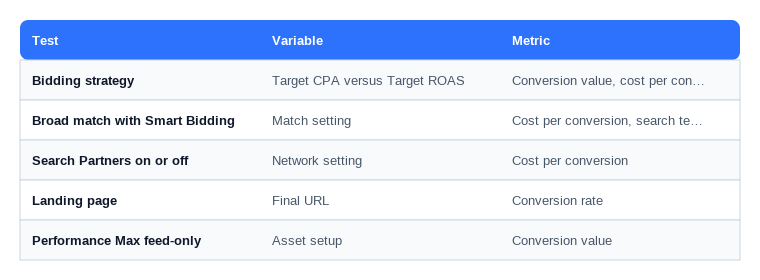
Tie the test to a business goal. Google’s own example is a hypothesis that switching a bidding strategy to Target ROAS will drive a higher conversion value for acquisition campaigns compared to Target CPA. Good store tests:
| Test | Variable | Metric |
|---|---|---|
| Bidding strategy | Target CPA versus Target ROAS | Conversion value, cost per conversion |
| Broad match with Smart Bidding | Match setting | Cost per conversion, search terms quality |
| Search Partners on or off | Network setting | Cost per conversion |
| Landing page | Final URL | Conversion rate |
| Performance Max feed-only | Asset setup | Conversion value |
How do I set one up?
- Write the hypothesis: what you change, what you expect, why.
- Test one variable at a time. Google warns that two changes at once leave you unable to tell which caused the result.
- Pick one or two metrics before the test begins, and let that metric choose the winner.
- Create the experiment from the Experiments page and set the traffic split and the dates.
- Run it long enough to cover your purchase cycle, so weekday and weekend behaviour are in both arms.
- Leave the base campaign alone: Google says to avoid making changes to your base campaigns unless sync is on, because it becomes hard to know which change did what.
- Apply the result: either update the original campaign, which keeps its history, or convert to a new campaign when you are testing a new structure.
- Record every test, because Google advises keeping records of your experiments to prioritise the next ones.
Do experiments work for Demand Gen?
Yes, with their own rules. Google’s Demand Gen page says you can start an experiment with a minimum of 2 Demand Gen campaigns, both ready but not currently running, and to choose campaigns that differ in only one variable. It also says all changes to campaign setup should be done before saving, and that Demand Gen experiments run on all inventories. A/B experiments support the scenario of a Demand Gen campaign with a product feed versus one without. See how to set up Demand Gen with a product feed.
What mistakes spoil an experiment?
- Changing the base campaign halfway. It muddies the comparison.
- Judging on a handful of conversions. If the test cannot reach enough data, extend it or test a bigger change; see how to test a Smart Bidding strategy.
- Testing during a sale on one arm only.
- Picking the winner by clicks when the goal was sales.
Related: Performance Max versus Search for ecommerce and Target CPA versus Maximize conversions.
How big should a test be?
Size the test to the decision. A bidding-strategy test needs enough conversions in each arm to tell a real difference from noise; if each arm will collect only a handful of purchases, the result will not be reliable, so extend the dates, increase the traffic share or test a larger change. Plan the length around your purchase cycle: if buyers typically take a week from click to order, a four-day test sees mostly clicks without orders. Do not stop a test the day one arm leads; agree the minimum duration and metric before you start. And avoid running a test across a sale or a stock-out in only one arm. If the result is a draw, that is information too: the change did not matter much, so choose the simpler option and spend your time on a bigger lever. Record every test in a shared sheet with hypothesis, dates, result and decision.
Where does Bach.ai fit?
Bach.ai is our product. It audits a connected Google Ads account and highlights where a change deserves a test, such as a bid strategy that sits far from its target. On an active paid plan it can apply a supported change after you approve it, by default. It does not replace the experiment itself.
FAQ
How long should an experiment run?
Google’s pages do not give one number; the guidance is to let your chosen metric decide the winner. Run it across a full buying cycle and until each arm has meaningful conversions.
Can I run two experiments on one campaign?
Google says you can only have one experiment running at a time for any given campaign. Queue the next test after you apply or end the first.
Should I test on my best campaign?
Test where a bad result is affordable. A smaller campaign or a duplicate is safer, because an experiment takes a portion of the original’s traffic and budget.
What if the result is inconclusive?
Keep the original, record the result, and test a bolder variation. An inconclusive test still tells you the change is not a big lever.
Sources
Sources, each opened and read on 25 Nov 2026: Google Help pages, Test with confidence with the Experiments page; Campaign experiment: Definition; Create A/B experiments for Demand Gen campaigns. Menu names and limits change, so check the page before you act.