Google Shopping Image Requirements for Stores
What image requirements does Google Shopping have?
Use JPEG, WebP, PNG, GIF, BMP or TIFF images of at least 500 x 500 pixels (required for all products from 31 January 2027), ideally 1500 x 1500 or more, under 64 megapixels and 16 MB. Let Googlebot-image crawl your site, use stable URLs without changing parameters, and add up to 10 extra images.
A Shopping listing is mostly a picture. Google says the main image is the first thing potential customers see across its channels, and a feed with small, cropped or broken images loses both clicks and approvals. In 2026 Google announced a new minimum size. This guide gathers the image rules in one place. Sources are Google’s Merchant Center pages, read on 25 November 2026.
What size must the main image be?
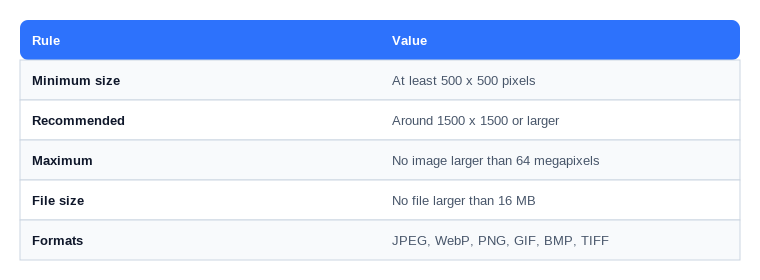
Google’s image link page states it recently announced new image size requirements of at least 500 x 500 pixels for all products beginning January 31, 2027. To ensure best performance in all listing formats it recommends images 1500 x 1500 pixels or above. Treat 500 x 500 as the floor and 1500 as the working target.
| Rule | Value |
|---|---|
| Minimum size | At least 500 x 500 pixels |
| Recommended | Around 1500 x 1500 or larger |
| Maximum | No image larger than 64 megapixels |
| File size | No file larger than 16 MB |
| Formats | JPEG, WebP, PNG, GIF, BMP, TIFF |
| URL length | 1 to 2,000 characters |
What file formats and URLs work?
Supported formats are JPEG, WebP, PNG, GIF, BMP and TIFF, and the file extension should match the real format. Google warns that a .jpg extension on a PNG file can lead to Unsupported image type errors, and if images are synced from third-party platforms you should verify they generate correct image URLs and formats. URLs must be ASCII and RFC 3986 compliant, with symbols and spaces encoded.
Can Google crawl my images?
Google says your robots.txt must allow both Googlebot and Googlebot-image so it can fetch images, with an example of allowing the root for each. Changes can take 24 to 48 hours to take effect. Use stable URLs: avoid dynamic parameters such as timestamps or session IDs that change on every feed submission, because static URLs prevent unnecessary recrawling and server load.
How do additional images work?
Use the additional image link attribute for alternative angles or detail shots, optional but recommended. You can include up to 10 additional images, and the same size guidance applies. There is also a lifestyle image attribute for an in-context representation of the product. A good set is the product on a plain background first, then angles, detail and use in context.
Can Google fix small image problems for me?
Google says you can turn on automatic image improvements in Merchant Center so it can fix minor image policy issues, such as promotional overlays, and avoid disapprovals. Check what it changed on a few products before relying on it, since a changed image can differ from your site.
What about AI-edited images?
Google notes that AI regulations in the European Union, India, New York, California, South Korea and Vietnam require that ads with certain AI-generated or edited assets include disclosures or labels. You can add labels to your creatives or use the AI label setting in Google Ads, Merchant Center and Ads Editor. Google also says use of the setting does not guarantee compliance with any regulation, so seek legal advice where unsure. See do I have to label Google Ads assets made with AI.
How do I audit my feed images?
- Export your products with the image link column.
- Check dimensions: flag anything under 1500 pixels on the long side, and anything under 500 now.
- Test a sample of URLs for the correct format and a 200 response.
- Confirm robots.txt allows Googlebot-image.
- Replace images with dynamic parameters in the URL.
- Review Diagnostics after the next fetch. For product rejections generally read how to fix Merchant Center product disapprovals.
What does a good product image set look like?
A strong set has a clean main image where the product fills most of the frame and nothing overlays it; two or three alternate angles; one detail shot of material or texture; one image showing scale, such as the product in use; and, if you have it, a lifestyle image in the lifestyle attribute. Keep backgrounds consistent across a range so the Shopping grid looks coherent. Export at the largest sensible size, not the minimum, and compress carefully so file size stays reasonable. Name files by SKU and variant so the feed maps correctly, and keep URLs stable. Check for third-party watermarks, text overlays and borders, since these cause disapprovals; see how to fix Merchant Center disapprovals. Finally, audit a sample in the Shopping tab on mobile, where images are smallest, and see Google Shopping product titles.
Where does Bach.ai fit?
Bach.ai is our product. It audits connected Google Ads accounts and, with your store connected, reads products so you can see which earn revenue. It does not edit images or feeds, and on an active paid plan any supported Google Ads change waits for your approval, by default.
FAQ
Is 500 x 500 enough?
It is the stated minimum from 31 January 2027. Google recommends about 1500 x 1500 or more for best performance in all listing formats.
Can I use WebP?
Yes. WebP is on Google’s supported list, and the extension must match the format.
Do I need a white background?
The pages we read set size and format rules, not background colour. Follow your category’s image policy in Merchant Center before using lifestyle shots as the main image.
How many extra images can I add?
Up to 10 additional images per product with the additional image link attribute.
Sources
Sources, each opened and read on 25 Nov 2026: Google Help pages, Image link; Additional image link; Allow Merchant Center to improve your product images. Menu names and limits change, so check the page before you act.