Demand Gen Image and Video Sizes (2026)
What image and video sizes does Demand Gen need?
Images: square 300x300 minimum (1200x1200 recommended), horizontal 1.91:1 at 600x314 minimum, vertical 4:5 at 480x600 minimum and 9:16 at 600x1067 minimum. Logo: square, 128x128 minimum on current specs. Video: at least 5 seconds, under 10 seconds is ineligible for YouTube In-stream; image files up to 5 MB, logos 150 KB.
Demand Gen eats creative. One image in the wrong ratio quietly removes you from a placement, and a nine-second video never reaches YouTube In-stream. Google’s specs are precise, but spread over three pages that do not agree on every number. This guide consolidates them, read on 25 November 2026, and flags the difference.
Which image sizes are supported?
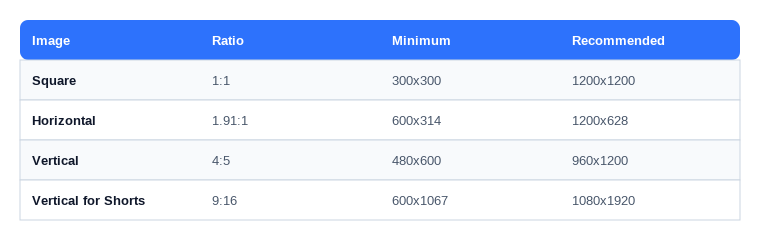
Google’s image specification page lists:
| Image | Ratio | Minimum | Recommended |
|---|---|---|---|
| Square | 1:1 | 300x300 | 1200x1200 |
| Horizontal | 1.91:1 | 600x314 | 1200x628 |
| Vertical | 4:5 | 480x600 | 960x1200 |
| Vertical for Shorts | 9:16 | 600x1067 | 1080x1920 |
Image files can be .jpg or .png up to 5 MB, and Google says the safe zones for 9:16 images are similar to 9:16 videos. You can upload up to 20 image assets per ad, with square and horizontal required in practice and vertical ratios optional. The 9:16 image is recommended for YouTube Shorts. The page also says to use the in-platform preview to see how ads will look, since mocks are not exhaustive.
What about logos?
A square 1:1 logo is needed. Google’s image spec page gives a minimum of 128x128 and a recommended 1200x1200, with a 150 KB maximum file size. Its older creative guidelines page lists a minimum of 144x144, in .jpg or .png. Use the larger figure, 1200x1200, and keep to 150 KB, so both pages are satisfied.
Which video formats are supported?
Google’s video page gives recommended HD sizes: square 1080x1080, horizontal 16:9 at 1920x1080, vertical 4:5 at 1080x1350 and vertical 9:16 at 1080x1920 (recommended for YouTube Shorts). The eligible format is MPG (MPEG-2 or MPEG-4), the minimum length is 5 seconds, and videos shorter than 10 seconds are ineligible to serve on YouTube In-stream. The maximum video file size is 256 GB.
How should a store prepare creative?
- Shoot or cut in 9:16 first, then crop to 4:5 and 1:1; keep key content in the Shorts safe zone.
- Export videos of 10 to 30 seconds so In-stream remains eligible.
- Make images in 1:1, 1.91:1 and 4:5, at the recommended size, not the minimum.
- Keep a clean 1200x1200 logo under 150 KB.
- Preview every format in Google Ads before launch.
- Refresh assets regularly; Google publishes a creative refresh guidance page.
What if I use a product feed?
Product feed ads have their own spec page: a square logo of at least 128x128, images from 300x300 up to 1080x1920, and video of at least 5 seconds, with the same file limits. Square product images are recommended. See Demand Gen with a product feed.
What about quality?
Google’s Demand Gen not-running guide says Demand Gen maintains a stricter creative quality threshold than standard Video or Performance Max campaigns, so assets flagged low quality or policy-rejected can stop delivery. See Demand Gen learning phase and how to fix a disapproved Google ad.
What is a practical creative pack for a store?
A pack that satisfies every format needs surprisingly few files: one square 1200x1200 image, one horizontal 1200x628 image, one vertical 960x1200 (4:5) image and one 1080x1920 (9:16) image, plus a 1200x1200 logo under 150 KB. For video, a 15-second and a 30-second cut in 9:16, with a 1:1 version for feeds. Cut the 9:16 first and check the Shorts safe zones, so captions and the product are not hidden by interface elements. Name the files by format and version, for example hero_9x16_v2, so refreshes are tracked. Upload several image variants, since each ad can hold up to 20 image assets, and let the system combine them; test one idea at a time, such as product alone against product in use, so the asset report teaches you something. Plan the shot list around placements: Shorts and In-feed reward vertical, fast openings; Discover and Gmail reward clean images with a clear product; In-stream rewards a hook in the first seconds because viewers can skip. A single product shot with no text on the image is the safest starting asset, with the offer carried in the headline. Review each combination in the preview before launch, and watch the asset reports for low-quality flags, because Google says Demand Gen applies a stricter quality threshold. When you refresh, change the idea, not just the colour, and retire assets that the report marks as weak.
See also Demand Gen with a product feed and how to start YouTube ads.
Where does Bach.ai fit?
Bach.ai is our product. It audits connected Google Ads accounts and flags campaigns with few creative formats. It does not produce creative; on an active paid plan any supported change waits for your approval, by default.
FAQ
What is the smallest square image?
300x300. Google recommends 1200x1200.
Can I run a 7-second video?
Videos under 10 seconds are ineligible for YouTube In-stream per Google’s page, though the minimum overall is 5 seconds.
How large can the image file be?
Google’s pages list 5 MB for images and 150 KB for logos.
Do I need a vertical video?
Vertical 9:16 is recommended for YouTube Shorts. Without it you miss that placement.
Sources
Sources, each opened and read on 25 Nov 2026: Google Help pages, About image assets specifications for Demand Gen; About video assets specifications for Demand Gen; Demand Gen campaign creative: Asset specifications and guidelines. Menu names and limits change, so check the page before you act.