Dynamic Remarketing for Retail in Google Ads
How does dynamic remarketing for retail work in Google Ads?
Dynamic remarketing shows past visitors ads with the specific products they viewed. Enable the Dynamic Remarketing add-on in Merchant Center, submit your product data, link Google Ads and Merchant Center, set up dynamic remarketing in Google Ads and add the dynamic remarketing tag to your site. Google's policies for interest-based ads apply.
Most shoppers leave without buying. Dynamic remarketing is how a store shows them the product they looked at, not a generic banner, when they browse elsewhere. Google has renamed parts of it and built overlapping features, so the first question is often where it fits today. This guide follows Google’s help pages, read on 25 November 2026.
What is dynamic remarketing for retail?
Google says remarketing lets you show ads to your past site visitors and customise those ads based on the section of your site people visited. Dynamic display ads for retail go further by displaying dynamic remarketing ads with specific product information tailored to the customer’s previous site activity. It is part of Display Network advertising; Google’s definition of Your data describes using your data to customise a display ads campaign for people who have previously visited your site, and to reach them with dynamic remarketing when they browse the web and use apps.
What changed in the terms?
Google’s audience reporting update renamed remarketing to Your data, and renamed audience types, including custom, in-market and affinity, to audience segments. You add your data segments to ad groups so ads show to people who have visited your website. If you read an older guide that says remarketing lists, look for data segments under Audiences in the Campaigns menu.
How do I set it up?
Google lists the order:
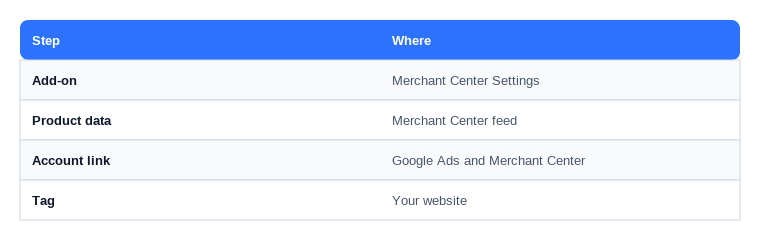
- Enable the Dynamic Remarketing add-on in Merchant Center: Settings, Add-ons, then Add on the Dynamic Remarketing card.
- Submit your product data to Merchant Center.
- Link your Google Ads and Merchant Center accounts. See how to link Google Ads and Merchant Center.
- Set up dynamic remarketing in Google Ads.
- Add the dynamic remarketing tag to your website.
- Optionally add display-ad-specific attributes to your product feed.
| Step | Where |
|---|---|
| Add-on | Merchant Center Settings |
| Product data | Merchant Center feed |
| Account link | Google Ads and Merchant Center |
| Tag | Your website |
What policies apply?
Google says advertisers must follow Google Ads policies to run dynamic ads campaigns, with specific policies for interest-based advertising such as dynamic remarketing. Make sure your site’s privacy and consent setup allows this use of data; see consent mode. Google’s Merchant Center help also has a page on landing pages and tracking with dynamic remarketing; read it when your product pages use variants or redirects.
Is it still the best way to retarget?
Google also offers overlapping ways to reach past visitors and known customers: Performance Max with a product feed, Demand Gen with a product feed and Customer Match. For many stores a Performance Max campaign with a feed covers part of this; see Is Performance Max just remarketing and Demand Gen with a product feed. Use a separate dynamic remarketing campaign when you want control over frequency, creative and budget for past visitors; see Customer Match.
What should I measure?
Measure incremental sales, not just last-click returns. Retargeting often claims credit for purchases that would have happened anyway. Compare conversion value on a holdout, or use an experiment; see how to run a Google Ads experiment. Also exclude recent purchasers so you do not pay to chase someone who already bought.
What should be on my exclusion and frequency checklist?
Retargeting wastes money fastest when it follows people who have already bought or who bounced by accident. Exclude purchasers for a sensible period after an order, with a longer window for durable goods than for consumables. Exclude visitors who spent only seconds on the site, if your audience tools allow it. Cap how often the same person sees the ad, in line with what the campaign type offers. Segment by recency: someone who viewed a product yesterday deserves a different message from someone who viewed it three weeks ago. Keep an eye on the number of products shown; a long carousel dilutes the product they actually wanted. Test the creative on mobile, where most display impressions are served, and keep the message consistent with the product page the shopper will land on. Finally check the feed: ads for out-of-stock items damage trust, so keep availability current, as in Merchant Center automatic item updates.
Where does Bach.ai fit?
Bach.ai is our product. With your store connected it compares ad-reported revenue with real orders, which shows how much retargeting credit overlaps with sales you would have made anyway. On an active paid plan any supported Google Ads change waits for your approval, by default.
FAQ
Is remarketing still called remarketing?
Google’s audience updates call it Your data, with audience segments replacing audience types. The functionality is similar.
Do I need a feed?
Yes for retail dynamic remarketing: Google says you need your product data in Merchant Center and linked to Google Ads.
Where does the tag go?
On your website, as the final setup step. Check it fires on product pages and that variants report the same IDs as your feed.
Does it work on Search and Shopping?
This feature is described for display ads. For Search and Shopping retargeting see audiences and Performance Max.
Sources
Sources, each opened and read on 25 Nov 2026: Google Help pages, About dynamic remarketing for retail; Add data segments for website visitors to ad groups; Your data. Menu names and limits change, so check the page before you act.