Demand Gen Audiences, Lookalikes and Channels
How do I choose audiences and channels in Demand Gen?
Add audience segments such as interests, in-market and your own data, build Lookalike segments from a customer list seed at narrow, balanced or broad reach, and leave channel selection on All Google channels unless a creative needs one surface, such as YouTube Shorts. Channel controls sit at ad group level and reports show YouTube, Gmail, Discover, Display and Maps.
In Search you buy intent; in Demand Gen you buy audiences. The creative and the product feed matter, but the audience decides whether the first impressions land on people who might ever buy. Google’s audience and channel help pages changed recently, particularly for Lookalikes. This guide summarises them, read on 25 November 2026.
How do Demand Gen audiences work?
Google says Demand Gen has an audience-first approach and lets you show ads to segments based on who people are, their interests and habits, what they are researching or how they have interacted with your business. Segments are groups of people with specific interests, intents and demographics, as estimated by Google, determined by activity on Google products and third-party websites. You add segments to a campaign or ad group, and Google shows ads to people likely to be in them. Campaign-level targeting covers device, location and language; the recommended default for location is presence or interest, which includes people in or who frequently visit the area as well as those who showed interest. See location targeting for shipping regions.
What are Lookalike segments?
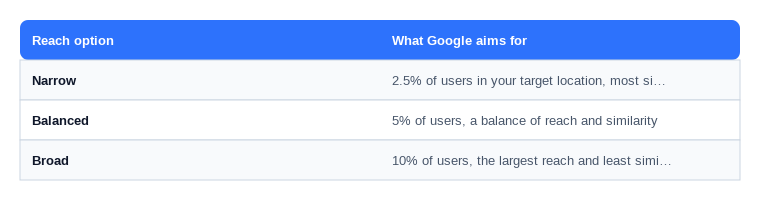
Google defines them as groups of people who share characteristics with people on a seed list, which you provide using first-party data: a Customer Match list, or people who interacted with your website, app or YouTube channel. They keep refreshing as activity updates, and Google alerts you if your data does not meet the requirements to refresh.
| Reach option | What Google aims for |
|---|---|
| Narrow | 2.5% of users in your target location, most similar to your seed |
| Balanced | 5% of users, a balance of reach and similarity |
| Broad | 10% of users, the largest reach and least similarity |
Start with a seed of your best customers, such as repeat buyers or high-value orders, not everyone who ever bought, since seed quality drives similarity. See Customer Match for stores.
What changed for Lookalikes?
Google says the default behaviour of Lookalike segments in Demand Gen will evolve toward a suggestion mode, and that you can retain the original behaviour, a Targeting Constraint, by opting out of the new update. Check which mode your campaign uses before comparing results to older tests, because a suggestion is a hint to the system and a constraint restricts who sees the ads.
What are channel controls?
Google says they let you choose where ads appear across its visual-first surfaces, including YouTube, Gmail, Discover and Maps as well as the Google Display Network, with an example of serving only on YouTube Shorts for a vertical creator video. They are set at the ad group level. You can choose channels manually or choose All Google channels to set them automatically, which Google recommends for most advertisers because its system is designed to achieve the best results across all inventory. Not all channels are compatible with every ad type or audience.
How do I see where ads ran?
Channel-level reporting is available by channel at campaign, ad group and ad level using network segmentation: Discover, Gmail, YouTube, Google Display Network and Maps (Maps serves only when a non-affiliated location extension is enabled). For YouTube traffic you can segment by ad format: skippable in-stream, in-feed and Shorts. Compare conversion value per channel against your break-even ROAS, as in the Performance Max channel report.
What should a store test first?
- Run one audience-first campaign on All Google channels with a customer-list lookalike at balanced reach.
- Wait through the learning phase; see the Demand Gen learning phase.
- Test a narrow and a broad lookalike in separate ad groups, same creative.
- Restrict channels only when a creative suits one surface.
- Compare with Meta results before shifting budget; see Google Demand Gen versus Meta ads.
What should I avoid?
- Narrowing and layering at the same time: a narrow lookalike plus tight demographics plus a single channel can leave too few people to serve, and the campaign will under-deliver for reasons that look like a creative problem.
- Using everyone who ever bought as the seed when most are one-time discount buyers. A seed of repeat or high-value buyers tells the model what a good customer looks like.
- Judging channels on cost per click. Compare conversion value per channel, since cheap Discover or Display clicks may not buy.
- Changing audiences during the learning phase; see the Demand Gen learning phase.
- Forgetting exclusions: add past purchasers to acquisition ad groups so you do not pay to reach people who already bought.
Where does Bach.ai fit?
Bach.ai is our product. It audits connected Google Ads accounts and flags where one channel or audience spends heavily with weak return. On an active paid plan any supported change waits for your approval, by default; customer-list uploads always wait for you.
FAQ
What is a seed list?
The first-party data you give Google to model from: a customer list, site and app activity or YouTube engagement, per Google’s Lookalike page.
Which reach should I pick?
Narrow is most similar to your seed, broad has the most reach. Balanced is a middle option; test.
Should I limit channels?
Google recommends All Google channels for most advertisers. Limit only for a specific creative or strategy.
What is suggestion mode?
A change where Lookalikes become suggestions for the system rather than a hard constraint; Google lets you opt out to keep the original behaviour.
Sources
Sources, each opened and read on 25 Nov 2026: Google Help pages, Demand Gen audiences overview; Use Lookalike segments in Demand Gen campaigns; Channel controls in Demand Gen campaigns. Menu names and limits change, so check the page before you act.