Custom Labels for Google Shopping Campaigns
How do I use custom labels to split Shopping campaigns?
Add up to five custom labels (0 to 4) to your Merchant Center products, define one meaning for each such as season or margin tier, assign a value per product, then build product groups in Shopping or Performance Max by those values. Labels are internal; shoppers never see them. Keep a catch-all campaign so new products are not missed.
A Shopping feed treats every product alike unless you tell it otherwise, and that is how a store ends up bidding the same on a 70% margin hero product and a 15% margin accessory. Custom labels are the tool for telling Google Ads the difference. They are simple to set up and easy to design badly. This guide follows Google’s help pages, read on 25 November 2026.
What are custom labels?
Google says that with Shopping campaigns and Performance Max campaigns that use a Merchant Center feed, custom labels are a tool for managing which products appear in your ads. You can subdivide products by criteria you define, such as seasonality (Winter, Summer) or sales performance (Best Seller, Clearance). The values can be used for monitoring, reporting and setting bids. Custom labels are for internal campaign management and do not appear in your ads. You can have up to 5 custom labels, numbered 0 through 4.
What should each label mean?
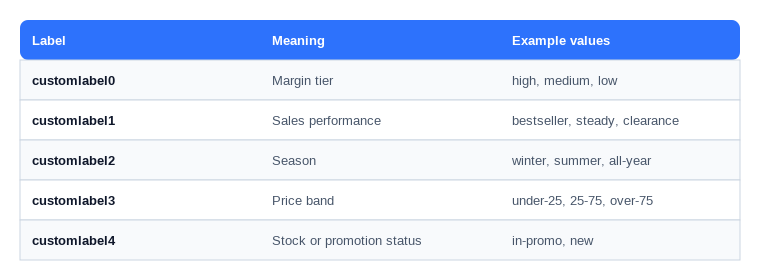
Decide one meaning per label and a small set of allowed values, then assign one value per product. A store might use:
| Label | Meaning | Example values |
|---|---|---|
| custom_label_0 | Margin tier | high, medium, low |
| custom_label_1 | Sales performance | bestseller, steady, clearance |
| custom_label_2 | Season | winter, summer, all-year |
| custom_label_3 | Price band | under-25, 25-75, over-75 |
| custom_label_4 | Stock or promotion status | in-promo, new |
The example is illustrative; Google’s examples are season and sales performance, and any rule you can compute from your catalogue works. Keep values lowercase and consistent, because “Best Seller” and “bestseller” become different groups.
How does product type differ?
Google describes the product type attribute as a way to include your own internal categorization in your product data, so you can structure bidding and reporting in your Shopping campaigns around your own store’s navigation. It is optional, and unlike the Google product category, which uses a predefined set of Google categories, product type lets you define your own taxonomy. Use product type for structure that mirrors your site (shoes, boots, sandals) and custom labels for business rules that change (bestseller, margin tier).
How do I use labels in a campaign?
- Define what each label means and its values in a sheet.
- Add the label attributes to your product data source in Merchant Center, one value per product.
- Wait for the feed to process, then check the products show the labels.
- Create product groups in your Shopping or Performance Max campaign using the label values.
- Set different bids or ROAS targets per group, based on margin. Use the break-even ROAS calculator for each tier.
- Review performance by group before changing bids again.
Why do I need a catch-all campaign?
Google says catch-all campaigns offer bid coverage for products not included in other campaigns that use inventory filters and custom labels, ensuring that 100% of approved products are targeted in your account and capturing new products added to your feed. Its recommendations include one All Products product group and a single bid, not applying inventory filters or exclusions, ensuring the campaign is not budget constrained, and setting campaign priority to low for Standard Shopping. If your main campaigns are Performance Max, Google recommends a Performance Max catch-all with a lower budget and higher ROAS target.
What mistakes should I avoid?
- Using a label that reflects last month’s sales and never refreshing it.
- Splitting into so many groups that none gets enough conversions to learn; see how to test a Smart Bidding strategy.
- Forgetting returns and fees in margin; see how returns affect your true ROAS.
- Overlapping campaigns on the same products, which makes results hard to read. See Performance Max versus Search.
What is a worked example of margin tiers?
Illustrative numbers: a store has three tiers. Tier A products have a 60% gross margin, so break-even return on ad spend is about 1.7 (1 divided by 0.6). Tier B products have 40%, so break-even is 2.5. Tier C products have 20%, so break-even is 5. Setting one Target ROAS of 3 across all of them overbids Tier C, which loses money at that return, and underbids Tier A, which could afford to chase more volume. With custom label 0 holding the tier, three product groups can carry different targets, for example 2, 3 and 6, each a little above break-even for its tier. The numbers are examples; use your own margins after fees and returns, as in contribution margin versus ROAS. Review the labels monthly, because margins and bestsellers change.
Where does Bach.ai fit?
Bach.ai is our product. With a Shopify store connected it reads products, orders and costs where available to show margin ROAS, which is the number that should decide your margin-tier bids. It does not write your labels, and on an active paid plan any supported Google Ads change waits for your approval, by default.
FAQ
Do shoppers see custom labels?
No. Google says custom labels are for internal management and do not appear in your Shopping ads.
How many custom labels can I have?
Up to 5, numbered 0 through 4. Plan the meaning of each before you start, because changing them later means rebuilding product groups.
Can I use labels in Performance Max?
Yes, for Performance Max campaigns that use a Merchant Center feed, Google says labels help control which products appear.
Should I label every product?
Label the products that your rules cover and use a catch-all for the rest, so nothing sits outside every campaign.
Sources
Sources, each opened and read on 25 Nov 2026: Google Help pages, Use custom labels for Shopping ads; Product type; Create a Catch-all Campaign for Shopping ads. Menu names and limits change, so check the page before you act.