How to Write Google Shopping Product Titles
How do I write product titles for Google Shopping?
Write a specific, accurate title of up to 150 characters that describes the product on your landing page, adds the variant details such as colour and size, and leaves out promotional text, prices, shipping and your company name. Avoid all caps, symbols and extra spaces. Put price and sale details in their own attributes.
On Google Shopping the title does the work a headline and a keyword list do in Search. Shoppers see an image, a price and a title, and the title is also how Google decides which searches your product fits. Google publishes the rules, and they are stricter than most store owners expect: no promotions, no all caps and no company name. This guide turns them into a repeatable formula. Source pages were read on 25 November 2026.
What does Google say a title must do?
Google calls the title one of the most prominent parts of your ad or free listing, and says a specific and accurate title helps show your product to the right customers. It is required for each product. The title must be 1 to 150 characters; if it does not fit, Google truncates it and warns you. It must describe the product shown on your landing page. The title does not always need to be identical to the page text, but both must refer to the same product.
How should I structure a title?
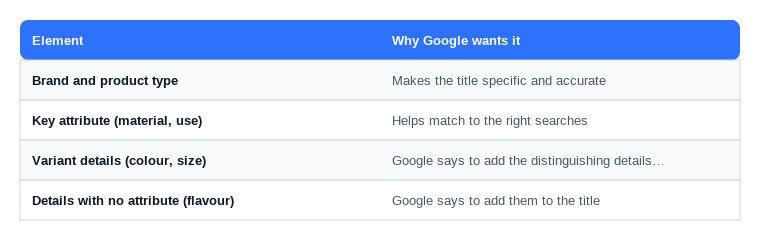
Google’s rules point to this order: brand, product type, key attribute, then variant details. For example, a made-up listing for a shoe might read: Brand Name Trail Running Shoes, Men’s, Waterproof, Blue, Size 9. That example is illustrative; the order is a sensible convention rather than a Google requirement, but every element is something Google asks for.
| Element | Why Google wants it |
|---|---|
| Brand and product type | Makes the title specific and accurate |
| Key attribute (material, use) | Helps match to the right searches |
| Variant details (colour, size) | Google says to add the distinguishing details of each variant |
| Details with no attribute (flavour) | Google says to add them to the title |
What must stay out of the title?
Google’s list is explicit:
- Promotional text: do not add price, sale price, sale dates, shipping, delivery date, other time-related information or your company’s name. Use the sale price, shipping and promotion attributes instead.
- Capital letters for emphasis: capitalisation is fine for abbreviations, phone numbers, countries and currency, but not for shouting.
- Gimmicks: symbols, HTML tags and foreign characters used for effect are common in spam.
- Extra white space: use the characters to describe the product.
- Foreign words unless well understood, such as a product with a foreign name.
The majority of your product data must match the data source language, and the language should be professional and grammatically correct.
How do I handle variants?
Google tells you to distinguish between variants by adding the distinguishing details to the title, for example Google T-Shirt, Red, and also to submit them through attributes such as colour, size or age group. Group the variants with the same item group ID, so that each size and colour is its own product but all share one ID. Google’s example is a T-shirt in 3 sizes and 3 colours submitted as 9 products with the same item group ID. Align the grouping with your landing page: if shoppers pick a size on one page, those variants share an ID.
What about titles written by AI?
Google says all titles created using generative AI must be provided using the structured title attribute instead of the title attribute, with a digital source type sub-attribute set to trained algorithmic media. Titles not made with generative AI can use either attribute. Google also notes you can opt out of Product Data Customization for Shopping ad titles through your account manager or support, typically processed in 3 to 5 business days. If you use a feed tool that rewrites titles, check which attribute it fills.
How do I know a title is working?
Check the Shopping campaign’s search terms and the product-level impressions for the titles you changed, and give changes a full cycle. Changing titles too often resets what Google has learned. For identifiers read how to fix missing GTINs; for rejected products, how to fix Merchant Center disapprovals.
What are before and after examples?
Illustrative example for a fictional brand. Before: BEST SELLER Free Shipping Trail Shoe 20% OFF. After: Northpeak Trail Running Shoes, Men’s, Waterproof, Blue, Size 9. The before title contains capitals for emphasis, shipping and promotional text, all of which Google says to leave out, and lacks the product type, gender, material and variant. The after title carries brand, product, audience, key attribute and variant. For a product with no clear brand, lead with the product type and the most searched attribute. Keep the first 70 or so characters meaningful, since some surfaces show only part of a long title. Maintain a template per category, for example brand, type, material, colour, size, so titles stay consistent and feed tools can generate them without gimmicks. See also Google Ads text guidelines for the ads side of AI-written text.
Where does Bach.ai fit?
Bach.ai is our product. It audits connected Google Ads accounts and, with your store connected, reads products and orders so you can see which products actually earn revenue. It does not rewrite your feed titles, and on an active paid plan any supported Google Ads change waits for your approval, by default.
FAQ
How long can a Shopping title be?
Google allows 1 to 150 characters and truncates longer titles with a warning. Put the most important words first, because not every surface shows the full title.
Can I put my brand name in the title?
Your brand as part of the product description is normal; Google’s prohibition is on your company’s name as promotional text. Use the brand attribute for the brand and keep the title descriptive.
Can I add Free Shipping to the title?
No. Google says do not add shipping, price or sale information to titles. Use the shipping, price and sale price attributes, and promotions.
Do titles need to match my website exactly?
No, but they must refer to the same product. Describe what is on the landing page and keep variant details consistent.
Sources
Sources, each opened and read on 25 Nov 2026: Google Help pages, Title and structured title; About unique product identifiers; Item group ID. Menu names and limits change, so check the page before you act.