How to Transfer a Google Ads Account to a New Owner
How do I transfer my Google Ads account to a new owner?
To hand over ownership, invite the new person as Admin in Access and security, let them accept, then remove yourself. To move billing between agencies, the current paying manager starts a Change Who Pays request, and an admin of the receiving manager account approves it. You need Admin access to the paying manager account to start one.
Account handovers are where stores lose history, tracking and sometimes money. Google separates two things people often mix: who owns the account and who pays for it. Both have documented routes. This guide follows Google’s pages, read on 25 November 2026, and adds a handover checklist drawn from them.
How do I transfer ownership to a person?
Google says you can transfer ownership of a Google product to another Google Account, for Google Ads, Google Analytics and Google Merchant Center. For Google Ads: click the Admin icon, open Access and security, then the Users tab, click the plus button and enter the email address of the person taking over, which must match their Google Account email address (they create one if needed). Under access level select Admin and send the invitation. They receive an email with instructions; once they complete it they appear on the Users page. To remove yourself, find your email on the Users page and click Remove access. Do not remove yourself until they have confirmed they can sign in and manage billing.
How does billing move between agencies?
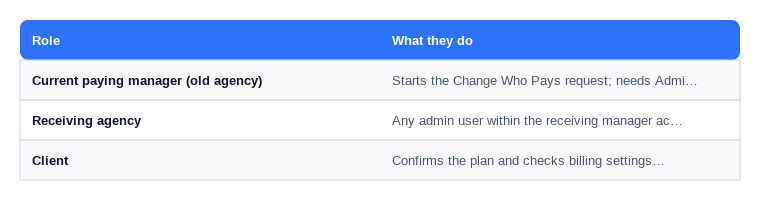
Google calls it Change Who Pays: when an advertiser changes or leaves agencies, accounts under the current payments profile move to a new paying manager account.
| Role | What they do |
|---|---|
| Current paying manager (old agency) | Starts the Change Who Pays request; needs Admin access to that manager account |
| Receiving agency | Any admin user within the receiving manager account’s hierarchy can review and approve or deny the request |
| Client | Confirms the plan and checks billing settings afterwards |
To find out who the paying manager is, log into the client account and open Billing settings. Google notes that the receiving flow is in beta, so not all listed options may be available; contact Google Ads support if you have questions. The old agency must initiate the request; you cannot pull it.
What should I do before a handover?
- Export key data: campaign structure, conversion actions, audiences and reports for the last 12 months.
- Confirm who owns the Merchant Center, Analytics and tag manager accounts; see how to verify and claim your store.
- Check linked accounts, tracking templates and auto-tagging; see auto-tagging and tracking templates.
- List users and access levels; see how to give access safely.
- Agree a date and a freeze on major changes in the week before.
- Keep a business-owned administrator throughout.
What should I check afterwards?
Confirm billing: the payment profile, invoices and card on file. Review linked accounts, remove the old agency’s manager link and old users, and check Change history for the handover period; see how to read Change history. Confirm conversion tracking still records orders and the Merchant Center link remains. Check that scheduled reports, scripts and rules the old agency ran still work or are removed. Update 2-Step Verification and recovery information; see how to secure your account. If you are changing agency, do I need a manager account as an agency explains the setup on their side.
What mistakes cost the most?
Removing yourself before the new owner has Admin and billing access; leaving a former agency with access; forgetting Merchant Center or Analytics ownership, which are separate; and losing tag access because only one administrator held it. A written handover note with account IDs, linked accounts and logins to retire prevents most of these.
What should the handover document contain?
A good handover document lists the account ID and its manager links; the users and access levels before and after; the Merchant Center, Analytics and Tag Manager accounts and who owns each; conversion actions with their primary or secondary status; automated rules, scripts and scheduled reports; the payment profile and who pays; open disapprovals and known issues; and a short history of major changes and tests. Add a date for the cutover and a named person on each side. Ask the outgoing party to confirm in writing that all assets are transferred and that their access will be removed on a stated date. File the document with your contracts. Next time you change agency it will save a week.
What if the other party does not respond?
Start with Google’s help routes: the Change Who Pays request must come from the current paying manager, so you cannot force it from the receiving side, and Google suggests contacting Google Ads support with questions about a transfer. Keep records of your correspondence, your authority as the business owner and any contract terms about account ownership. If you hold Admin access on the Google Ads account itself, you can usually manage users and settings even while billing is being arranged. Keep copies of invoices and performance data in case you need to prove history.
Where does Bach.ai fit?
Bach.ai is our product. After a handover you can connect the account so audits cover the new setup, and on an active paid plan any change it applies waits for your approval, by default. It does not handle ownership or billing transfers.
FAQ
Is ownership the same as who pays?
No. Ownership is user access with Admin; billing responsibility moves through Change Who Pays or the payment profile.
Who starts Change Who Pays?
Google says the previous agency, the current paying manager, must initiate the request.
Can the new owner use any email?
It must match their Google Account email address, per Google.
Is the receiving flow fully available?
Google says it is in beta, so not every option may be available.
Sources
Sources, each opened and read on 25 Nov 2026: Google Help pages, Transfer ownership of a Google Ads, Analytics or Merchant Center account; Transfer your client account to another agency; Transfer an existing client account to your agency. Menu names and limits change, so check the page before you act.