Google Display Campaigns Are Moving to Demand Gen
What happens to Google Display campaigns moving to Demand Gen?
Google says Display Ads campaigns now live inside Demand Gen as the Google Display Network, with the same reach. A migration tool began rolling out in June 2026 and carries over 42 days of performance history. New Display campaigns can only be created in Demand Gen later, and eligible ones will be migrated automatically.
If your store runs Google Display campaigns, usually for remarketing, a quiet but important change is under way: Google is merging them into Demand Gen. The network is the same; the campaign type, controls and reporting are not. Google’s pages carry dates, so this guide works from them. Sources were read on 25 November 2026, and the rollout is phased, so check your own account.
What is changing?
Google says Display Ads campaigns have a new home as the Google Display Network (GDN) in Demand Gen. The creation workflow is different, but your ability to serve ads on the Google Display Network remains the same: access to the same network, more than 2 million sites and apps, as it describes it. Customers who want Display-only campaigns can still buy them, and the change adds Demand Gen features. Advertisers who want performance across Google’s visual surfaces can access GDN inventory alongside YouTube, Discover, Gmail and Maps (in beta) in a single campaign type.
What are the key dates?
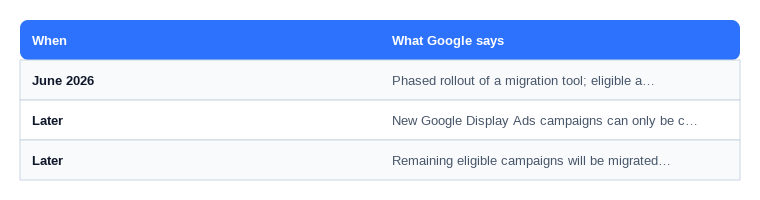
| When | What Google says |
|---|---|
| June 2026 | Phased rollout of a migration tool; eligible advertisers can start moving existing Display campaigns |
| Later | New Google Display Ads campaigns can only be created within Demand Gen |
| Later | Remaining eligible campaigns will be migrated automatically with no advertiser action |
Until migrated, you can continue to access and edit existing Display campaigns. Because dates are phrased as coming later, check Google’s page for current wording.
How do I migrate?
Google gives two routes. The recommended one is the migration tool, which updates live campaigns with performance history dating back 42 days ported over, which Google says minimises learning time to approximately 1 to 2 days and avoids a cold start. The other is to move budgets manually: decrease Display budgets while proportionally increasing Demand Gen budgets.
- Open Campaigns and filter by Campaign type, choosing Display.
- Tick the campaigns to migrate.
- Choose Edit, then Upgrade to Demand Gen.
- Read the alert: settings and learning transfer; budget transfers, but spend on the day of migration is not taken into account.
- Apply and wait a few minutes.
Google notes migrated campaigns have the Google Display Network opted in by default and you cannot unselect it during migration; you can add YouTube and Gmail afterwards. It does not recommend migrating more than 100 campaigns in one batch, and says migrated campaigns cannot be reverted to Display. You can review changes under Bulk actions.
What do I gain?
Google lists features from Demand Gen: access to more channels, audience-first targeting including Lookalikes, channel controls, product feeds, and value-based bidding once eligible. Demand Gen’s own pages say it includes image inventory across the Display Network and controls to choose where ads appear. See Demand Gen audiences, Lookalikes and channel controls, Demand Gen with a product feed and Demand Gen creative sizes.
What should a store check before migrating?
- Which Display campaigns carry real revenue, for example dynamic remarketing; see dynamic remarketing for retail.
- Whether creative meets Demand Gen specs and its stricter quality threshold.
- Frequency, exclusions and audience lists: confirm they carried over.
- Tracking: conversion goals and attribution; see data-driven or last click.
- Budgets: migrate a few campaigns first, not all at once.
Compare results for two weeks against the old campaign, as a migrated campaign keeps its history but may serve differently. If you prefer a clean test, use a Demand Gen A/B experiment; see how to run a Google Ads experiment.
What does a migration week look like?
Day one: export performance for each Display campaign and note the audiences, exclusions, placements and frequency settings, since not every Display control has an equivalent. Day two: migrate one low-risk campaign with the tool and confirm the budget, audience and conversion goal. Days three to seven: compare spend, conversions and cost per conversion with the pre-migration week, expecting a day or two of adjustment as Google describes. Then migrate the next group. Keep an eye on which channels the migrated campaign serves on, since Demand Gen can add YouTube, Gmail and Discover, and set channel controls if you want Display only. If results fall well short, use an experiment to compare against a new Demand Gen campaign built from scratch before moving the rest.
Where does Bach.ai fit?
Bach.ai is our product. It audits connected Google Ads accounts and flags Display spend with weak return before a migration. On an active paid plan any supported change waits for your approval, by default.
FAQ
Does Google Display Network reach shrink?
Google says your ability to serve ads on the Google Display Network remains the same.
Can I undo a migration?
No. Google says migrated campaigns can’t be reverted to Google Display Ads campaigns.
Will my learning be lost?
Google says the migration tool ports up to 42 days of performance history and cuts learning to about 1 to 2 days.
Do I have to migrate?
Google says eligible remaining campaigns will be automatically migrated later, so plan on moving.
Sources
Sources, each opened and read on 25 Nov 2026: Google Help pages, Google Display Ads campaigns have a new home in Demand Gen; Google Display Network integration with Demand Gen; About Demand Gen campaigns. Menu names and limits change, so check the page before you act.