Google Ad Disapproved? How to Fix and Appeal
How do I fix a disapproved Google ad and appeal?
Hover over the Disapproved status in the Status column, select Read the policy, then edit the ad or landing page to comply and save it for re-review. If you fixed it or believe Google erred, select Appeal and choose Dispute decision or Made changes to comply. Track the result in Policy Manager.
A disapproval is a specific message about a specific policy, and the fix starts with reading it, not with resubmitting the same ad. For a store the cause is often a landing page or product detail rather than the ad text. This guide follows Google’s help pages, read on 25 November 2026, and keeps to the steps Google documents.
What does a disapproved ad mean?
Google defines a disapproved ad as one that won’t show because it violates the Google Ads policies. Its fuller guidance adds that a disapproved ad won’t be able to run until the policy violation is fixed and the ad is reviewed again. Disapproval is not a penalty on the whole account; it is a status on an ad, asset or campaign. Repeated violations you leave in place are a different matter, covered below.
How do I find out why it was disapproved?
- Open Ads or Ad groups in the Campaigns menu.
- Hover over the Disapproved status in the Status column to see the reason.
- Select Read the policy to learn exactly what the policy says.
- Add the Policy details column if you want it in the table: Columns, Attributes, Policy details, Apply.
- Use the View and fix policy issues link if you came from a disapproval email, which opens Policy Manager for that policy.
Google says the cause can be an issue with your assets, your ad or the landing page the ad points to, so read all three before editing anything.
How do I fix the ad?
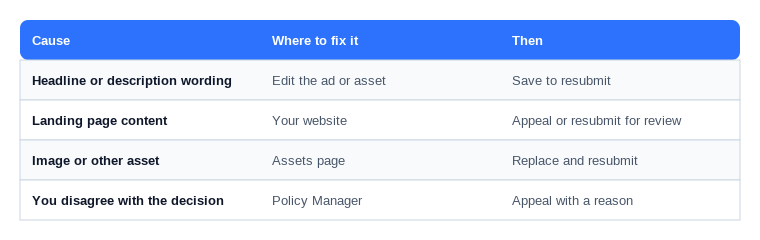
For an ad-level violation you update the content to comply and save it, which resubmits it for review. Google’s examples of ad-level causes include repeated punctuation or symbols in a headline under the Editorial policy, and a mention of tobacco in ad text under the Dangerous products or services policy. If the problem is the landing page, fix the page first, then request a review, because the review looks at the ad and where it leads.
| Cause | Where to fix it | Then |
|---|---|---|
| Headline or description wording | Edit the ad or asset | Save to resubmit |
| Landing page content | Your website | Appeal or resubmit for review |
| Image or other asset | Assets page | Replace and resubmit |
| You disagree with the decision | Policy Manager | Appeal with a reason |
How do I appeal?
Google’s appeal route is the same whether you fixed the problem or think the decision is wrong. Select Campaigns or Assets, hover over Disapproved in the Status column, then select Appeal. Under Reason for appealing choose Dispute decision or Made changes to comply with policy, choose which ads to appeal and submit. After you submit, the appeal is reviewed and you can check its status in Policy Manager. Google says an ad can become Eligible if the review determines that it complies. If the Appeal link isn’t available, Google notes the associated policy doesn’t allow campaign appeals, so you fix and resubmit instead.
Only appeal when you have either changed the ad or have a specific reason to dispute. Appealing the same unchanged ad repeatedly wastes time.
What if I cannot fix it?
Google advises that if you aren’t able to fix the violation or choose not to, you should remove your ad to help prevent your account from becoming suspended in the future for repeated policy violations. A dead ad costs nothing; a pile of repeat violations puts the whole account at risk. Remove the ad, then rebuild it from a compliant version.
For store feeds, many disapprovals originate in product data. See how to fix Merchant Center product disapprovals and the Google Ads text guidelines post for wording control. If conversions dropped after a disapproval, why Google Ads conversions dropped lists the other causes.
Where does Bach.ai fit?
Bach.ai is our product. It audits a connected Google Ads account and surfaces ads and assets that are not serving, so a disapproval does not sit unnoticed. It cannot overturn a Google policy decision, and on an active paid plan any supported change it applies waits for your approval, by default.
FAQ
Can a disapproved ad hurt my other ads?
A disapproved ad itself does not run. Google’s concern is repeated violations left in place, which it says can lead to suspension, so remove ads you cannot or will not fix.
How long does an appeal take?
Google does not state a fixed time on these pages. After you submit, the appeal is reviewed, and you check Policy Manager for the status. Plan campaigns, especially sale launches, with a buffer.
Why is there no Appeal button?
Google notes that if the Appeal link isn’t available, the associated policy doesn’t allow campaigns to be appealed. Fix the ad or landing page and resubmit instead.
Should I appeal or edit first?
Edit first when the reason is clear, because an edited ad is reviewed again anyway. Appeal when you believe the decision is wrong and have changed nothing, or after you fix a landing page.
Sources
Sources, each opened and read on 25 Nov 2026: Google Help pages, Fix a disapproved ad or appeal a policy decision; Disapproved: Definition; Submit a campaign for policy review. Menu names and limits change, so check the page before you act.