How to Cap Ad Frequency in Google Ads
How do I limit how often people see my Google Ads?
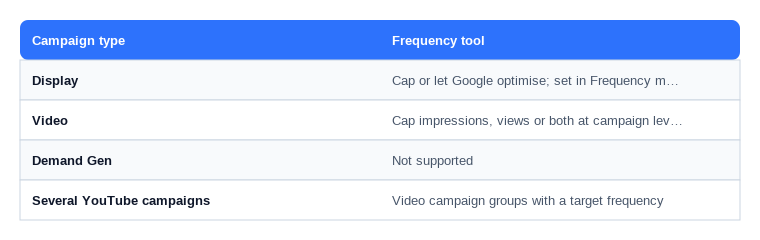
Use frequency capping in Display and Video campaigns: for Display set it in Frequency management after the campaign exists, for Video set it in campaign settings on impressions, views or both. It is not supported in Demand Gen. For several YouTube campaigns, video campaign groups deduplicate reach and coordinate a target frequency.
Retargeting without a frequency limit is how a store ends up following a shopper around the internet for a month. Google has a frequency tool, but it covers only some campaign types, and the newest ones, Demand Gen and Performance Max, are not among them. This guide explains where capping works and what to do where it does not. Sources were read on 25 November 2026.
What is frequency capping?
Google defines it as a feature that limits the number of times your Display or Video ads appear to the same person, and frequency as the number of times a user sees ads over a time period. It works differently in Display and Video campaigns, and Google says it is not supported in Demand Gen campaigns.
| Campaign type | Frequency tool |
|---|---|
| Display | Cap or let Google optimise; set in Frequency management after creation |
| Video | Cap impressions, views or both at campaign level |
| Demand Gen | Not supported |
| Several YouTube campaigns | Video campaign groups with a target frequency |
How do I cap Display?
For Display, you can let Google Ads optimise how often your ads show, which Google recommends, or set a manual cap per campaign, ad group or ad over a day, week or month. Google says you can only set the cap after you create the campaign, from Frequency management under Additional settings in campaign settings, not during creation. Third-party cookies are used by default, and if unavailable first-party cookies approximate impressions. Only impressions that were viewable count toward the cap. Since Display is moving into Demand Gen, check what you will keep after migration; see Display moving to Demand Gen.
How do I cap Video?
Google says frequency caps for Video campaigns can only be set at the campaign level, in Additional settings, Frequency capping. You choose to cap impression frequency, view frequency (views or interactions from the same user) or both, enter a whole number and pick a time interval. When a user reaches the cap, Google stops showing the campaign to that user. If the videos are used in other Video campaigns, impressions and views from those also count toward this campaign’s cap. Google says the cap applies to in-stream and bumper ads in the auction.
What are video campaign groups?
For brands running several YouTube campaigns, Google offers video campaign groups: you group campaigns across bidding strategies and ad formats to deduplicate reach and optimise toward unified reach and frequency goals. Two optimisation goals exist: increase group reach by deduplicating reach across eligible campaigns, or set a campaign group frequency target so users are on average served your ads a specified number of times per week. Some subtypes are optimisable, such as Efficient Reach, Non-skippable reach, Target Frequency and Video views; others are only countable. Most small stores do not need this.
What should I do where capping is not available?
In Demand Gen, shape frequency indirectly: narrow the audience size, exclude past purchasers and recent converters, refresh creative often, keep budgets in proportion to audience size and watch the reach and frequency columns. Use audience lists and exclusions; see Demand Gen audiences and Customer Match. In dynamic remarketing, use recency windows; see dynamic remarketing for retail.
What is a sensible starting cap?
Illustrative starting points, not Google guidance: a few impressions a day for retargeting display, and a cap on weekly views for YouTube video. Then check the reports: if conversion rate falls as frequency rises, cap lower; if reach is thin and returns are good, loosen. Re-evaluate after sales.
How do I judge whether frequency is too high?
Add the average frequency and unique reach columns where the campaign type offers them, and compare conversion rate by frequency band if you can segment it. A common pattern is that the first few exposures convert at a decent rate and later ones barely move. If a retargeting campaign shows a frequency of 15 a week with falling conversion rate and rising cost per order, tighten the audience or the cap. If frequency is low and returns are strong, you may be leaving sales on the table. Treat frequency as a diagnostic, not a goal: the target is profitable orders per shopper, and the right number differs for a $15 consumable and a $400 appliance. Review after each sale, since peak weeks inflate frequency naturally.
Where does Bach.ai fit?
Bach.ai is our product. It audits connected Google Ads accounts and flags campaigns with weak return at high frequency. On an active paid plan any supported change waits for your approval, by default.
FAQ
Does frequency capping work in Demand Gen?
No. Google says frequency capping isn’t supported in Demand Gen campaigns.
Can I set a cap while creating a Display campaign?
No. Google says Display caps are set after the campaign exists, in Frequency management.
Where do Video caps apply?
At campaign level, on impressions, views or both, and they apply to in-stream and bumper ads in the auction.
What is a campaign group frequency target?
An average number of times per week that users are served ads across the grouped YouTube campaigns, with reach deduplicated.
Sources
Sources, each opened and read on 25 Nov 2026: Google Help pages, Use frequency capping; Frequency capping: Definition; Optimize reach and frequency with video campaign groups. Menu names and limits change, so check the page before you act.