How to Secure Your Google Ads Account
How do I secure my Google Ads account against hijacking?
Turn on 2-Step Verification, use a passkey where Google asks for one, give each person their own Google Account instead of a shared login, remove inactive users, and check for unexpected changes to ads and budgets. Google also prompts Confirm it's you challenges for sensitive actions such as inviting admins or making unusual bulk changes.
A Google Ads account is one of the few places a small business keeps a live card and an open budget behind a single login. Hijacked accounts run scam ads on your card within hours. Google publishes a security hub with clear controls; most stores use none of them. This guide turns Google’s pages, read on 25 November 2026, into a short checklist.
What does 2-Step Verification do?
Google says 2-Step Verification, also called multi-factor authentication, is designed to prevent account hijacking and unauthorised access and can keep bad actors out even if your password is compromised. You sign in with a password and a second verification step. The second step can be a call, the Google Authenticator app, a Google prompt on a compatible phone, a security key or a text message. Google adds that completing 2-Step Verification is often required to confirm your identity when contacting Google Ads support, so make sure you have access to your chosen method and use the email address tied to your account and your 10-digit customer ID. Changes to recovery information, such as a phone number, may take up to 7 days to update across Google services.
What are passkeys?
Google calls passkeys a simple and secure alternative to passwords: unlike passwords they can’t be shared, copied, written down or accidentally given away, which makes them more secure against phishing, and they are backed up securely in the cloud and end-to-end encrypted. Some advertisers may be required to use a passkey to authorise sensitive actions, and Google notifies affected accounts by email and in the product. Requirements include a computer on Windows 10 or later, macOS Ventura or later, a phone on Android 9.0 or iOS 16 or later, or a FIDO2 security key, plus a supported current browser outside private mode, and a device screen lock.
What are Confirm it’s you challenges?
Google says these protect your account when you complete sensitive actions, and you may be prompted once in 24 hours to confirm your identity, for example with a code on your phone. Actions include inviting Standard or Admin users, making unusual budget or bulk changes, creating ads with URL domains not used before in the account and creating campaigns with apps not used before. They work in addition to, and independently from, 2-Step Verification: disabling 2-Step Verification does not disable them. If a prompt surprises you, stop and check who initiated the action.
What are the best practices?
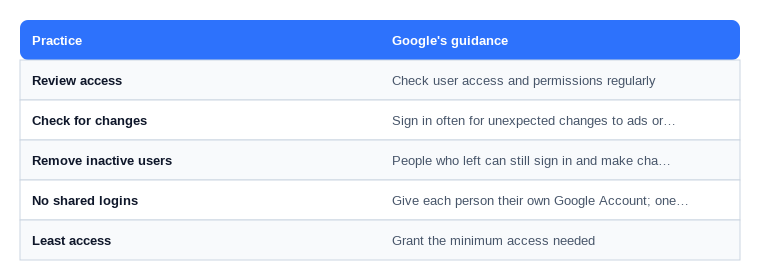
| Practice | Google’s guidance |
|---|---|
| Review access | Check user access and permissions regularly |
| Check for changes | Sign in often for unexpected changes to ads or budget; check bank and card statements if you suspect billing exposure |
| Remove inactive users | People who left can still sign in and make changes until removed |
| No shared logins | Give each person their own Google Account; one account can hold direct access to up to 20 Google Ads accounts |
| Least access | Grant the minimum access needed |
| Manager accounts | If you manage several accounts, use a manager account |
What is a practical checklist?
- Switch on 2-Step Verification for every user, with a method that is not the same phone for everyone.
- Register a passkey on owners’ devices.
- Use business email addresses and keep two administrators; see how to give someone access safely.
- Remove former staff and agencies the day they leave.
- Review Change history monthly; see how to see who changed your campaign.
- Watch billing alerts and your card statements.
- Keep recovery options current, because a stale phone number can lock you out for days.
What if something looks wrong?
Do not wait. Sign in, check recent changes, pause suspicious campaigns, remove unknown users, change your password and review your payment method. Google has separate pages for reporting unauthorised activity and recovering a compromised account; see what to do if your Google Ads account is compromised.
How should a team roll this out?
Do it in one afternoon. Make a list of everyone with access, including agencies and freelancers. Ask each person to enable 2-Step Verification on the Google Account they use for Google Ads and to register a passkey on a work device. Give a deadline and remove access from anyone who has not completed it. Document recovery steps, and store the backup method somewhere the second administrator can reach. Add a line to your onboarding checklist for new hires and agencies and to the offboarding checklist for leavers. Test one sensitive action, such as inviting a user, to see the Confirm it’s you prompt so nobody is surprised at an awkward moment. Repeat the review each quarter.
Where does Bach.ai fit?
Bach.ai is our product. It connects to Google Ads with the access you authorise, and on an active paid plan any change it applies waits for your approval, by default, with each change logged. Treat it like any other user: least access and a review each quarter.
FAQ
Is 2-Step Verification required?
Google’s page describes it as designed to prevent hijacking and often needed for support checks. Some accounts face mandates; check your notifications.
Can I share one login with my agency?
Google advises against shared usernames and passwords. Give each person their own Google Account access.
Do passkeys replace passwords?
Google calls them an alternative to passwords. Some advertisers may be required to use one for sensitive actions.
Does turning off 2-Step Verification stop the Confirm it’s you prompts?
No. Google says those challenges work independently, and disabling 2-Step Verification does not disable them.
Sources
Sources, each opened and read on 25 Nov 2026: Google Help pages, Secure your Google Ads account: 2-Step Verification; Secure your Google Ads account: Best Practices; Use a passkey to log into your Google Ads account; Secure your Google Ads account: Confirm it’s you. Menu names and limits change, so check the page before you act.