Auto-Tagging, GCLID and UTMs in Google Ads
Should I use auto-tagging or UTM tags for Google Ads?
Keep auto-tagging on. Google says it is needed to track conversions on all browsers, to import key events and to link Google Ads with Analytics, and in GA4 auto-tagging wins over manual tags. Add UTM parameters or a tracking template only for other tools, and make sure your site and redirects do not strip the GCLID.
Three tracking mechanisms can sit on the same ad URL: Google’s auto-tagging, your own UTM parameters and a tracking template for a third-party tool. They are meant to coexist, but stores regularly break one while fixing another. This guide separates what each does, using Google’s help pages read on 25 November 2026.
What does auto-tagging do?
Google says auto-tagging is needed to track conversions on your website on all browsers, import key event data into Google Ads from Google Analytics and other sources such as a CRM, import Google Ads campaign and cost data into Analytics reports, and import Analytics engagement metrics such as bounce rate into Google Ads reporting. It is now on by default for new accounts. After a click it adds a parameter called GCLID, the Google Click Identifier, to the URL, for example example.com/?gclid=123xyz. Google’s glossary adds that the GCLID is required for Google Ads website conversion tracking and can be used with offline conversion tracking.
What if I prefer UTM tags?
Google says you can keep tracking Google Ads traffic with manual tags and not integrate Analytics with Ads by tagging destination URLs with UTM parameters. But in GA4 auto-tagging is prioritized over manual tagging because there is no override option, so UTMs will not replace it. The sensible setup is both: auto-tagging on for measurement, plus UTMs only if another tool needs them.
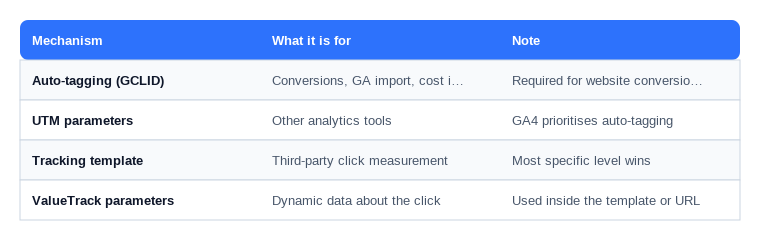
| Mechanism | What it is for | Note |
|---|---|---|
| Auto-tagging (GCLID) | Conversions, GA import, cost import | Required for website conversion tracking |
| UTM parameters | Other analytics tools | GA4 prioritises auto-tagging |
| Tracking template | Third-party click measurement | Most specific level wins |
| ValueTrack parameters | Dynamic data about the click | Used inside the template or URL |
How do tracking templates work?
A tracking template is where you put tracking information; you can use URL parameters to customise the final URL, and templates can sit at account, campaign, ad group, ad or keyword level. Google says if you define several, the most specific is used: keyword first, then ad, ad group, campaign and account. The Tracking template source column shows which applies. Changes to tracking templates take 24 to 48 hours to be reflected in serving ads.
What are ValueTrack parameters and parallel tracking?
ValueTrack parameters are URL parameters you can add to landing page URLs to collect information about the source of ad clicks. Google says parallel tracking, which sends customers directly from the ad to the final URL while click measurement happens in the background, is now the only click measurement tracking method for all accounts, so check with your click measurement provider that it is compatible. Google also says the first tracking call uses HTTPS and all subsequent redirect URLs must be HTTPS and server-side.
What breaks the GCLID?
Google warns that a small percentage of websites don’t allow arbitrary URL parameters and serve an error page when auto-tagging is on. Test by clicking your own ad: if the link works, you can use auto-tagging; if you get an error, turn it off, ask your developer to allow arbitrary parameters, then turn it on again. Redirects are the other common cause: if your site redirects the landing page, the GCLID must survive the redirect. Test with a real ad click or a URL with a sample gclid and see whether it reaches the final page.
How do I check my setup?
- Confirm auto-tagging is on in account settings.
- Click your own ad or open a test URL with a sample gclid and check the page loads.
- Inspect the address after redirects for the gclid.
- Compare Google Ads conversions with orders; see why Shopify orders and Google Ads conversions differ.
- Review tracking templates at every level to find an unexpected one.
- Link GA4 afterwards; see how to import GA4 conversions.
What do I do when conversions vanish after a site change?
A missing gclid is the usual suspect when Google Ads conversions fall right after a developer release. Typical causes are a new redirect from the landing page, a checkout or domain switch that drops query strings, or a consent tool that blocks the tag before the visitor responds. Reproduce it: click your own ad in a private window, watch the address bar through every redirect and confirm the gclid survives to the final page. Then place a test order and check the conversion status. If the parameter is lost at a redirect, ask your developer to pass query strings through it. If the page returns an error for unknown parameters, fix that first. For the wider diagnosis, why Google Ads conversions dropped lists the other causes and how to turn on enhanced conversions covers a second route for matching orders to clicks.
Where does Bach.ai fit?
Bach.ai is our product. It checks tracking and signal health on a connected Google Ads account and flags conversion gaps that suggest broken parameters. On an active paid plan it can apply a supported Google Ads change after you approve it, by default. It cannot edit your website redirects.
FAQ
Is auto-tagging on by default?
Google says it is on by default for new accounts. Older accounts may have it off, so check Settings.
Will auto-tagging conflict with my UTMs?
In GA4, Google says auto-tagging is prioritised over manual tagging. Keep UTMs for tools other than Google Analytics.
Can I lose conversions if the GCLID is stripped?
Yes. Google says auto-tagging is needed to track conversions on all browsers, so a redirect that drops the parameter can lose attribution.
What does parallel tracking change?
It sends the shopper straight to your final URL while click measurement happens in the background. Make sure your tracking provider supports it.
Sources
Sources, each opened and read on 25 Nov 2026: Google Help pages, About auto-tagging; Google Click Identifier (GCLID): Definition; Tracking template: Definition; About ValueTrack parameters. Menu names and limits change, so check the page before you act.