Google's 2026 Target CPA and ROAS Change
What changed in Google Ads Target CPA and Target ROAS in 2026?
Since 17 August 2026, campaigns limited by budget that use Target CPA or Target ROAS aim closer to the target you set, instead of overshooting it. Google says rollout finished on 27 August 2026 and it does not adjust your targets or budgets for you, so review any campaign that beat its target.
If a Google Ads campaign suddenly cost more per sale, or delivered more of it at a higher target, after mid-August 2026, the cause may not be your account. Google changed how target-based bid strategies behave for campaigns limited by budget. The change is documented, dated and mostly about expectations: a campaign that used to beat its target now aims to hit it. This guide summarises Google’s help pages, read on 25 November 2026.
What exactly changed?
Google says that starting 17 August 2026 it updated its bidding systems to deliver more consistent and predictable performance based on the targets you set, even when you make budget adjustments. Before the change, a campaign limited by budget that used a target-based strategy such as Target CPA or Target ROAS could overperform its target and then swing when budgets were adjusted. After it, such campaigns perform more consistently toward the bid target.
Google’s example: if your Target CPA is $10 but your recent actual CPA is $5, the campaign now delivers more closely to a $10 actual CPA. Google’s FAQ states that the global rollout began on 17 August 2026 and was completed on 27 August 2026, and that the new behavior is now fully live across affected accounts.
Which campaigns are affected?
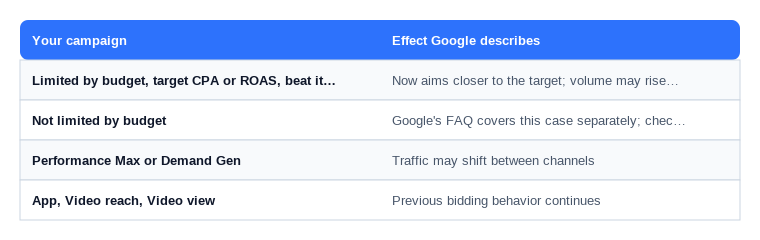
The change applies to campaigns that are limited by budget and use a target-based strategy. Google lists Search, Shopping, Performance Max and Demand Gen as eligible; it says Hotel and Display campaigns already had the new behavior, and that App Campaigns, Video reach campaigns and Video view campaigns continue using previous bidding behavior. For multi-channel campaigns like Performance Max and Demand Gen, Google adds that you may also find shifts in how traffic is distributed across channels.
| Your campaign | Effect Google describes |
|---|---|
| Limited by budget, target CPA or ROAS, beat its target | Now aims closer to the target; volume may rise, efficiency may fall |
| Not limited by budget | Google’s FAQ covers this case separately; check it before assuming a change |
| Performance Max or Demand Gen | Traffic may shift between channels |
| App, Video reach, Video view | Previous bidding behavior continues |
What should I do now?
Google states it won’t automatically adjust your bidding targets or budgets, so the next step is yours:
- Filter Campaigns by the Limited by budget status. See what Limited by budget means.
- Compare each campaign’s stated target with its recent actual CPA or ROAS.
- Keep the target if it matches your business goal and you are happy to scale towards it.
- Adjust the target to recent performance if you want to hold the old efficiency, Google’s suggestion for campaigns that overperformed.
- Raise the budget deliberately if you want more volume at your stated target.
- Wait for results to stabilise before changing again, because repeated edits blur what you are measuring.
For a store, the target should come from margin. The break-even ROAS calculator and the post on Target ROAS versus Maximize conversion value help set it.
What about label changes?
Separate from the August change, Google’s Maximize conversion value page notes that from June 2026 it is updating how bidding strategies are labelled: Maximize conversions with a Target CPA is changing to Target CPA, and Maximize conversion value with a Target ROAS is changing to Target ROAS. Google says the underlying behavior remains exactly the same and you do not need to act. If you read older guides, expect the old names; see Target CPA or Maximize conversions for the earlier framing.
How do I check my own numbers?
Use a before and after view with the same date range lengths: compare the 28 days before 17 August 2026 with a recent 28 days for each limited-by-budget campaign, and write down target, actual CPA or ROAS, spend and conversions. If conversions rose and CPA moved toward target, the system is doing what Google describes. If CPA climbed far past target, review conversion tracking before blaming bidding.
Where does Bach.ai fit?
Bach.ai is our product. It reviews budget and bidding on a connected Google Ads account and can flag campaigns whose actual results sit far from their set target. On an active paid plan it can apply a supported target or budget change after you approve it, by default. The choice of target stays a business decision.
FAQ
Did Google change my targets?
No. Google says it won’t automatically adjust your bidding targets or budgets. It changed how the system pursues the targets you set, for campaigns limited by budget.
Why is my cost per conversion higher than in July?
If your campaign had been beating its target, it now aims closer to the target, which can raise cost per conversion while increasing volume. Compare against your stated target.
Does this affect campaigns that are not limited by budget?
Google’s FAQ lists that question separately. Read it for your case; its main description concerns campaigns limited by budget.
Do I need to rename my strategies?
No. Google says the June 2026 label changes keep the underlying behavior the same and require no action.
Sources
Sources, each opened and read on 25 Nov 2026: Google Help pages, Changes to target based bid strategies; FAQ about changes to Target-based bid strategies; Fix Limited by budget bid adjustments. Menu names and limits change, so check the page before you act.