Do I Need a Google Ads Manager Account as an Agency?
Do I need a Google Ads manager account as an agency?
Yes, if you manage several client Google Ads accounts. A manager account gives one sign-in, one dashboard, cross-account reports and alerts, and lets clients unlink at any time. Google also requires one for monthly invoicing. Choose its time zone and currency carefully, because neither can be changed after creation.
If you manage Meta for clients you probably touch Google Ads too, and Google solved the multi-client problem with its own structure: the manager account. This guide covers what it does, when it is needed and the two settings you cannot undo.
What is a manager account?
Google describes a manager account as a Google Ads account that lets you view and manage multiple Google Ads accounts, including other manager accounts, from a single location (About Google Ads manager accounts). It is not an upgrade of an existing account but a new account that acts as an umbrella over linked accounts. You can link new and existing accounts and other managers.
Benefits Google lists: a single sign-in to all client accounts, one dashboard to search and navigate, creating and managing campaigns for clients from within the manager account, comparing performance and running reports across accounts, linking to a payments profile for monthly invoicing, alerts to monitor linked accounts, quickly creating and linking accounts, and giving users different levels of access.
When is it required?
Google says a manager account may suit anyone with more than one Google Ads account, and works well for agencies managing many clients. Two specifics: up to 20 Google Ads accounts, including manager accounts, can be associated with a single email address, so past 20 a manager account is probably the best option; and a manager account is required for Ads accounts using monthly invoicing. Google’s monthly invoicing page says you might be eligible if your business has been registered for at least a year and you spend a minimum of $5,000 USD for any 3 of the last 12 months, and that it is typically for large advertisers; you apply through your Google representative or a form (Monthly invoicing).
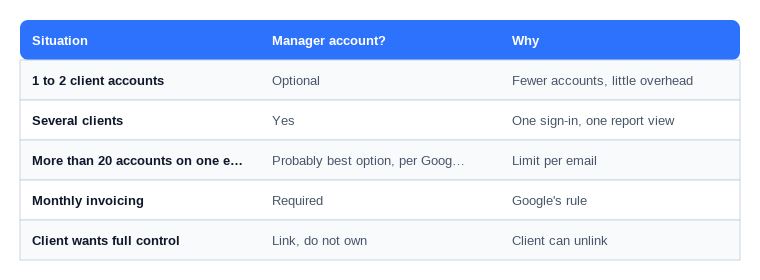
| Situation | Manager account? | Why |
|---|---|---|
| 1 to 2 client accounts | Optional | Fewer accounts, little overhead |
| Several clients | Yes | One sign-in, one report view |
| More than 20 accounts on one email | Probably best option, per Google | Limit per email |
| Monthly invoicing | Required | Google’s rule |
| Client wants full control | Link, do not own | Client can unlink |
What can the client see and do?
Google says client accounts’ users sign in and use their accounts as usual, and they will not have access to the manager account they are linked to or other accounts linked to it. Users with administrative access to a client account can end the relationship at any time by unlinking from the manager. A manager can be given ownership of a client account to manage user access, but cannot change proprietary information such as sign-in details. If your manager account needs ownership of child accounts, the child account admin grants it under Admin, Access and Security, in the Managers section.
How do I create one?
- Go to the Google Ads manager account homepage and choose Go to Manager Accounts, signed in with the email you want to use.
- Name the account. Google says this is the name clients will find in their client account, and URLs are not accepted in account names.
- Choose whether it is to manage your own accounts or other people’s.
- Select the country and time zone. Google says the time zone is used for reporting and billing and cannot be changed (Create a Google Ads manager account).
- Select a permanent currency. Client accounts are billed in their own currencies.
- Link existing client accounts, or create new ones from within.
- Invite your team and give each person a level of access.
What should I decide before I click create?
The time zone and currency. Pick the zone your team works in and the currency you do business in, since both stick. Agree naming rules for client accounts, and decide whether staff get one manager login or individual ones; individual logins with limited access are safer. Match this to your Meta structure, described in Who should own a client’s Meta ad account?, so that ownership and offboarding follow one rule across platforms.
How does it fit with the rest of the stack?
A manager account gives you cross-account reporting inside Google. For performance across Meta and Google you still need a shared reporting layer; see How do I build white-label Meta ads reports for clients?. For campaign choices once inside, Should an ecommerce store use Performance Max or Search campaigns? helps. The Meta ads audit checklist works as a template for a Google audit too.
Can software help?
Bach.ai audits connected Google Ads accounts alongside Meta, per brand, and on a paid plan applies supported changes on Google Ads only after your approval by default, under the same permission rules. The Agency plan covers up to 20 brands. It does not replace a manager account; you still use Google’s structure for access.
FAQ
Can clients see my other clients?
Google says client users do not have access to the manager account or other accounts linked to it.
Can I move an account between managers?
Google documents moving accounts within a manager hierarchy; read its create-account page for the steps and check your access first.
Can the client leave?
Yes. Google says users with administrative access can unlink their account from the manager at any time.
Does a manager account save money?
It does not change ad costs. It saves time, and it is required if you want monthly invoicing.
Sources: Google Ads Help, About Google Ads manager accounts, Create a Google Ads manager account, About monthly invoicing eligibility (checked 25 Nov 2026); Bach.ai capabilities from our features page and pricing.