How to Give Someone Access to Your Google Ads
How do I give someone access to my Google Ads account?
Go to Access and security in the Admin menu, invite the person by email, pick an access level and send the invitation; they accept by email. Remove or change access at any time, set an expiry date for temporary people, and keep at least two administrators so you cannot lose control of your tags.
An agency leaves, a freelancer finishes, a staff member moves teams, and their access to your ad spend stays. Access reviews are the unglamorous security task most stores skip. Google’s access controls are good enough, if you use them. This guide follows Google’s help pages, read on 25 November 2026.
How do I give someone access?
Google says that when you share access you can work with other people on the same account, edit their access level or remove it later. The invited person must have a Google Account or create one. Steps: go to Access and security within the Admin menu, invite by email, choose the access level and send the invitation. When they accept by email you receive a notification in your account; you can revoke an invitation from the Actions column before it is accepted. Google’s steps include confirming the user has the access level you intend, and it notes a user invited with an alternate email can accept using either address but signs in with their Google account password.
What if I want it to end automatically?
Google’s expiring access feature lets you assign temporary access and set an expiration date, which makes it easier to manage temporary users like consultants and lowers the chance of unauthorised access later. Expiring access notifies users when access is about to expire or has expired, and as administrator you receive an email 7 days before and one day before an account’s temporary access expires. Use it for every freelancer and short-term contractor by default.
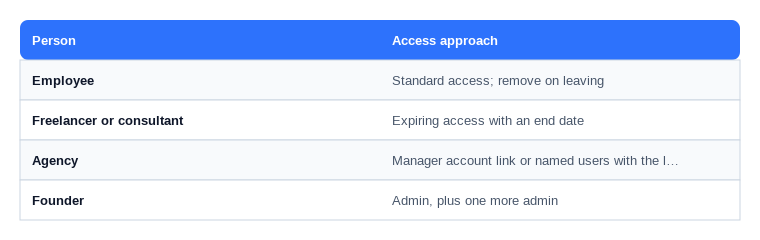
| Person | Access approach |
|---|---|
| Employee | Standard access; remove on leaving |
| Freelancer or consultant | Expiring access with an end date |
| Agency | Manager account link or named users with the lowest working level |
| Founder | Admin, plus one more admin |
Why two administrators?
Google warns that if your account has only one administrator, you may lose access to your tags if that user becomes unavailable, and that adding at least one additional administrator may help ensure uninterrupted tag management. You will see a Tag Diagnostics notification if the account has only one admin. If you lose access, contact support through the Contact us button at the bottom of the Help Center.
How do I remove or change access?
Go to Access and security within the Admin menu, find the user and in the Actions column choose Remove access, or hover over their access level in the Access level column and pick a new one. Check the Access level column regularly to see who holds what. Remove people the day their engagement ends and check the account after offboarding.
What about manager accounts?
If an agency manages your account through a manager account, access is controlled differently: you link your account to their manager account. Google notes there is always the chance that multiple users on a manager account can make conflicting changes to the same account, so agree on roles and responsibilities. See do I need a manager account as an agency and keep the link under review.
How do I audit what people changed?
Use Change history to see who changed what, including tools that use the API; see how to see who changed my campaign. If someone has access you do not recognise, remove them and check the account for unfamiliar campaigns or billing changes.
What else protects the account?
Google has separate security pages: 2-step verification, allowed email domains and security best practices. Turn on 2-step verification for every user and use business email addresses, not personal ones. Keep tag ownership with a business-owned Google account, not an individual’s.
What does a quarterly access review look like?
Once a quarter, open Access and security and export or screenshot the list. For each user, answer four questions: who is this person, do they still work with us, is their access level the lowest that lets them do the job, and is there an expiry set if they are temporary. Remove anyone you cannot place. Check that at least two people hold administrator access and that one of them is a business-owned account. Review your manager account links too, since an old agency link keeps access that individual user removal will not. Finally, check Change history for the period and confirm that the people who made changes are the people you expect; see how to see who changed a campaign. Keep a dated record of the review, which is useful evidence if an incident ever occurs.
Where does Bach.ai fit?
Bach.ai is our product. Connecting a Google Ads account gives it the access you authorise, and on an active paid plan any change it applies waits for your approval, by default. Grant it the narrowest access that works, and review the connection like any other user.
FAQ
Can I give temporary access?
Yes. Google’s expiring access feature lets you set a date for access to end and emails you 7 days and one day before it does.
What if the only admin leaves?
Google warns you may lose access to your tags. Add at least one more administrator before that happens.
Can the invited person use any email?
They need a Google Account. Google says an alternate email on a Google account can accept the invitation.
How do I remove someone?
Access and security, find the user, Actions, Remove access.
Sources
Sources, each opened and read on 25 Nov 2026: Google Help pages, Manage access to your Google Ads account; About expiring access to your Google Ads account; Manager Accounts: Manage users and access levels. Menu names and limits change, so check the page before you act.