Why Google Paused My Ad Groups for Low Activity
Why did Google Ads pause my ad groups for low activity?
Google Ads automatically pauses ad groups that were created over 13 months ago and have had no impressions in the past 13 months, to simplify accounts. You can re-enable them from Notifications, the Ad groups page or Ads Editor, but they pause again if they get no impressions for 3 months, so only revive ones you expect to serve.
An old campaign shows a paused ad group nobody paused. No policy is involved and no performance penalty applies. It is a housekeeping rule, and for most stores the right response is to leave the ad group paused. This guide covers the rule, how to find them and when reviving one makes sense. Sources are Google’s pages, read on 25 November 2026.
What is the rule?
Google says Google Ads automatically pauses ad groups that haven’t served after a set period, to simplify your account, speed up access and let you focus on ad groups that drive results. Ad groups are considered low activity and may be paused automatically if they were created over 13 months ago and have had 0 impressions over the past 13 months. Google lists the benefits as a streamlined workflow, a simpler account and flexibility to unpause what you still need.
How do I find the paused ad groups?
- Click the Notifications icon on the top bar and open the notification about low activity ad groups, then View.
- Or go to Campaigns, then Ad groups, click the filter icon, choose Status reason and tick Ad group paused due to low activity.
- Or use Google Ads Editor.
Low activity ad groups show the status Paused (due to low activity).
Should I re-enable them?
Google strongly recommends only unpausing ad groups you believe will receive impressions in the coming weeks. If an unpaused ad group gets no impressions for 3 months, it is automatically paused again. An ad group with no impressions in 13 months is usually dead for a reason: keywords with no search volume, an audience too narrow, a bid or target too low, a product no longer sold, or an ad disapproval. Fix the reason first, or leave it. See how to fix a disapproved ad and Shopping campaigns getting no impressions.
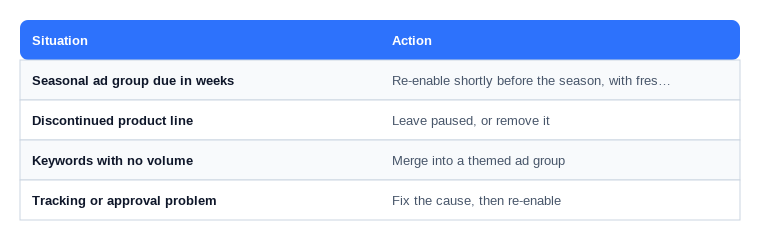
| Situation | Action |
|---|---|
| Seasonal ad group due in weeks | Re-enable shortly before the season, with fresh ads |
| Discontinued product line | Leave paused, or remove it |
| Keywords with no volume | Merge into a themed ad group |
| Tracking or approval problem | Fix the cause, then re-enable |
What does this say about account structure?
Google’s structure guidance says to clean up duplicate and non-serving keywords and to move single-keyword ad groups into themed ad groups. Ad groups with no impressions for over a year are clutter. A tidy account is easier to manage and gives Smart Bidding clearer data; see how to structure an account for Smart Bidding. Google also notes that reorganising can wipe accumulated data, so remove only what is truly dead, and keep a note of what you removed.
How do I stop surprises?
Look at your Ad groups page with the Status reason column every quarter. Export paused ad groups before a big restructure so you have a record. Tell everyone who works on the account that pauses can be automatic, so nobody wastes time hunting for a person who paused them. If you run seasonal campaigns that sit idle for most of the year, set a reminder to review them before the season; a campaign unused for 13 months can come back paused.
What should I do with the account after reading the list?
Export the list of automatically paused ad groups and sort them by campaign. For each campaign, decide whether it still serves a purpose. If every ad group in a campaign is paused for low activity, the campaign itself is probably dead and can be archived or removed. If only some are, check whether the remaining ad groups are well themed and whether the paused ones should be merged into them. Look at keywords with no volume and at product groups that no longer exist. Write the decision beside each item: leave, merge, rebuild or remove. Review again in six months. If you rely on seasonal campaigns, schedule the revival work before the season starts, so ads, landing pages and budgets are ready, rather than discovering paused groups on the first day of the sale.
Can I prevent automatic pauses on seasonal ad groups?
Google’s page describes re-enabling as the remedy and says unpaused ad groups pause again after 3 months without impressions; it does not describe a setting to turn the rule off. For a seasonal range, the practical answer is timing: unpause a few weeks before the season, check keywords, ads and landing pages, and make sure the ad group will receive impressions in that window. If it must run all year with little volume, ask whether it belongs in a broader themed ad group that has regular traffic.
Where does Bach.ai fit?
Bach.ai is our product. It audits connected Google Ads accounts and flags dormant ad groups and campaigns that hold no spend. On an active paid plan any supported change waits for your approval, by default.
FAQ
Is this a penalty?
No. Google describes it as housekeeping to simplify your account.
How long before an unpaused group pauses again?
Google says 3 months with no impressions.
Do I lose the ad group?
No. It is paused, not removed, and you can re-enable it.
Does it apply to campaigns?
The page describes ad groups. Check campaign status separately.
Sources
Sources, each opened and read on 25 Nov 2026: Google Help pages, About ad groups paused due to low activity; The ABCs of Account Structure; Organize your account with ad groups. Menu names and limits change, so check the page before you act.