Google Tag Setup for Store Conversion Tracking
How do I set up Google Ads conversion tracking on my store?
Create a purchase conversion action in Google Ads, then add the Google tag with its event snippet to your order confirmation page, or use Google Tag Manager or your platform's integration. Pass the order value and a transaction ID to avoid duplicates, then check the tag status after a test order.
Everything in Google Ads depends on one question: did that click lead to a sale? Without the answer Smart Bidding has nothing to optimise, Performance Max has nothing to chase and reports are guesses. Setup is short, and the errors are well known. This guide follows Google’s help pages, read on 25 November 2026.
What is conversion tracking?
Google defines it as a free tool in your account that can help measure how clicks on your ads and free product listings lead to meaningful actions such as sales or leads. A conversion occurs when a click or other interaction leads directly to a valuable behaviour such as a purchase, newsletter sign-up, phone call or download. It also shows which ads, listings and keywords are most successful. Google says it only collects data on sites and apps where you have configured tracking.
What is the Google tag?
Google’s page says the global site tag (gtag.js) is now the Google tag, so new and existing installations get new capabilities without additional code. A single tag can have several tag IDs, such as GT-, G- and AW- IDs; Google says instead of managing multiple tags for different product accounts you can use the Google tag across your whole website and connect it to multiple destinations. The first ID is the main one, but the IDs can be used interchangeably when adding the tag, and removing a destination does not change existing tag IDs.
How do I set it up?
Google describes two parts: create a conversion action, and set up your Google tag.
- Create a conversion action in Google Ads, for example Purchase. Choose Website, and set the value and count.
- Get the tag from the setup screen. You or your developer must be able to edit your website code.
- Identify the conversion page, usually the Thank you for your order page.
- Add the Google tag to every page and the event snippet to the conversion page, or use Google Tag Manager or your platform’s integration. For clicks on buttons rather than a new page, follow Google’s click-tracking instructions.
- Check the tag status in the conversion action, and place a test order.
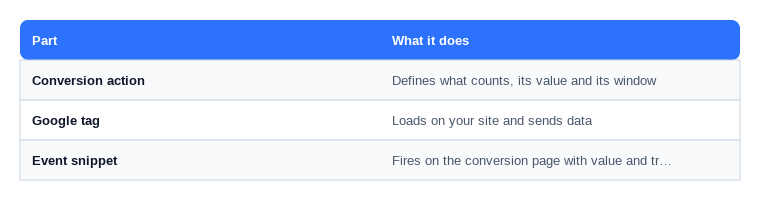
| Part | What it does |
|---|---|
| Conversion action | Defines what counts, its value and its window |
| Google tag | Loads on your site and sends data |
| Event snippet | Fires on the conversion page with value and transaction details |
For a store, always pass the order value and a transaction ID. Google has a page on using the transaction ID to minimise duplicate conversions, which matters when customers refresh the confirmation page. See how to track purchase value in Google Ads.
What should I check after setup?
- The conversion action’s status in Google Ads shows that conversions are being recorded after a test order; Google has a troubleshooting page for conversion tracking status if it does not.
- The value matches the order total (excluding what you do not want counted, such as shipping).
- One order produces one conversion.
- Consent settings are working; see consent mode.
- Auto-tagging is on; see auto-tagging, GCLID and UTMs.
- Enhanced conversions are enabled; see how to turn them on.
What if numbers do not match the store?
They rarely will exactly; each system counts with its own rules. Treat the gap as a trend to monitor, and investigate sudden changes; see why Shopify orders and Google Ads conversions differ and why conversions dropped. If you use Shopify, Google’s Google and YouTube app can set up tracking; see how to sync Shopify products to Merchant Center.
What does a good test order look like?
Place a real or test order in a private browser window after clicking your own ad. Check four things in order. First, the confirmation page loads and the event fires once. Second, in Google Ads the conversion action status shows that tracking is working, and it can lag the order, so check again later. Third, the recorded value matches the order total you intend to count, and the transaction ID is passed. Fourth, refresh the confirmation page and confirm that no second conversion is counted. If you use Tag Manager, use its preview mode to see the tag fire and the variables it reads. Write down who did the test and when, and repeat it after every checkout or theme change. A five-minute test after each release prevents the most costly measurement failure in a store.
Where does Bach.ai fit?
Bach.ai is our product. It checks tracking and signal health on a connected Google Ads account and, with your store connected, compares ad-reported revenue with real orders. On an active paid plan it can apply a supported Google Ads change after you approve it, by default. It does not install your tag.
FAQ
Is conversion tracking free?
Google describes it as a free tool in your account. Your platform or tag manager may have its own costs.
Do I still need gtag.js?
Google says gtag.js is now the Google tag, so installations carry new capabilities without additional code.
Which page should carry the conversion event?
The page a customer sees after completing the action, typically an order confirmation page.
Can I track clicks on a button?
Yes, with Google’s click tracking instructions, for example for add to cart events. Purchases remain the primary action for most stores.
Sources
Sources, each opened and read on 25 Nov 2026: Google Help pages, Add a Google tag to your website; Google tag ID; Conversion tracking: Definition. Menu names and limits change, so check the page before you act.