How Do I Track Purchase Value in Google Ads?
How do I track purchase value in Google Ads?
Create a website conversion action with the code method, open its settings and choose Use different values for each conversion. Then pass the order total as a number with a period decimal, and the currency as an ISO code, from your confirmation page. Google says purchases should be set as Primary.
Target ROAS and Maximize conversion value only work if Google Ads receives the real order value. A URL-based purchase conversion records a fixed value, which is fine for one-price offers and wrong for a store with a basket. This post follows Google’s help pages on web conversion setup and transaction-specific values, fetched on 25 November 2026. Menus move, so use the linked pages when a step does not match your screen.
Which setup method do I need for order value?
Google says to use Set up with URL for simple tracking of page loads, and Set up with code for button clicks, dynamic values such as variable purchase amounts, or transaction IDs. A store with different order totals needs the code method. Google also warns that if a CMS platform’s plugin manages tags, you must make sure you are not double-tagging the site, since that can cause duplicate conversion reporting.
How do I create the purchase conversion with dynamic value?
- In Google Ads open Goals, then Summary, and select Create conversion action.
- Choose conversions on a website, enter your domain and complete the scan or data source step.
- Choose the code-based method and set the category to Purchase.
- Under Value, select Use different values for each conversion, and enter a default value for when none is passed.
- Install the Google tag, then the event snippet on the page the customer sees after buying.
- Save, and check the Status column in the conversion actions table to confirm it records data.
Google’s value page says that to edit an existing action you open it from Summary, click Edit settings, click Value, choose Use different values for each conversion, provide a default value and save.
What must the tag pass?
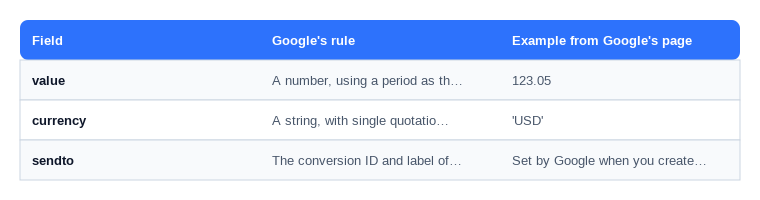
| Field | Google’s rule | Example from Google’s page |
|---|---|---|
| value | A number, using a period as the decimal delimiter | 123.05 |
| currency | A string, with single quotation marks, using ISO 4217 codes | ‘USD’ |
| send_to | The conversion ID and label of your action | Set by Google when you create the action |
Google adds that the page holding the snippet must be the one the customer finds after a conversion. On Shopify and other platforms, an app or the checkout settings usually writes this for you; confirm what it sends before trusting it. Our Shopify-specific cause list is in Why do Shopify and Google Ads conversions differ?.
Should the purchase be Primary or Secondary?
Google says configuring conversion actions as Primary (biddable) or Secondary (observation-only) is critical, and that misconfiguring them can stop Smart Bidding from optimizing effectively, because the algorithm relies on these signals. Set the purchase as Primary; keep add-to-cart or page-view events as Secondary unless you intend to bid on them. For what to do with the value once it flows in, see Should I use Target ROAS or Maximize conversion value?.
What can go wrong?
Three failures are common. A static value of 1 is left in place, so every order counts the same. The value arrives as text with a comma decimal, so it is read wrongly. Or the tag fires twice, inflating conversions. Each shows up as ROAS that does not match store revenue; compare the two after a test order. If conversions fall suddenly, use Why did my Google Ads conversions drop?.
How do I test the value before spending more?
Place a test order of a known total on your live store, then check three places. The tag sends the number and currency you expect, the conversion action’s Status shows it is recording, and the conversion value in Google Ads for that test matches the order after the usual reporting delay. Repeat with an order in a second currency if you sell in more than one. Do this before you switch the campaign to a value-based bid strategy, because Smart Bidding will optimise toward whatever number it receives, right or wrong.
Bach.ai is our product. Its audit includes tracking and signal health, plus store truth: with the read-only Shopify connection it checks the revenue each channel reports against real orders. On a paid plan a supported change is applied on Meta or Google Ads only after you approve it by default (Auto-Pilot is opt-in); the free trial does not apply changes, and recoverable-spend figures are estimates, not guarantees. For a hands-on review, use the Meta Ads audit checklist.
FAQ
Can I import purchases from Google Analytics instead?
Google says imports need Admin access in Google Ads, Edit access in the linked Analytics property, a linked property, and key events; after linking it can take 24 to 48 hours for import options to appear.
What currency format does the tag need?
A string in single quotes using an ISO 4217 code, such as ‘USD’, with the value as a number using a period as decimal.
Why does my conversion show a value of 1?
Google says the default for a URL-based action is the fixed value you enter, often 1. Switch to different values for each conversion and pass the order total.
How do I confirm tracking works?
Place a test order, then check the Status column in the conversion actions table for the action. Google says to use it to verify recording.
Sources, read on 25 November 2026: Set up your web conversions; Track transaction-specific conversion values; Set up conversions with a URL.