Conversion Windows in Google Ads for Stores
What conversion window should I use in Google Ads?
Match the window to your real buying cycle: Google's default is 30 days, and you can set a different window for each conversion action. Use the time lag report in Attribution to see how long customers take. A change only applies to conversions recorded from that day forward, and a shorter window caps attribution reports.
A shopper clicks your ad on Monday and buys on the following Sunday. Whether Google Ads counts that purchase depends on a single setting most stores never look at. Set too short, it undercounts considered purchases; set too long on an impulse product, it credits ads for sales they did not cause. This guide follows Google’s help pages, read on 25 November 2026.
What is a conversion window?
Google defines it as the period of time after an ad interaction, such as a click or video view, during which a conversion, such as a purchase, is recorded in Google Ads. You can edit it for webpage, imported, in-app and phone call conversions. It is ideal for businesses with a buying cycle that does not fit the default 30-day window. A longer window also lets you find keywords early in the path to a conversion in Attribution reports.
How do I choose the length?
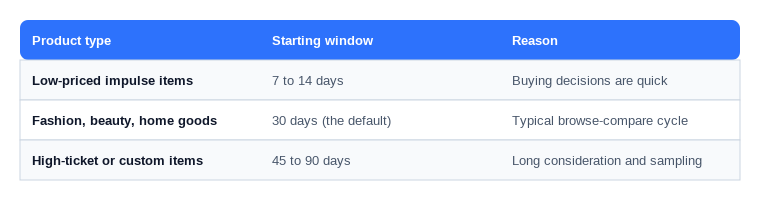
Do not guess: Google points you to the time lag report in your attribution reports, which shows how the time between people’s ad interactions and conversions varies. Then use these rules of thumb as a starting hypothesis:
| Product type | Starting window | Reason |
|---|---|---|
| Low-priced impulse items | 7 to 14 days | Buying decisions are quick |
| Fashion, beauty, home goods | 30 days (the default) | Typical browse-compare cycle |
| High-ticket or custom items | 45 to 90 days | Long consideration and sampling |
The table is illustrative, not Google guidance. Your own time lag report overrides it.
What happens when I change the window?
Google says you can set different windows for each conversion action, either when you create it or any time after, and change it as often as you like. Any changes apply to all conversions going forward: if you move from 30 to 10 days, the 10-day window only applies to conversions recorded from that day. Google’s worked example: an interaction on March 1 under a 30-day window, a change to 10 days on March 7, then to 20 days on March 16; a March 13 conversion that was not counted at the 10-day setting is not retroactively counted.
A shorter window also caps attribution: with a 7-day window, attribution reports are capped at 7 days, so you cannot see conversions that came later. Changing the window repeatedly makes trend comparisons unreliable, so pick one and keep it for a quarter.
What is the view-through window?
Google defines the view-through conversion window as the period after an impression during which a view-through conversion is recorded, where the user did not interact with the ad but later converted. A longer view-through window will usually increase the number of view-through conversions recorded. It matters for YouTube and Demand Gen, where many people see but do not click; treat view-through numbers as a weaker signal than click-based ones. See how to track YouTube ads and view-through results.
How do attribution models interact?
Google’s attribution page says the first click, linear, time decay and position-based models are no longer supported, and conversion actions using them were upgraded to data-driven attribution; you can also switch to last click, which is still supported. The window decides which interactions are eligible; the model decides how credit is shared among them.
How do I set it?
- Open Goals, then Conversions, and choose the conversion action.
- Open its settings and edit the click-through conversion window.
- Check the view-through window if you use video or Demand Gen.
- Save and note the date, because reports before and after use different rules.
- Review results after a full cycle and compare with store orders, see why Shopify orders and Google Ads conversions differ.
How do I read my own time lag report?
Open Goals, then Attribution, and look at the time lag report for your purchase action. It shows how many conversions happened within a day of the click, within a week and so on. If 90 percent of purchases occur within seven days, a 30-day window adds little except noise and extra credit for old clicks, so you might shorten it to 14 days. If a third of purchases arrive after two weeks, a short window undercounts and Smart Bidding sees too few conversions to learn from; keep it at 30 or extend it. Re-check after major seasons, because gift buying shortens the lag and high-ticket launches lengthen it. Make one change at a time and note the date. See how to track purchase value and why conversions differ from Shopify for the surrounding checks.
Where does Bach.ai fit?
Bach.ai is our product. It reviews tracking and attribution windows on a connected Google Ads account and, with your store connected, compares ad-reported revenue with real orders. On an active paid plan it can apply a supported change after you approve it, by default. The window choice follows your buying cycle.
FAQ
What is the default conversion window?
Google refers to the default 30-day conversion window for conversion actions, and you can change it per action.
Will a longer window increase my conversions?
It can count later purchases that a shorter window would miss, so conversions can rise. They are not necessarily incremental; compare with orders.
Do window changes rewrite history?
No. Google says changes apply going forward, and earlier conversions are not recounted.
Does the window apply to Smart Bidding?
Smart Bidding learns from the conversions you count, so a window change alters the signal it sees. Give it time to adapt after changes.
Sources
Sources, each opened and read on 25 Nov 2026: Google Help pages, About conversion windows; View-through conversion window: Definition; About attribution models. Menu names and limits change, so check the page before you act.