Import GA4 Conversions Into Google Ads
How do I import GA4 key events into Google Ads?
Link your GA4 property to Google Ads, then in Goals choose New conversion action, Import, Google Analytics properties, Web and tick the key events. E-commerce events are enabled as key events automatically. Imports are secondary by default, so set purchase to primary in Google Ads and avoid counting the same sale twice.
Many stores run two measurement systems for the same sale: a Google tag in Google Ads and GA4 events in Analytics. Importing GA4 key events can be a convenient shortcut, or it can quietly double the number of purchases Smart Bidding sees. This guide explains the import, then the choice that matters: which source is primary. Source pages were read on 25 November 2026.
What do I need before importing?
Google says the import works after you have linked your Google Ads account and your Google Analytics property. You need a GA4 property with a web data stream, key events set up in it, and Edit permission in Analytics to set it up. E-commerce events are automatically enabled as key events. If you import through the Analytics interface you must have at least Marketer access.
How do I import web key events?
- Open the Goals icon in Google Ads and click the Conversions drop-down.
- Click New conversion action and select Import.
- Click Google Analytics properties, then Web, and Continue.
- Tick the web key events you actually want. Every key event in the property is listed, so choose only the relevant ones, such as purchase.
- Click Import and continue, then Done.
- Open the new conversion action to review its settings.
Alternatively import from Analytics, under Admin and Conversion management, choosing the Google Ads account and the key events. To see which conversions came from Analytics, segment the campaigns table by Conversion source.
Why are imports secondary by default?
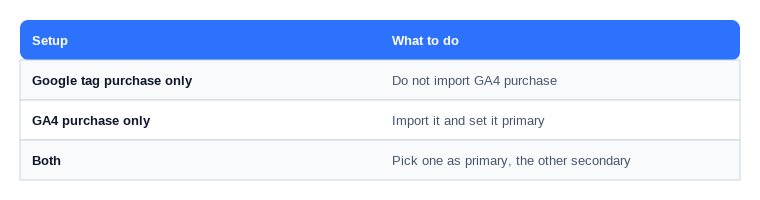
Google says conversions created from Google Analytics events are secondary by default, and can only be updated to primary in Google Ads. That protects bidding from changing by accident. If your purchase is tracked by a Google tag as well, keep one source primary and the other secondary, or Smart Bidding counts each order twice. Read which conversions should be primary or secondary.
| Setup | What to do |
|---|---|
| Google tag purchase only | Do not import GA4 purchase |
| GA4 purchase only | Import it and set it primary |
| Both | Pick one as primary, the other secondary |
What about the old Universal Analytics pages?
Google’s migration pages are still live and say Google Analytics 4 has replaced Universal Analytics, and that on July 1, 2023 all standard Universal Analytics properties stopped processing data. If you still bid on imported Universal Analytics conversions, the page says to migrate to GA4 to keep recording conversion events and using them for bid optimization. Another page says that as of April 2023 properties that had received hits in the last 12 months were replaced by automatically created GA4 properties, that the automated process might not make the same choices you would, and that Google strongly recommends migrating manually. Check your conversion list for old imported actions.
How do I check the import?
Compare yesterday’s purchases in GA4, Google Ads and your store. They will not match exactly, since each system counts differently, but the gap should be stable and explainable; see why Shopify orders and Google Ads conversions differ. If Google Ads is far lower, check consent settings with how consent mode works and enhanced conversions.
How do I avoid double counting in practice?
List every conversion action in Goals, Conversions, with its source and primary or secondary status. If you see a Google tag purchase and a GA4 purchase both set to primary, keep the one that you trust more and set the other to secondary. Google tag conversions usually connect most directly to ad clicks; GA4 imports bring Analytics definitions and cross-channel logic. Whichever you choose, keep it fixed for at least a quarter, because switching changes the baseline. Name actions clearly, for example Purchase (Google tag) and Purchase (GA4), so nobody confuses them later. Check the Conversion source segment in the campaign table to confirm where numbers come from, and compare the primary purchase count against store orders each week. After any change, give Smart Bidding one or two conversion cycles to adjust.
Where does Bach.ai fit?
Bach.ai is our product. It checks tracking and signal health on a connected Google Ads account and flags duplicate conversion actions. On an active paid plan it can apply a supported change after you approve it, by default. It does not set up GA4 for you.
FAQ
Do I need GA4 to run Google Ads conversion tracking?
No. A Google tag conversion action works without importing. GA4 import is an alternative or an addition.
Why is my imported conversion not counted?
It is secondary by default, so it appears in All conversions, not in Conversions, and does not steer bidding until you set it to primary.
Does GA4 count the same as Google Ads?
No. Each uses its own attribution and rules, so differences are normal. Compare trends and reconcile with your store.
Which permissions do I need?
Google says you need Edit permission in Analytics to set up the property and at least Marketer access to import key events from the Analytics side.
Sources
Sources, each opened and read on 25 Nov 2026: Google Help pages, Measure web key events from Google Analytics properties; About primary and secondary conversion actions; GA4 Migration: Switch to Google Analytics 4 conversions manually. Menu names and limits change, so check the page before you act.