Cross-Account Conversion Tracking for Agencies
How do I track conversions across several Google Ads accounts?
Create conversion actions in your manager account, choose which managed accounts use them and keep one Google tag across accounts. Keep your old tag and conversion actions for the length of your conversion window before removing them. Campaigns targeting a specific action switch to the manager account's default goals, so check each campaign's goal afterwards.
An agency running three client accounts on one store, or a brand running separate Google Ads accounts per region, often ends up with several conversion tags on the same confirmation page. That slows the site and invites double counting. Google’s cross-account conversion tracking uses one tag and shared actions. It also has a switchover trap. This guide follows Google’s pages, read on 25 November 2026.
What is cross-account conversion tracking?
Google says that if you have multiple Google Ads accounts you can track conversions across all of them using a single Google tag, with a Google Ads manager account (MCC) used to create the conversion actions. You need more than one Google Ads account and a manager account linked to them. Google lists benefits: fewer code snippets and reports; simpler, more powerful reports, since cross-account attribution reports consolidate data across accounts, which you view in the manager account; fewer miscounts because fewer tags make accidental double counting less likely; and faster sites because fewer tags mean less HTML. It also says the feature is beneficial for Smart Bidding because it provides more data.
How do I set it up?
- Sign in to the manager account and create the conversion actions there, choosing the appropriate conversion source.
- Add the new tracking tag to your website, or code to your app, where needed.
- Keep the old tag and old conversion actions until the conversion window has passed; Google says otherwise you could lose conversions from clicks before the change.
- Choose which managed accounts use the manager’s conversion actions, from within the manager account.
- Verify that at least one conversion is recorded in a managed account.
Google says conversion actions cannot be shared between managed accounts, only from the manager account to managed accounts, and that you must add the necessary tags before changing any account’s conversion setup or conversions will not be recorded.
What is the switchover trap?
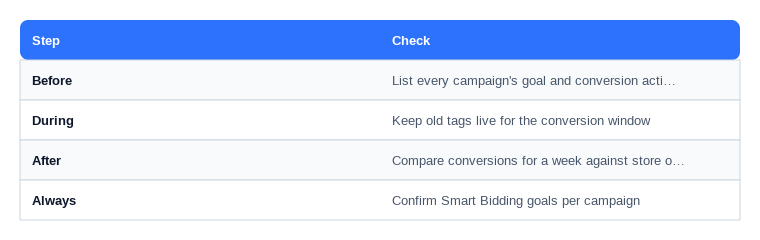
Google warns that when you move from account-specific conversion tracking to cross-account tracking based on your manager account, campaigns targeting a specific conversion action will switch to the manager account’s default conversion goals, and continuing to target a specific action can give inconsistent behaviour because the manager account may not have the same goals as the serving account. The same applies moving back. So after switching, open each campaign’s conversion goals and confirm it optimises the right ones. See primary versus secondary conversion actions.
| Step | Check |
|---|---|
| Before | List every campaign’s goal and conversion actions |
| During | Keep old tags live for the conversion window |
| After | Compare conversions for a week against store orders |
| Always | Confirm Smart Bidding goals per campaign |
When is it worth it?
When you have two or more accounts that share a site and want one purchase definition, for example regional accounts or an agency running several brands under one store. It is not needed for one account. Pair it with cross-account bid strategies if you manage portfolio bidding at manager level: Google says they let you create, monitor and manage Smart Bidding portfolio strategies at the manager account level across customer IDs; see portfolio strategies.
What else should an agency check?
Access and ownership: who controls the manager account, who can edit conversion actions and what happens when the agency relationship ends; see how to transfer a Google Ads account and do I need a manager account as an agency. Also confirm that enhanced conversions and consent settings are applied consistently; see how to turn on enhanced conversions.
What does a safe migration timeline look like?
Week one: list every account, its conversion actions and the campaigns that target specific actions; create the cross-account actions in the manager account; add the new tag next to the old one, without removing anything. Weeks two to three: share the actions with one managed account first and check that conversions are recorded there and match the old tracking within a normal margin. Then roll out account by account, checking each campaign’s conversion goal. Leave old tags and actions for the full conversion window after the last switch, as Google advises. Only then retire them, one account at a time, and note the date in your change log. Compare store orders with the combined conversions weekly through the process.
Where does Bach.ai fit?
Bach.ai is our product. It audits each connected Google Ads account and flags duplicate or conflicting conversion actions. Agencies can manage up to 20 brands on the Agency plan. On an active paid plan any supported change waits for your approval, by default.
FAQ
Do I need a manager account?
Yes. Google says to have or create one for creating conversion actions you can use across accounts.
Can managed accounts share actions with each other?
No. Google says conversion actions cannot be shared between managed accounts, only from the manager account.
When can I remove the old tag?
After your conversion window has passed, per Google.
Will my campaigns keep their goals?
Campaigns targeting a specific action switch to the manager’s default goals, so check them.
Sources
Sources, each opened and read on 25 Nov 2026: Google Help pages, About cross-account conversion tracking; Manager Accounts: Set up cross-account conversion tracking; About cross-account bid strategies. Menu names and limits change, so check the page before you act.