Why Shopify and Google Ads Conversion Counts Differ
Why do Shopify orders and Google Ads conversions not match?
Shopify counts every order once, on the day it is placed. Google Ads counts only conversions it attributes to its own ads, on impression-date reporting, filtered by Primary or Secondary status, counting settings, attribution model and invalid-traffic removal. Expect a gap, and check settings before suspecting a tracking fault.
Picture a store owner (illustrative figures) who opens Shopify, sees 140 orders last week, opens Google Ads, sees 96 conversions, and assumes tracking is broken. Usually it is not. The two numbers measure different things: Shopify counts every order, while Google Ads counts conversions it attributes to its own ads, subject to settings you can change. This guide lists the reasons Google itself gives for the gap and the order in which to check them.
For the multi-platform version of this question, see why Meta and Google together claim more sales than Shopify. If the Google number fell rather than differed, use why Google Ads conversions dropped.
What is Shopify counting that Google Ads is not?
Shopify counts orders from every source: direct, email, organic search, other ad platforms and your own campaigns. Google Ads only reports conversions that follow Google Ads interactions from the same account. Google notes that a tool other than Google Ads may report conversions from all Google Ads clicks across accounts, or attribute those conversions to other platforms (Data discrepancies). So Google Ads should be lower than Shopify unless you also count many non-purchase actions.
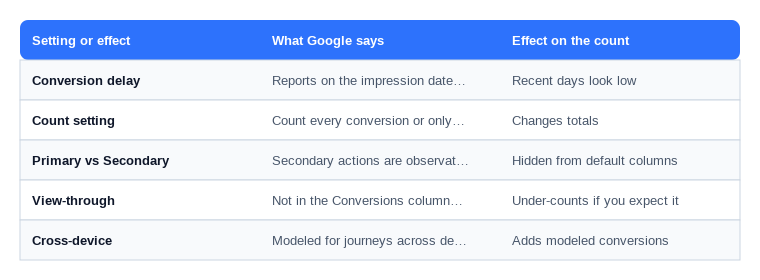
What causes the gap inside Google Ads?
| Setting or effect | What Google says | Effect on the count |
|---|---|---|
| Conversion delay | Reports on the impression date; others use the conversion date | Recent days look low |
| Count setting | Count every conversion or only 1 per interaction | Changes totals |
| Primary vs Secondary | Secondary actions are observation only | Hidden from default columns |
| View-through | Not in the Conversions column by default | Under-counts if you expect it |
| Cross-device | Modeled for journeys across devices | Adds modeled conversions |
| Invalid traffic | Some conversions removed later | Small retroactive drops |
| Attribution model | Switching models changes data | Counts shift on change |
Source: Data discrepancies: Factors and troubleshooting, read 24 Nov 2026.
Google also says conversion data can take up to 7 days to fully appear after significant changes or account linking, and that you should allow 24 to 48 hours for synchronization between Google Analytics and Google Ads before comparing (Data discrepancies: Factors and troubleshooting).
How do you reconcile one week, step by step?
- In Shopify admin, open Analytics, then Reports, and export orders for a fixed date range, excluding cancelled and test orders.
- In Google Ads, set the same date range and add the “Conversions (by conv. time)” column so dates line up.
- Go to Goals, then Conversions, then Summary and list which actions are Primary.
- Confirm only purchase is Primary. If Page view or Add to cart is Primary with a value, counts and values inflate; switch them to Secondary.
- Check each action’s count setting. For purchases, counting every conversion can double count repeat events on one order; Google also has a help article on using a transaction ID to minimize duplicate conversions.
- Add the view-through column and note the difference.
- Compute Google conversions as a share of Shopify orders, and track that share weekly rather than hunting for a perfect match.
The share is the useful number. Learn what is normal for your store over a few weeks; a sudden drop in the share points to a tag or setting that changed.
Why do I see fractional conversions?
Google says decimal values are expected behaviour from the data-driven attribution model, which splits credit when more than one ad interaction contributed. So 96.4 conversions is not an error. It also means a Shopify order count and a Google conversion count cannot be compared as whole numbers.
What if the tag is the problem?
If the share dropped sharply, check the tag. Google’s discrepancy guide tells you to make sure that third-party platforms such as Shopify have the correct Google conversion ID and label, and to use Tag Assistant to verify an inactive tag. Enhanced conversions can improve how many conversions are matched; see how to set up enhanced conversions on Shopify.
How should you use the result?
Do not bid on Shopify orders and do not report Google conversions as total sales. Use Google Ads numbers to compare Google campaigns with each other, and Shopify numbers to judge the whole business. The ad spend calculator helps size the budget once the numbers agree. When you need to value each channel, blended CAC across paid channels takes the store view.
Where does Bach.ai fit?
From Starter, Bach.ai connects Shopify read-only and puts the orders Shopify recorded next to the conversions Google and Meta report, so the share is computed for you. It does not change your store or your tags, and when an input is missing or stale it says the result is inconclusive instead of filling in a number.
What to do next
Run the seven steps for last week, record the share, and set a weekly reminder to compare it. If the share moves more than a few points, open the Conversions Summary first. A free 7-day trial needs no card; Google Ads and Shopify connections are included in the 7-day trial and from Starter (pricing).
FAQ
Should Google Ads conversions equal Shopify orders?
No. Shopify counts all orders; Google Ads counts only those attributed to its ads, under its own settings and dates. A gap is normal, so do not expect the two numbers to match exactly. Look at how large the gap is and whether it holds steady, not whether it exists.
Why are my Google Ads conversions higher than orders?
Possible causes are non-purchase actions set to Primary, counting every conversion instead of one per interaction, or duplicate tags. Check Primary actions and count settings first, then look for duplicate tags, and fix one cause at a time so you can see which change closed the gap.
Which number should I trust for revenue?
Trust Shopify for total revenue and orders. Use Google Ads for comparing Google campaigns and ads against each other. Do not add the two together or expect them to agree; each answers a different question, and mixing them hides which campaigns earn their budget.
How long until Google data is complete?
Allow 24 to 48 hours between Analytics and Google Ads, and up to 7 days after significant changes. Conversions can be reported up to 90 days after the click. Wait for the data to settle before you judge a change, and avoid comparing a recent day with an older, complete one.
Sources
Checked 24 Nov 2026: Data discrepancies: Factors and troubleshooting; Troubleshoot your conversion tracking status.