Google Ads Conversions Dropped? 8 Checks (2026)
Why did my Google Ads conversions drop?
First separate a reporting artifact from a real drop: recent days are incomplete because of conversion delay, and invalid conversions can be removed later. Then check tag status under Goals, Conversions, Summary, whether the action is Primary, recent attribution or counting changes, and your Shopify or tag manager setup before editing bids.
A conversion drop in Google Ads has two very different causes: the numbers are late or restated, or the tracking really stopped. Treating the first as the second leads to panicked bid changes that reset learning. This guide gives eight checks in the order that rules out the cheapest explanations first, using Google’s own troubleshooting pages.
For the same question on Meta, see why ROAS dropped overnight. The method is identical: prove the signal before you judge the ads.
Is the drop real, or is it conversion delay?
Google Ads reports conversions on the ad impression date, whereas many other tools attribute them to the conversion date. This is called conversion delay, and it makes the most recent days look low until conversions catch up. Google says conversions can be reported up to 90 days after the click, and that reporting can take 3 to 24 hours to update (Data discrepancies, Troubleshoot conversion tracking status).
To compare like with like, add the “Conversions (by conv. time)” or “All conv. (by conv. time)” columns. Google also notes it can take up to 7 days for conversion data to fully appear after significant changes or account linking (Data discrepancies: Factors and troubleshooting).
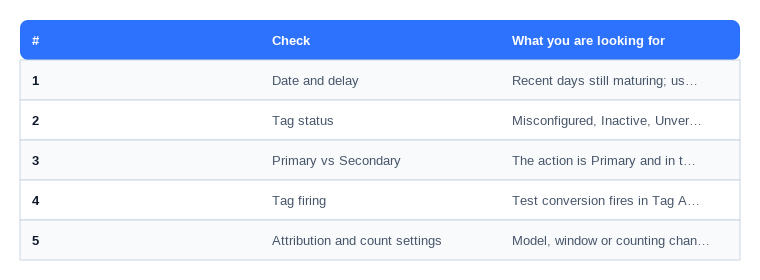
The 8 checks, in order
| # | Check | What you are looking for |
|---|---|---|
| 1 | Date and delay | Recent days still maturing; use by-conversion-time columns |
| 2 | Tag status | Misconfigured, Inactive, Unverified or Needs attention |
| 3 | Primary vs Secondary | The action is Primary and in the campaign’s goal |
| 4 | Tag firing | Test conversion fires in Tag Assistant |
| 5 | Attribution and count settings | Model, window or counting changed recently |
| 6 | Invalid conversions | Small retroactive removals for spam or invalid clicks |
| 7 | Tag manager and Shopify setup | Correct conversion ID and label, Conversion Linker |
| 8 | Real demand or spend change | Budget, bids, season or stock actually changed |
Sources: Troubleshoot your conversion tracking status and Data discrepancies, read 24 Nov 2026.
How do you check tag status and the action settings?
- In Google Ads, go to Goals, then Conversions, then Summary.
- Read the status of each conversion action. If it shows Inactive, Unverified, Needs attention or Misconfigured, follow the troubleshooting steps for that status.
- Confirm each action you rely on is set to Primary. Google says Primary actions are used for bidding and appear in the main reporting columns, while Secondary actions are for observation only and may not appear in default reports unless you add the “All conversions” column.
- Accept any terms of service required for features such as enhanced conversions; Google lists this as a check.
- Fire a test conversion with Google Tag Assistant and confirm the tag fires on the thank-you page.
If you see decimal conversions, that is expected behaviour from the data-driven attribution model, not a fault.
What changes inside Google Ads can lower the count?
Switching between attribution models can change your conversion data, according to Google. Count settings matter too: you can count every conversion or only one conversion per interaction, and changing that moves the totals. Review the change history for edits to the model, the conversion window or the count setting before drawing a conclusion.
Conversion value can drop for a different reason: if non-purchase actions such as “Page view” or “Add to cart” were previously Primary with a value and were later switched to Secondary, your headline numbers fall without any lost sales.
Could invalid conversions explain a small drop?
Yes. Google removes some conversions if it detects they came from spam, invalid traffic or invalid clicks. This can happen after conversions were first reported, so it can look like a small drop appearing over time. Your own analytics may keep counting that traffic, which is one reason the two disagree.
What should you check if you sell on Shopify?
Google’s discrepancy guide tells you to make sure third-party platforms such as Shopify have the correct Google conversion ID and label. If you use Google Tag Manager, confirm the Conversion Linker tag is set up. If an action shows Misconfigured and you cannot find a Conversion Label for Tag Manager, check whether the action was created automatically: auto-created goals cannot be mapped to Tag Manager conversion tags. Create a manual conversion action to get a Conversion ID and Label (Troubleshoot conversion tracking status).
When the tag is fine but Shopify and Google Ads still disagree, the cause is usually counting rather than loss; see why Shopify and Google Ads conversion counts differ.
What if tracking is fine and spend really fell?
Then the drop is real demand or delivery: a budget cut, a tighter target, a stock-out, or a seasonal dip. Compare spend, impressions and conversion rate over the same dates before changing anything. A conversion rate that held while impressions fell points to delivery; a conversion rate that fell while clicks held points to the page or offer.
Where does Bach.ai help?
Bach.ai reads Google Ads and, from Starter, a read-only Shopify connection, so it can compare conversions Google reports with real orders and flag a gap instead of leaving you to reconcile by hand. A finding built on stale or partial data is marked inconclusive. It never changes your store.
What to do next
If tracking needs rebuilding, set up enhanced conversions on Shopify after the basic tag is healthy, and run the Meta ads audit checklist for the Meta side. Work down the eight checks in order and write down what each one shows. Do not touch bids until checks 1 to 7 are clean. A free 7-day trial of Bach.ai needs no card; Google Ads and Shopify connections are included in the 7-day trial and from Starter (pricing).
FAQ
How long should I wait before worrying about a drop?
Wait for conversion delay to settle. Google says reporting can take hours to update and conversions can arrive up to 90 days after the click, so judge a drop on dates older than your typical conversion lag.
Why do I see fractional conversions?
Google says decimal values are expected behaviour from the data-driven attribution model, which splits credit across touchpoints. A fractional count therefore does not mean a tag is broken; it means credit for one conversion was shared, so the totals can show decimals.
Why does Google Analytics show different conversions?
Google Ads and Analytics use different attribution and dates, and data can take 24 to 48 hours to synchronise. Compare using by-conversion-time columns and allow time before concluding. A gap between the two reports is not a drop by itself, so check the date basis first.
Can I fix a tag status without a developer?
Often yes, using Tag Assistant to fire a test conversion. Tag placement or code changes may need your web developer. Start with the test conversion to see whether the tag fires, and bring in the developer only when the placement or code itself has to change.
Related: How do I automate Google Ads campaign setup safely?
Sources
Checked 24 Nov 2026: Troubleshoot your conversion tracking status; Data discrepancies: Factors and troubleshooting.