How to Turn On Enhanced Conversions in 2026
How do I turn on enhanced conversions in Google Ads?
Open Goals, then Settings, expand Enhanced conversions, tick Turn on enhanced conversions, accept the terms and choose a method such as the Google tag. Since April 2026 web and leads are one account-level setting. Clear old action-level setups first, because Google Ads prioritises them and they can conflict.
Enhanced conversions are the least glamorous way to improve a store’s Google Ads numbers, and one of the most effective at fixing purchases that were never attributed. Google changed the setup in April 2026, so a guide written before then can lead you into a conflict. This one follows Google’s current help pages, read on 25 November 2026, and explains the steps in the order they matter.
What are enhanced conversions?
Google says enhanced conversions is a feature that can improve the accuracy of your conversion measurement and unlock more powerful bidding. In practice, your site passes customer data it already collects at checkout, such as an email address, in a privacy-safe way, so a purchase can be matched to the ad click that preceded it when cookies are missing. It sits on top of ordinary conversion tracking, so set that up first; see how to track purchase value in Google Ads.
What changed in April 2026?
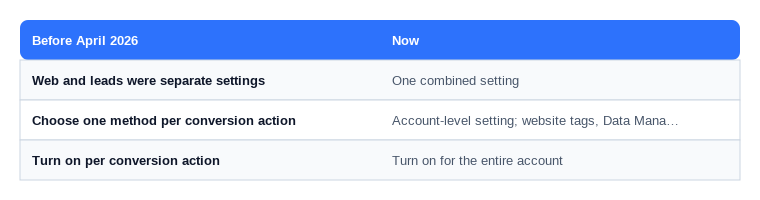
Google states that as of April 2026, enhanced conversions for web and leads have been combined into a single setting. Google Ads now accepts user-provided data from website tags, Data Manager and API connections simultaneously, and all users have been migrated to the unified setting. You no longer choose between implementation methods in the way older guides describe. It is now an account-level setting, so you turn it on once for the whole account instead of conversion action by conversion action.
| Before April 2026 | Now |
|---|---|
| Web and leads were separate settings | One combined setting |
| Choose one method per conversion action | Account-level setting; website tags, Data Manager and API accepted together |
| Turn on per conversion action | Turn on for the entire account |
How do I turn it on with the Google tag?
- Go to Settings within the Goals menu.
- Expand the Enhanced conversions panel.
- Tick Turn on enhanced conversions.
- Confirm you will comply with Google’s policies and that the Google Ads Data Processing Terms apply, then click Agree and continue.
- Choose a method for setting up and managing user-provided data, such as Google tag.
- Enter your website domain and click Check URL. If you see that your tag will collect user-provided data from your website, click Save.
- Open Tag details if the message does not appear, and pick how to capture the data.
Google warns that if you send enhanced conversions data in a way that differs from the method you selected, that data may not be processed. For example, if you select Google tag and send through the Google Ads API, the API data won’t be processed.
How should the tag capture the data?
Google lists three options. Automatically detect user-provided data inspects the page for strings matching a pattern and, in Google’s words, works well for most advertisers; you can add CSS selector exclusions. Specifying CSS selectors or Javascript variables gives more control. Adding a code snippet gives the most. Start with automatic detection, then move to a manual method if the diagnostics show missing fields.
What should I clean up first?
Google says to clean up old action-level configurations to ensure a seamless transition to account-level enhanced conversions: because Google Ads prioritises action-level settings, removing them prevents setup conflicts and ensures all conversion pings are captured.
Do I need a partner to implement it?
Not necessarily. Google runs an enhanced conversions Partner Program, an initiative that supports implementations through third parties that work with Google. It suits stores that need support beyond the help pages. Your e-commerce platform may also have an integration; check it before building custom code.
How do I know it works?
After turning it on, give the diagnostics some time, then compare Google Ads conversions with your store’s orders for the same days using why Shopify orders and Google Ads conversions differ. Note that consent settings also change what is measured; see how consent mode works for Google Ads.
Where does Bach.ai fit?
Bach.ai is our product. It checks tracking and signal health on a connected Google Ads account and, with your store connected, compares ad-reported revenue with real orders. It does not install tags for you, and on an active paid plan any supported Google Ads change waits for your approval, by default.
FAQ
Does enhanced conversions replace the Google tag?
No. It adds user-provided data to your existing conversion measurement, which still needs the Google tag or a Tag Manager setup.
Is it required?
Google does not require it on the pages we read; it says the feature can improve measurement accuracy and unlock more powerful bidding. Stores with missing attribution gain most.
Can I use my own data pipeline?
Google says the unified setting accepts data from website tags, Data Manager and API connections simultaneously, but data sent by a method different from the one you selected may not be processed. Pick one method consistently.
What if I turned it on per conversion action before?
Google recommends cleaning up old action-level configurations, since it prioritises them over the account-level setting, which can cause conflicts.
Sources
Sources, each opened and read on 25 Nov 2026: Google Help pages, Opt into enhanced conversions at the account level; About enhanced conversions at the account level; About the enhanced conversions Partner Program. Menu names and limits change, so check the page before you act.