How to Use Customer Match for Your Online Store
How do I use Customer Match in Google Ads for my store?
Upload your customer emails, phone numbers and addresses as a list, in the right format, so Google hashes and matches them to signed-in users. Use the list to reach existing customers, cross-sell, reactivate dormant buyers and find lookalike audiences. Most match rates are between 29 and 62 percent, so judge the list by match rate, not size.
A store’s first-party data is its best audience and most under-used asset. Customer Match is Google’s way to use it, and it matters more as browser cookies decline. It is not a free-for-all: matching rules, formatting and consent determine what you can do. This guide follows Google’s help pages, read on 25 November 2026.
What is Customer Match?
Google says it lets you use your online and offline first-party data to scale your reach and engagement with new and existing customers across Google’s surfaces, including Search, the Shopping tab, Gmail, YouTube and Display. Your customer data helps Google AI optimise bidding and audience strategies. Google reports that when advertisers applied Customer Match list signals to campaigns, it resulted in a 5.3% conversion uplift; that is Google’s own measurement, not a forecast for your account.
What can a store use it for?
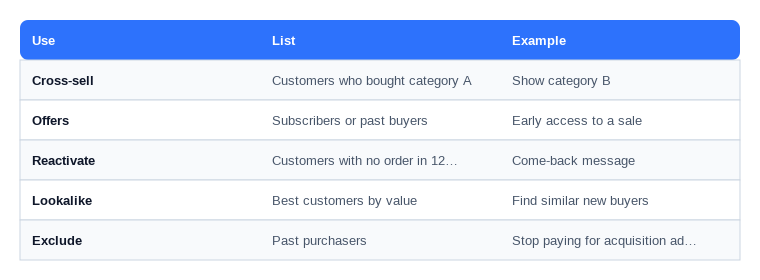
Google lists ways it helps deepen relationships and build new ones: cross-sell existing customers another product, reach them with special offers, reactivate dormant customers and find new customers who resemble your best ones.
| Use | List | Example |
|---|---|---|
| Cross-sell | Customers who bought category A | Show category B |
| Offers | Subscribers or past buyers | Early access to a sale |
| Reactivate | Customers with no order in 12 months | Come-back message |
| Lookalike | Best customers by value | Find similar new buyers |
| Exclude | Past purchasers | Stop paying for acquisition ads shown to buyers |
The last row is a common sensible use, covered further in Is Performance Max just remarketing to existing customers.
How do I build the list?
- Export customers from your store, with consent where the law requires it.
- Include every identifier you hold: email address, mobile device, phone number and physical address, in the right format, to maximise list size.
- Upload it in Google Ads’ audience tools, or through a verified Customer Match upload partner, which Google says streamlines the work and can raise match rates.
- Wait for processing, then check the list size.
- Apply it to campaigns as a signal or an audience.
Google explains privacy: customer information is hashed, turned into encrypted codes, and matched with codes of Google accounts; after matching the codes are deleted immediately, and whether there is a match or not Google does not keep this data or use it for another Google product.
How do I read match rate?
Google defines match rate as the percentage of your upload that was able to be connected to Google’s logged-in users. Do not worry about not having 100%; Google says it is common to have information that isn’t matched, and that most advertisers’ match rates are between 29% and 62%. A rate far below that suggests a formatting problem. Keep a list large enough to be useful by refreshing it regularly.
What are “your data” segments?
Google’s audience updates renamed remarketing to your data, and audience types such as custom, in-market and affinity to audience segments. If you read old guides on remarketing, look for Your data in Audiences. For the retail version that serves product ads to past visitors, see dynamic remarketing for retail.
What are the risks?
Policy and consent are the risks. You must have the right to use the data and follow Google’s policies for it; seek legal advice where unsure. Keep the list fresh so you do not target customers who asked to be removed, and check the list size after processing.
What should I upload first?
Start with three lists. First, all customers who have ordered, to exclude from acquisition campaigns and to seed a lookalike. Second, your best customers, such as repeat buyers or the top 20 percent by order value, as the lookalike seed, because seed quality shapes who the model finds. Third, lapsed customers with no order in a year, for a come-back offer. Refresh each list on a schedule, monthly for most stores, so recent buyers are excluded quickly and the lookalike keeps current. Remove anyone who asked to be removed from marketing. Check each list’s match rate as soon as it is processed and compare it with the 29 to 62 percent range Google cites, then fix formatting if you are far below it. For how to use the audiences, see Demand Gen audiences and targeting versus observation.
Where does Bach.ai fit?
Bach.ai is our product. With your store connected it reads orders and customers at the order level to show where ad-reported revenue comes from existing buyers. It does not upload customer lists to Google. On an active paid plan any supported Google Ads change waits for your approval, by default; high-risk changes and customer-list uploads always wait for you.
FAQ
Does Google store my customer list?
Google says the uploaded data is hashed and matched, then deleted immediately; whether or not there is a match it does not keep the data or use it for other Google products.
What match rate is normal?
Google says most advertisers’ match rates are between 29% and 62%.
Do I need an upload partner?
No, but Google says verified partners can streamline the work and add information that can greatly increase match rates and list size.
Is Customer Match the same as remarketing?
No. Remarketing, now called your data, uses people who visited your site; Customer Match uses data you upload from your own records.
Sources
Sources, each opened and read on 25 Nov 2026: Google Help pages, Customer Match best practices; Add data segments for website visitors to ad groups; Your data. Menu names and limits change, so check the page before you act.