YouTube Ad Formats Compared for Online Stores
Which YouTube ad format should an online store use?
Use skippable in-stream or in-feed ads for views and consideration, Shorts for mobile reach, bumper ads (6 seconds) for reminders and non-skippable for full-message awareness. Only skippable, in-feed and Shorts can count TrueView views and be remarketed to; bumper and non-skippable ads cannot. Masthead is a reservation buy for large launches.
Stores often buy YouTube in one format by accident: whatever the campaign wizard defaults to. The formats do different jobs, and Google’s comparison table shows the differences that matter for a small advertiser: length, how views are counted, whether you can remarket to viewers and which campaign types serve them. This guide summarises it, read on 25 November 2026.
Which formats exist?
Google lists six: skippable in-stream, non-skippable in-stream, in-feed video, bumper, Masthead and YouTube Shorts. A naming note: as of October 2025 the Views metric is called TrueView views in Google Ads, which does not change billing or how paid views are counted. For new campaigns the Awareness and consideration objective is now YouTube reach, views and engagements; see how to start YouTube ads.
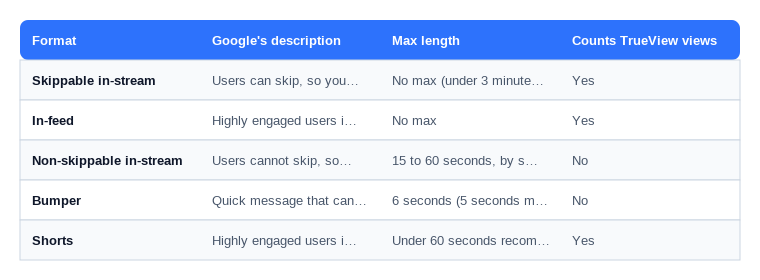
| Format | Google’s description | Max length | Counts TrueView views | Remarket to viewers |
|---|---|---|---|---|
| Skippable in-stream | Users can skip, so you can understand attention | No max (under 3 minutes recommended) | Yes | Yes |
| In-feed | Highly engaged users in discovery and search | No max | Yes | Yes |
| Non-skippable in-stream | Users cannot skip, so they view the whole message | 15 to 60 seconds, by subtype | No | No |
| Bumper | Quick message that cannot be skipped | 6 seconds (5 seconds minimum) | No | No |
| Shorts | Highly engaged users in a mobile-optimised experience | Under 60 seconds recommended | Yes | Yes |
| Masthead | Most prominent placement at YouTube’s entry point | No max (over 10 seconds recommended) | Yes | Yes |
All formats can increment the YouTube public view count. Masthead is a reservation buy; non-skippable and bumper are available in reach campaigns and reservations.
Where do they serve?
Skippable and non-skippable in-stream and bumper ads serve on YouTube videos, YouTube Playables in the mobile app, and Google video partners when opted in. In-feed ads serve on the YouTube Home feed, Search, Watch Next and Subscription feed. Shorts ads serve in YouTube Shorts. Masthead serves on the YouTube homepage. Compatible campaign types include Demand Gen, Video view campaigns, Video reach campaigns, Performance Max and reservations, varying by format.
Which should a small store use first?
- Skippable in-stream or in-feed to test a 15 to 30 second product story; you pay for engaged views and can remarket to viewers.
- Shorts for vertical creative on mobile; see creative sizes.
- Bumper only as a reminder after you have a viewer base, because you cannot remarket from it.
- Non-skippable for a short, strong message when reach matters more than cost.
- Masthead only for a major launch with a reservation budget.
For sales use Demand Gen with a product feed rather than reach formats; see Demand Gen with a product feed. For creative see YouTube creative best practices.
What if the campaign does not serve?
Google’s video troubleshooting page says to check, first, that the campaign is enabled because a paused campaign will not serve; that the date range includes the campaign dates; that the account is not suspended and billing is fine; that the start date is not in the future; and that a campaign total budget has not been fully spent. For ad review it says most ads are reviewed within 1 business day, with some taking longer. It also provides diagnostic insights that highlight issues and recommend fixes, such as disapproved assets. For performance swings, Google says it is normal for performance to vary and offers Explanations that compare the selected period with the previous one. See Performance Max not spending checks for the same logic.
How do I budget across formats?
Illustrative split for a store spending $3,000 a month on YouTube: put most of the money, say 60 percent, into one conversion-focused Demand Gen campaign with a feed; about 25 percent into a skippable in-stream or Shorts campaign to build audiences of viewers; and about 15 percent into a bumper or non-skippable reminder aimed at those audiences only if you can reach them. The proportions are an example, not Google guidance. Review after 30 days: cut the format with the worst cost per outcome for its job, not necessarily the lowest cost per view. Revisit when you launch a new product, when Masthead or reservation buys become realistic or when you add vertical creative.
Where does Bach.ai fit?
Bach.ai is our product. It audits connected Google Ads accounts and, with your store connected, compares ad-reported conversions with real orders, which matters for video where view-based numbers can overstate sales. On an active paid plan any supported change waits for your approval, by default.
FAQ
Can I remarket to bumper viewers?
Google’s table says no for bumper and non-skippable in-stream formats.
How long can a bumper ad be?
Six seconds, with a five-second minimum, per Google’s comparison.
Which formats can count TrueView views?
Skippable in-stream, in-feed, Shorts and Masthead per the table; non-skippable and bumper cannot.
Do I need the video on YouTube?
Google says video ad content must be hosted on YouTube, even when ads appear on partner sites.
Sources
Sources, each opened and read on 25 Nov 2026: Google Help pages, About video ad formats; How to fix Video campaigns not running or low traffic; Troubleshooting performance fluctuations in Video campaigns. Menu names and limits change, so check the page before you act.