How to Start YouTube Ads for an Online Store
How do I start YouTube ads for an online store?
Create a Video campaign and pick the YouTube reach, views and engagements objective, or run Demand Gen for sales with images, video and a product feed. Choose a campaign subtype, host the video on YouTube, link the channel, start with a modest budget and judge by the goal you chose, not by views alone.
Stores approach YouTube with two wrong ideas: that it is only for brands with a film budget, and that it can be run like Search. It is neither. A small store can show a 15-second cut to the right audience for modest spend, provided it picks the right campaign type for the goal and measures against that goal. This guide covers the structure, using Google’s help pages, read on 25 November 2026.
Which campaign type should a store use?
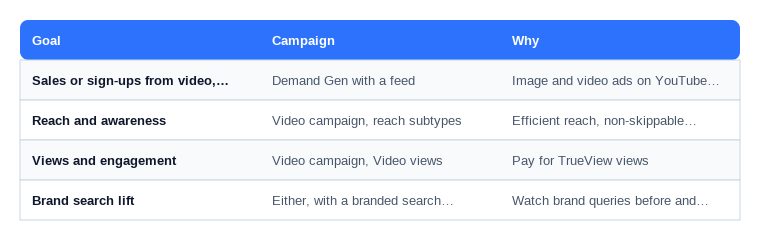
| Goal | Campaign | Why |
|---|---|---|
| Sales or sign-ups from video, with products | Demand Gen with a feed | Image and video ads on YouTube, Discover and Gmail; conversion bidding |
| Reach and awareness | Video campaign, reach subtypes | Efficient reach, non-skippable reach, target frequency, ad sequence or audio reach |
| Views and engagement | Video campaign, Video views | Pay for TrueView views |
| Brand search lift | Either, with a branded search check | Watch brand queries before and after |
Google says Video campaigns for product and brand consideration now show ads across YouTube video and YouTube Search networks, and that for new campaigns the Awareness and consideration objective has been renamed YouTube reach, views and engagements. If you have no objective in mind you can choose Create a campaign without guidance.
What are the video subtypes?
Google lists auction subtypes under Reach: Efficient reach, Non-skippable reach, Target frequency, Ad sequence and Audio reach; and Video views for views. Reservation subtypes such as Skippable, Non-skippable, Bumper, Shorts ads and Pause ads exist under premier and standard reach, and Masthead is separate. A small store should start with auction subtypes; reservation buys are for large brands.
How do I prepare the video?
Google recommends hosting your video on YouTube because certain metrics, such as watch time, are only available for YouTube-hosted content, and linking your YouTube account to Google Ads so earned actions and other functions are available. Make a vertical cut, hook in the first seconds, include the product and a clear offer, and a landing page matched to it. See creative sizes for Demand Gen.
What do I measure?
Google’s metrics page separates metrics by goal: awareness and reach metrics, and sales, website traffic and product and brand consideration metrics. For sales, use conversion value and cost per purchase; for reach, use unique reach and frequency; for attention, use watch time, which Google says is available for in-stream, non-skippable in-stream, bumper and Shorts ads. Understand what a view costs; see how YouTube ads count a view. Do not judge awareness spend on last-click ROAS.
How do I keep it safe and cheap?
- Start with a small daily budget and one audience, such as a customer-list lookalike; see Demand Gen audiences.
- Cap frequency where the subtype allows it, so the same person is not shown the ad too often.
- Exclude placements and content types that do not suit your brand.
- Wait through learning; see the Demand Gen learning phase.
- Compare with Meta video results before shifting budget.
What does a first 30-day plan look like?
Week one: decide the goal, link your YouTube channel, prepare a 15 to 30 second vertical video and a matching landing page, and set up conversion tracking. Week two: launch one campaign with one audience, a modest daily budget and one or two video variants. Week three: review view rate, watch time and cost per view for each variant, and check store analytics for sessions from YouTube; do not change bids yet. Week four: make one decision, such as pausing the weaker video or adding a lookalike audience. At day 30, compare the result with your original goal and with Meta video results, and decide whether to scale, test another format such as Demand Gen with a feed, or stop. Keep notes, because video benefits from patient iteration. Before day one, agree who approves creative, how often you will review results and what budget you will commit regardless of early noise; most failed first YouTube tests fail because the plan changed every three days. Write the thresholds down, such as the cost per visit or cost per add to cart you need to see by day 30, so the decision at the end is made against a number set in advance, not against the mood of the week.
Where does Bach.ai fit?
Bach.ai is our product. It audits connected Google Ads accounts and, with your store connected, compares ad-reported conversions with real orders, which matters most for video where view-through conversions inflate numbers. On an active paid plan any supported change waits for your approval, by default.
FAQ
Do I need a YouTube channel?
Google recommends hosting videos on YouTube and linking the account for fuller metrics and features.
What objective should I pick?
YouTube reach, views and engagements for awareness and views; use Demand Gen for sales with a feed.
How long should a first video be?
Short enough to hold attention; Demand Gen videos under 10 seconds are ineligible for In-stream, so 15 to 30 seconds is a safe range.
Will YouTube ads show in search?
Google says Video campaigns for product and brand consideration show across YouTube video and YouTube Search networks.
Sources
Sources, each opened and read on 25 Nov 2026: Google Help pages, About Video campaign objectives; About YouTube ads and view metrics; About watch time data for video campaigns. Menu names and limits change, so check the page before you act.