Performance Max Channel Report and Priorities
How do I see where Performance Max spends my budget?
Open the Performance Max channel report to see spend by channel: Google Search, Display, YouTube, Discover, Maps, Gmail and search partners. Google is also rolling out channel prioritisation, which lets you set High or Low priority per channel and a best-effort budget allocation percentage for Low priority channels, in Search, Shopping, Performance Max and Demand Gen.
The most common complaint about Performance Max is that nobody can say where the money went. Google has answered in two steps: a channel report that shows the surface each ad ran on, and new channel controls that let you steer budget between channels. Both are recent and rolling out in stages, so wording in your account may differ. This guide reflects Google’s help pages, read on 25 November 2026.
What is a Performance Max channel?
Google defines a channel as broadly the surface where an ad was served, and a single channel can include multiple ad formats; a YouTube channel might include video, text, image and product ads. The channels are Google Search, Google Display Network, YouTube, Discover, Maps, Gmail and search partners. Google Search covers google.com (excluding Maps) and the Google Search app (excluding the Discover feed). The Display Network is described as running on 2 million websites and apps, with Gmail and YouTube classified separately. The definitions appear in the Performance Max channel report and the Demand Gen channel report; Google says they will be available for standard Search and Shopping reports in 2027.
How do I read the channel report?
Compare channels on cost per conversion or conversion value, not on clicks. A cheap channel with weak conversion value can dominate spend. Remember Google’s own caution from its troubleshooting page: the campaign optimises across the whole campaign to reach a goal like Target ROAS, not per channel, so a lower-ROAS channel can still receive budget. Before acting on a channel, wait for enough conversions; Google says stable performance needs at least 15 conversions over 30 days.
What is channel prioritization?
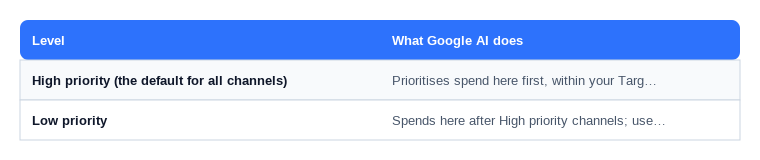
Google says channel prioritization and channel-level budget allocation help you steer how your budget is spent. You can set the priority of each channel at account, shared budget or campaign level using two levels:
| Level | What Google AI does |
|---|---|
| High priority (the default for all channels) | Prioritises spend here first, within your Target CPA or Target ROAS if set |
| Low priority | Spends here after High priority channels; use it for channels you value less instead of opting out |
The controls are rolling out progressively to Search, Shopping, Performance Max and Demand Gen campaigns, and availability varies by campaign type and rollout timing. When a campaign with Target CPA or Target ROAS is not limited by budget, Google says priority levels generally do not change how spend is distributed, because the system tries to hit your target across all channels.
What is budget allocation?
For Low priority channels you can set an optional daily budget allocation percentage, a best-effort limit on daily spend for that channel. It is calculated as a percentage of the campaign’s average daily budget, not of actual spend: Google’s example is a 5% allocation on a $1,000 average daily budget, so Google AI aims to keep that channel at or below $50 per day. It is not a guarantee, and spend may occasionally exceed it. The allocation resets each day and unspent or overspent amounts do not carry over.
If you earlier opted out of search partners or the Display Network, Google says you can use these controls to opt back in with more confidence about how budget is allocated.
Why do Google Analytics numbers look different?
Google’s Analytics page says a Performance Max campaign is still a Google Ads campaign, that its data may be split across multiple rows when used with campaign dimensions, and that filters such as Ad group, Campaign terms and Campaign content are not compatible and may show stats incorrectly. Use the Campaigns tab and remove incompatible filters. For wider reconciling see why Shopify orders and Google Ads conversions differ.
What should a store do with this?
- Open the channel report for the last 30 days and note spend share by channel.
- Compare conversion value per channel against your break-even ROAS using the break-even ROAS calculator.
- Test a Low priority setting on one weak channel in a campaign where the control is available, with a small allocation.
- Judge after a full cycle, not after two days.
- Keep brand control with brand exclusions.
Where does Bach.ai fit?
Bach.ai is our product. It audits connected Google Ads accounts and flags where spend concentrates on a channel with weak returns. On an active paid plan it can apply a supported change after you approve it, by default. It does not set Google’s channel controls automatically.
FAQ
Can I turn channels off in Performance Max?
Google’s page describes priority levels and allocation, not an on-off switch, and says feature availability varies. Check your campaign settings.
Is the budget allocation a hard limit?
No. Google says it works on a best-effort basis and daily spend may occasionally exceed it.
Which channels does the report include?
Google Search, Google Display Network, YouTube, Discover, Maps, Gmail and search partners, per Google’s definition page.
Does Low priority mean never?
No. Google says Low priority channels are spent after High priority ones, and you can use it instead of opting out.
Sources
Sources, each opened and read on 25 Nov 2026: Google Help pages, Definition: Performance Max channel; About channel prioritization and budget allocation; Performance Max reporting in Google Analytics. Menu names and limits change, so check the page before you act.