How to Link a YouTube Channel to Google Ads
How do I link my YouTube channel to Google Ads?
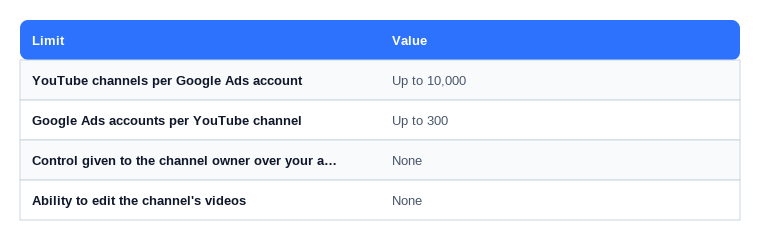
You need Admin access to the Google Ads account. Link in YouTube (Google's recommended route) or in Google Ads under Product linking; the channel owner chooses which features to share, such as organic view counts and data segments of viewers. You can link up to 10,000 channels per Google Ads account and 300 accounts per channel.
Linking your YouTube channel to Google Ads takes a few minutes and unlocks things stores forget to use: reports on organic views, audiences of people who watched your videos and fuller earned-action reporting. It also controls what a partner or agency can see. This guide covers requirements and limits from Google’s help pages, read on 25 November 2026.
What does linking give me?
Google says linking a YouTube channel to a Google Ads account allows the account to run ads based on interactions with the channel’s videos. The linked account can be granted permissions to access video ads’ organic view metrics, show ads to people who visit and interact with the channel and get insights about how people interact with the channel after viewing ads. When the channel owner enables sharing, features include viewing organic (non-paid) metrics for videos and creating data segments, previously called remarketing lists, based on viewers’ past interactions on linked channels. Google also recommends linking as a best practice because it makes earned actions and other functionality available.
What do I need?
Your Google Ads account needs administrative access, or you cannot link. You can check access levels on the Account access page; see how to give access safely. If you link to a channel or video managed by someone else, Google recommends engaging the channel owner before sending the request, so it is accepted.
How do I link?
There are two routes: link or unlink Google Ads accounts in YouTube, which Google marks as the recommended approach, or link or unlink YouTube channels in Google Ads under Product linking. The channel owner must approve and decides which features the account can use. Google adds that a YouTube channel can now control whether a Google Ads account can use the videos hosted on that channel as ads, so linked accounts can run ads using videos from a channel only if the channel has this control enabled.
| Limit | Value |
|---|---|
| YouTube channels per Google Ads account | Up to 10,000 |
| Google Ads accounts per YouTube channel | Up to 300 |
| Control given to the channel owner over your ads account | None |
| Ability to edit the channel’s videos | None |
What does linking not do?
Google says linking accounts doesn’t give the channel owner control over the Google Ads account and doesn’t let the advertiser add, delete or modify videos from the linked channel. If personalised ads are turned off on a YouTube channel, earned action reports and data segments are not available for videos on that channel. If a manager account oversees your Google Ads account, linking can let the manager account access your channel metrics, and with data segment sharing enabled, manager accounts can share data segments with managed accounts.
What about creator videos?
If you work with a creator you can request access to their video, or use shared codes, which are unique clickable URLs the creator generates during upload. The creator can make view counts, data segments based on video views, engagement from linked channels and a creator partnerships boost available. Google says you are responsible for securing sufficient rights to use the video as an ad, which may require a separate agreement with the creator or other rights holders. Get that in writing before you spend.
How should a store use the link?
Build data segments from channel viewers and use them as Observation or exclusions; see targeting versus observation and Customer Match. Host ad videos on YouTube, as Google recommends, to get full metrics; see how to start YouTube ads for a store and YouTube ad formats.
What should I do after linking?
Create a data segment of people who watched your videos or visited the channel and attach it to a campaign as Observation, to see whether channel viewers convert better than average. Check the earned actions report for subscriptions or views following your ads. Review who has access: only administrators can link, so make sure at least two people can manage the connection. Decide which videos you want available as ads and use the channel control Google describes to restrict use to linked accounts only. Keep organic and paid creative aligned; viewers who arrive from an ad and then browse the channel should find the same story. Revisit the link when an agency or creator relationship ends and remove access they no longer need.
Where does Bach.ai fit?
Bach.ai is our product. It audits connected Google Ads accounts and, with your store connected, checks whether video audiences produce orders. On an active paid plan any supported change waits for your approval, by default. It does not link channels for you.
FAQ
Do I need to link my channel?
No, but Google says it is a best practice for YouTube video campaigns, because it unlocks earned actions and other functions.
Can the channel owner control my Google Ads account?
No. Google says linking does not give the channel owner control of the Google Ads account.
How many channels can I link?
Up to 10,000 per Google Ads account, and up to 300 accounts per channel.
Can I use a creator’s video as an ad?
With their permission and sufficient rights; the access request or a shared code gives technical access only.
Sources
Sources, each opened and read on 25 Nov 2026: Google Help pages, Product Linking: Link YouTube channels or videos and Google Ads accounts; About YouTube ads and view metrics; Your data. Menu names and limits change, so check the page before you act.