What Access Should Each Agency Team Member Get?
What Meta access should each agency team member have?
Give most media buyers basic access on only the ad accounts they work on, keep full access to one or two senior owners, add finance access only for billing staff, and give apps and integrations to whoever manages tracking. Meta lets you change permissions at any time, so review them each quarter.
An agency with ten people and thirty client accounts needs a permission scheme that survives staff turnover. Meta’s business portfolio has one, and its defaults are tighter than most teams use. This guide maps each role to the level Meta documents.
What access levels does Meta offer?
Meta describes two levels that apply to both a business portfolio and the assets inside it, such as Pages, Instagram accounts and ad accounts: full access, the highest level, and partial access, limited to the assets or tasks a person is assigned (About business portfolio and business asset permissions). Meta says giving people only the permissions they need keeps portfolios more secure, and that you can change permissions at any time.
Within partial access there are two types. Basic access, formerly the employee role, lets a person work only on assigned assets, and it is the default when people are added. Apps and integrations access, formerly the developer role, lets someone set up the Conversions API, monitor events, edit applications and create access tokens. On top of either level, a person can have finance access to view or manage transactions, invoices, account spend and payment methods.
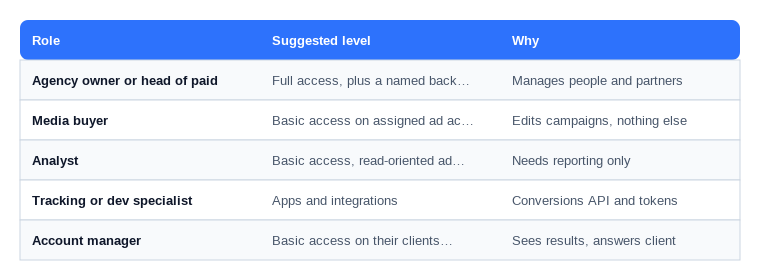
Which role gets which level?
| Role | Suggested level | Why |
|---|---|---|
| Agency owner or head of paid | Full access, plus a named backup | Manages people and partners |
| Media buyer | Basic access on assigned ad accounts | Edits campaigns, nothing else |
| Analyst | Basic access, read-oriented ad account role | Needs reporting only |
| Tracking or dev specialist | Apps and integrations | Conversions API and tokens |
| Account manager | Basic access on their clients only | Sees results, answers client |
| Finance or billing | Finance access, view or manage as needed | Invoices and payment methods |
| Contractor | Temporary basic access, 3 to 75 days | Ends on a date |
Meta says people with full access can manage everything: portfolio settings, people, tools and assets, claim or remove assets or people, and even delete the portfolio. That is why it should be a short list.
What are the three kinds of user?
Meta lists three user types in a portfolio (About users in your business portfolio): people, who get access through a two-layer permissions system; partners, which are other businesses such as agencies or clients; and system users, which represent servers or software making API calls, though not all accounts have system users. If you connect software to client accounts, ask whether it uses a person’s token or a system user, because that changes what happens when the person leaves.
What limits apply to access on ad accounts?
Meta’s ad account limits say one person can manage up to 25 ad accounts, and an ad account can be assigned to up to 25 people (Ad account limits). A closed ad account still counts towards the limit. For a large agency that means you cannot give one buyer all thirty clients; plan pods of fewer than 25 accounts per person.
What must be on, before anyone is added?
Two-factor authentication. Meta says advertisers may be required to complete it to publish ads, including people with advertising access to ads that reach certain regions and business portfolios more than 90 days old, and that without it Meta may restrict or remove advertising access or a payment method (About two-factor authentication). Check each new hire has it on before their first day on a client account.
How do I run an access review?
- Export or list every person and partner in each portfolio.
- Mark anyone who has not worked on the account this quarter.
- Remove them, following How do I offboard a client from Meta ads? for client-side removals.
- Confirm two people have full access, not one and not five.
- Check finance access belongs only to people who handle billing.
- Record the review date and what changed.
For the first-week audit of a client account see Agency Checklist to Onboard a New Meta Ads Client, and for account structure across many clients How do I manage many client ad accounts safely on Meta?.
Can software help?
Bach.ai connects per brand and by default proposes changes for your approval, so a junior team member cannot apply a supported change without one. That sits on top of Meta’s permissions, not in place of them. The Agency plan covers up to 20 brands; see pricing, and best Meta ads tools for how tools compare. If you also use an AI assistant, What permissions should an AI agent have on my ad account? covers that layer.
FAQ
How many people should have full access?
Meta’s permissions page sets no number, and full access can manage everything including deleting the portfolio, so keep the list short. Two named people is a sensible agency default, so one absence never locks you out.
Can I give a contractor access for a limited time?
Yes. Meta says temporary access gives only basic access, for a minimum of 3 days and a maximum of 75 days. Use it for contractors and note the end date in your client file.
Does a partner need to be in my portfolio?
To share assets with a partner, the partner must have its own business portfolio, per Meta’s user types page.
What is finance access?
It lets a person view or manage financial information for the portfolio, such as transactions, invoices, account spend and payment methods.
Sources: Meta Business Help Center, About business portfolio and business asset permissions, About users in your business portfolio, Ad account limits, About two-factor authentication for your business portfolio (checked 25 Nov 2026); Bach.ai capabilities from our features page.