How to Manage Client Ad Accounts on Meta Safely
How do I manage many client ad accounts safely on Meta?
Have each client keep ownership of its ad account in its own business portfolio and share it with yours as a partner, with partial access for the tasks you do. Limit full control to a few people, require two-factor authentication, remove inactive users after 90 days, and remove the partner when the contract ends.
An agency that creates ad accounts inside its own portfolio for every client owns a problem: when the client leaves, the account, its history and its audiences are hard to hand back. The safer pattern, and the one Meta designs for, is that the client owns the account and you work as a partner. Meta’s help pages call the container a business portfolio, while its developer documentation still says Business Manager; they mean the same place.
Who should own the client’s ad account?
The client. Meta defines partners as other businesses, such as agencies or clients, that you work with, and says a partner must have its own business portfolio to be added (About users in your business portfolio). In that model the client keeps the assets and you receive access, which is what makes offboarding a click instead of a negotiation. For takeover scenarios, How do I take over a Meta ads account from an agency? covers the handover side.
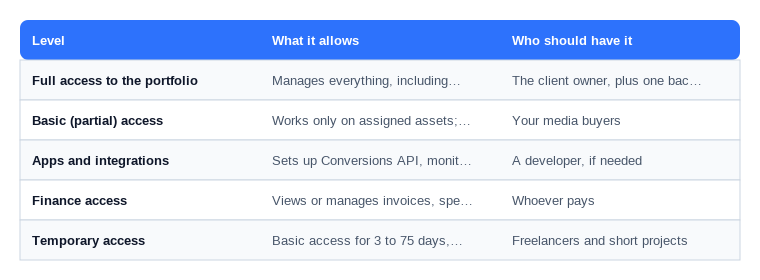
What access levels exist?
From Meta’s permissions article, checked 24 Nov 2026:
| Level | What it allows | Who should have it |
|---|---|---|
| Full access to the portfolio | Manages everything, including people, assets and deleting the portfolio | The client owner, plus one backup |
| Basic (partial) access | Works only on assigned assets; the default for new people | Your media buyers |
| Apps and integrations | Sets up Conversions API, monitors events, creates access tokens | A developer, if needed |
| Finance access | Views or manages invoices, spend and payment methods | Whoever pays |
| Temporary access | Basic access for 3 to 75 days, then auto-revoked | Freelancers and short projects |
| Asset-level partial access | Specific tasks on one ad account, Page or Instagram account | Your team on each client |
How do I get access to a client’s ad account?
There are two routes, both from Meta Business Suite Settings by someone with full control of the portfolio. The client gives you access, or you ask them to share.
Client gives access (give a partner access):
- The client opens Settings in Meta Business Suite and clicks Partners in the Users section.
- They click Add and choose Give a partner access to your assets.
- They enter your business portfolio ID and click Next.
- They choose the assets to share and the access level; if partial, they select which tasks you may do.
- They click Assign assets. Another full-control person may need to approve it.
You ask them to share (ask a partner to share assets): in your Settings, click Partners, Add, then Ask a partner to assign you their assets, enter their email and business portfolio ID, pick roles and permissions, and click Send request. The client can approve, deny or change what is shared, and you can see the status in the Partners tab.
Both routes require two-factor authentication on the business portfolio. Meta also says that with partial access you can only assign your people the specific tasks given to your business.
How do I keep many clients from getting mixed up?
- One client, one set of assets. Share each client’s ad account separately, and do not reuse one pixel or catalog across clients.
- Name by client. Put the client in the audience labels and report names, so exports never carry the wrong brand.
- Assign people per client. Give each team member access only to the accounts they work on; basic access is the default for exactly this reason.
- Use temporary access for contractors.
- Check Activity history weekly. In Ads Manager, open Activity history and filter by Changed by to see who changed what (view activity history). Meta notes anyone with the admin or advertiser role on an ad account can change campaigns, so an unfamiliar name needs a permissions check.
When a team grows, the tooling decision matters too; see What Meta ads tool should an agency use for multiple clients?
What security settings should I turn on?
Meta’s business portfolio security guide recommends:
- Remove people who have not logged in for 90 days, especially those with full control.
- Close or remove ad accounts you no longer need, since inactive accounts are more targeted by bad actors.
- Remove users without passkeys or two-factor authentication.
- Remove users whose email addresses are on public domains.
- Limit full control, ideally to 10 or fewer people.
- Add peer approval so a trusted user reviews ads before they publish.
- Keep two active people with full control, as a second-admin safeguard.
Meta’s two-factor authentication article adds that advertisers may be required to complete it to publish ads, and that without it Meta may restrict or remove advertising access.
How do I offboard a client?
- The client opens Settings, then Partners, and selects your business.
- They remove the partner in Business settings (remove partners), then confirm the partner no longer appears on each shared asset.
- You remove your own people from anything you had assigned and archive exports and reports.
- Delete any audiences and data you hold on your side if the contract requires it.
Removing a partner is different from removing a person in your own organisation, so do both. The agency-side process is in How do I take over a Meta ads account from an agency?.
Can software help?
Bach.ai works per brand: the Agency plan covers up to 20 brands, each with up to 2 Meta and 2 Google Ads accounts and a store, and it applies a supported change, by default, only after you approve it (Auto-Pilot is opt-in), with every change logged. It does not replace the portfolio settings above; set those first. Run the Meta ads audit checklist at onboarding.
FAQ
Should I create the ad account for my client?
Prefer not to. If you create it in your own portfolio, you hold the asset, the history and the payment relationship. Ask the client to create it in their portfolio and share it with you as a partner.
Can I give a freelancer access for a month?
Yes. Meta’s temporary access gives basic access for a minimum of 3 days and a maximum of 75 days, then removes the person from the portfolio and assigned assets automatically.
Who pays for ads on a shared account?
That depends on the payment method on the account, normally the client’s, with finance access for whoever must see invoices. Meta separates finance access from other permissions, so you can manage ads without seeing payment methods.
What if a team member leaves?
Remove them from your portfolio the same day, and check Activity history for their last changes. Meta says to remove inactive users, especially those with full control, because bad actors target them.
Sources: Meta Business Help Center, About users in your business portfolio, About business portfolio and business asset permissions, Give a partner access to business assets, Ask a partner to share assets, Best practices for making a business portfolio more secure, About two-factor authentication, Remove partners, View activity history (all checked 24 Nov 2026).