How Do I Fix the Connect an Instagram Account Error?
How do I fix the connect an Instagram account error?
Open the ad, go to the ad level, and under Identity choose your Instagram profile, connecting it if it is not listed. If you have no profile, select a Facebook Page instead. Publish, and if the error persists check Instagram is still a placement, or remove it if you do not want Instagram.
The error blocks an ad that is otherwise ready, and it often appears when an agency or a new team member builds ads on an account whose Instagram link was never set. It has a short fix and a longer root cause.
What does the error mean?
Meta says the “connect an Instagram account” error appears when your ad has no Instagram profile for your business connected to it and no Facebook Page associated with it. An Instagram ad needs an identity, which is the Instagram profile or Facebook Page shown as the advertiser, and without one the ad cannot be delivered on Instagram (How to fix the connect an Instagram account error). The full message reads: “You’re using Instagram as a placement. Please select an Instagram account to represent your business in your Instagram ads, or select a Facebook Page to use instead.”
How do I fix it?
- In Meta Ads Manager, find the ad showing the error and edit it.
- If you cannot edit the ad, you may lack the ad account permission; ask an admin of the ad account to edit it or grant you access.
- At the ad level, below Identity, choose your Instagram profile.
- If the profile is not listed, click Connect profile and follow the instructions.
- If you have no Instagram profile for the business, select a Facebook Page; it will represent your business in the Instagram ad.
- Click Publish. The error should clear.
- If it persists, check Instagram is still a placement in the ad set. If you do not want Instagram, remove it as a placement instead of adding an identity.
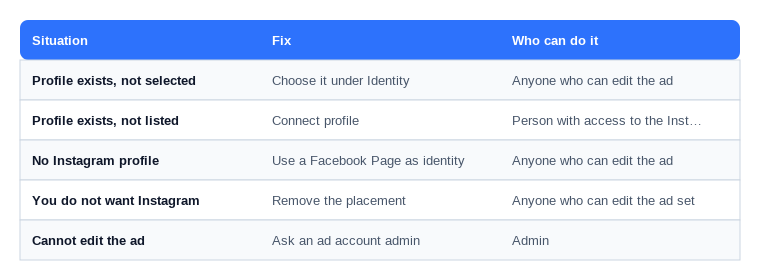
Which fix fits which situation?
| Situation | Fix | Who can do it |
|---|---|---|
| Profile exists, not selected | Choose it under Identity | Anyone who can edit the ad |
| Profile exists, not listed | Connect profile | Person with access to the Instagram account |
| No Instagram profile | Use a Facebook Page as identity | Anyone who can edit the ad |
| You do not want Instagram | Remove the placement | Anyone who can edit the ad set |
| Cannot edit the ad | Ask an ad account admin | Admin |
How do I stop it happening again?
The cause is usually that the Instagram account is not attached to your assets. Meta says that if you have full control of a business portfolio, you can add an Instagram professional account to it in Meta Business Suite on desktop, and that each Instagram account can only be added to one business portfolio (How to add an Instagram account to a business portfolio). You need an Instagram professional account, and it must not be linked to another portfolio. Meta adds that if the account is already in another portfolio, you can be given access to it or add it once it is removed from the other portfolio. After you add the account, Meta says new campaigns and ad sets will automatically include Instagram as a placement and you can link new ads to the account. It also says only people with access to the ad accounts connected to the Instagram account can use it to advertise, so check each buyer has that access.
For agencies, ask for this step during onboarding. Agency Checklist to Onboard a New Meta Ads Client lists the access you need, and Who should own a client’s Meta ad account? explains why assets belong in the client’s portfolio.
What if the Instagram account is personal?
You need a professional account, Instagram for Business or creator. Switch the account type in Instagram first, then add it to the portfolio. Meta notes you may be asked to set up your professional account if your Instagram is a personal account during the add flow.
How do I check Instagram ads are delivering?
After publishing, check the ad’s delivery status and preview on Instagram placements. If the ad is stuck in review rather than showing an error, see Why is my Facebook ad stuck in review?. If it delivers on Facebook but not Instagram, check placements against Which Instagram placements should my store’s ads run on?. The Meta ads audit checklist includes an access check you can use for the whole account.
Can software help?
Bach.ai audits what is running on a connected account; it does not set ad identity or connect Instagram profiles, which are Meta settings. Its audit can still flag Instagram-related delivery problems once ads are live, and any supported change it proposes waits for your approval by default on a paid plan.
FAQ
Can I use a Facebook Page instead of an Instagram profile?
Yes. Meta says if you do not have an Instagram profile for your business, select a Facebook Page and it will represent you in the Instagram ad.
Why can I not edit the ad?
You may not have the ad account permissions needed. Ask an admin of the ad account to edit it or give you access.
Does adding the Instagram account to my portfolio fix every ad?
Meta says new campaigns and ad sets will automatically include Instagram as a placement and new ads can be linked to the account. Check existing ads and set identity on any that still show the error.
Can one Instagram account be in two portfolios?
No. Meta says each Instagram account can only be added to one business portfolio, though you can be given access if it is in another.
Sources: Meta Business Help Center, How to fix the connect an Instagram account error, How to add an Instagram account to a business portfolio (checked 25 Nov 2026); Bach.ai capabilities from our features page.