How Do I Get Support for a Client's Meta Account?
How do I get support for a client's Meta ad account?
Go to Meta Business Support Home, open Account Overview and review status, restrictions and rejected ads, then follow the steps it lists or request a review. To request a review of a restricted ad account you must be an admin on it, so agree who holds that role with the client beforehand.
When a client’s ads stop, the first question is whether it is billing, policy or something in the account. Meta has one place that shows most of it. Agencies who know it save days of guessing.
What is Business Support Home?
Meta describes Business Support Home as a centralised way to monitor and resolve issues around compliance with its Advertising Standards, Commerce Policies and other terms (About Meta Business Support Home). In it you can review the status of business portfolios, ad accounts, commerce accounts, catalogs and Pages; address issues; learn what to do if an account or Page is disabled or restricted; request a review of ads or assets you think were incorrectly rejected; track rejected ads and catalog items; review your feedback score; and contact support.
In Account overview you can see whether accounts or business portfolios are disabled or have advertising restrictions, view the last 14, 30 or 90 days, and use the Outstanding and Resolved tabs for current and past issues. Meta also says you can confirm in the overview whether an email, text or call from someone claiming to be a Meta representative is genuine, which matters because scams target agencies.
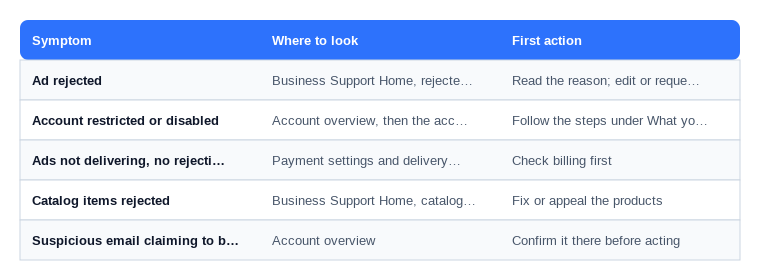
What can I do for each problem?
| Symptom | Where to look | First action |
|---|---|---|
| Ad rejected | Business Support Home, rejected ads | Read the reason; edit or request review |
| Account restricted or disabled | Account overview, then the account | Follow the steps under What you can do |
| Ads not delivering, no rejection | Payment settings and delivery status | Check billing first |
| Catalog items rejected | Business Support Home, catalog items | Fix or appeal the products |
| Suspicious email claiming to be Meta | Account overview | Confirm it there before acting |
What does the rejected-ad flow look like?
Meta says that when an ad is rejected, you get an email with a link to Business Support Home where the reason is shown. You can edit the ad, which resubmits it automatically; create a new ad; or request another review if you believe it was incorrectly rejected. If you delete the ad you may lose the ability to request another review (How to troubleshoot a rejected ad). A successfully overturned rejection will not count as a violation, but severe or repeated violations can restrict advertising.
What about a restricted or disabled account?
Meta’s troubleshooting steps start in Business Support Home: open Account overview, click the restricted account and find the What you can do section (Troubleshoot a disabled or restricted account). Meta may ask you to confirm your identity, complete verification, secure your account or request a review, and to request a review you must be an admin on the account. It also warns that if an ad account disabled for a policy violation stays ineligible for reinstatement for 6 months, unused prepaid services may be forfeited where allowed by law, and after that the account cannot be reinstated.
That admin rule is the agency’s problem. If you are a partner without admin on the ad account, you cannot request the review. Agree in advance who the admin is, and give them a short procedure. For deeper walkthroughs see Why am I restricted from advertising on Facebook? and What should I do first when Meta disables my ad account?.
How should I log an incident?
- Record the date and time you noticed it, and the exact message.
- Capture the Account overview status and the Outstanding issue text.
- Note who has admin on the account and who you told.
- Record each action and its time: edit, appeal, verification.
- Record the outcome and the client communication.
- After resolution, add a rule to your onboarding list to prevent a repeat.
The Meta ads audit checklist covers pre-emptive checks, and Why is my Facebook ad stuck in review? covers delays.
What should I tell the client?
Say what Meta shows, what you did and the next step, in three sentences, within the hour. Do not guess the cause. If the client must act, such as confirming identity as an admin, send exact steps. Keep screenshots of the status page; they protect both sides.
Can software help?
Bach.ai monitors connected accounts and can surface delivery and tracking problems earlier in an audit, but it cannot resolve a policy restriction or speak to Meta for you. Those actions happen in Business Support Home by an account admin.
FAQ
Can a partner request a review?
Meta says to request a review of a restricted ad account you must be an admin on it. A partner without admin cannot.
Where do I see why an ad was rejected?
In Business Support Home, following the link in Meta’s email, or in the rejected ads list.
How long does a review take?
Meta’s pages I fetched give no fixed time; track it in Business Support Home and log it.
Can I trust an email that says my account is at risk?
Confirm it in Account overview before acting, as Meta advises for contacts claiming to be from Meta.
Sources: Meta Business Help Center, About Meta Business Support Home, How to troubleshoot a rejected ad, Troubleshoot a disabled or restricted account (checked 25 Nov 2026); Bach.ai capabilities from our features page.