What Access Should an AI Agent Have to Meta Ads?
What permissions should an AI agent have on my ad account?
Start with read-only access: Meta's ads MCP server needs ads_mcp_management plus ads_read or ads_management, so grant ads_read first. Add write permission only on a test account, keep campaign activation behind a human confirmation, use a dedicated login or system user, and review Activity history weekly.
An AI agent in your ad account is a user with very fast hands. What it can do depends on the permissions you grant, not on what its vendor promises, so the question to settle first is access, not intelligence. The sections below give the levels Meta documents, a safe order to grant them in, and the controls that stay with you.
What can an AI agent do with each permission level?
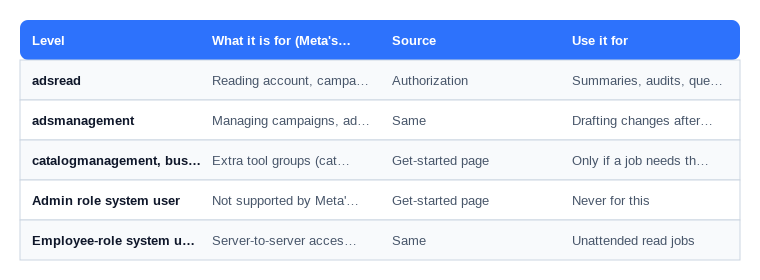
Meta’s ads MCP server documentation, updated 4 Sep 2026, sets the minimum token permissions as ads_mcp_management plus ads_read or ads_management, and says granting additional permissions enables more tools. Putting that beside the access roles gives this picture:
| Level | What it is for (Meta’s names) | Source | Use it for |
|---|---|---|---|
| ads_read | Reading account, campaign and reporting data | Authorization | Summaries, audits, questions |
| ads_management | Managing campaigns, ad sets and ads | Same | Drafting changes after trust is earned |
| catalog_management, business_management, pages_show_list, instagram_basic | Extra tool groups (catalogs, business assets, Pages, Instagram) | Get-started page | Only if a job needs them |
| Admin role system user | Not supported by Meta’s ads MCP server | Get-started page | Never for this |
| Employee-role system user | Server-to-server access for a programmatic setup | Same | Unattended read jobs |
Meta’s pages do not list, permission by permission, which individual tools work with ads_read alone, so treat read-only as something to verify: connect on a test account, list the tools the server shows, and call a write tool to see whether it is refused.
How do I grant the least access?
- Create or pick a dedicated login or system user for the agent; do not use a person’s account, so its actions are separable in the history.
- In the business portfolio, give that identity partial access to one ad account only, with the tasks it needs. Meta’s permissions article explains asset-level partial access.
- When authorising, request ads_mcp_management and ads_read, and nothing else.
- Connect the client to the server and run a harmless read, such as “List my ad accounts”, then check the tool list.
- Ask the agent to make a small change on a test account and confirm it is refused or needs your approval.
- Only then decide whether the agent gets ads_management on the real account.
Keep the agent out of the business portfolio’s full-control group; Meta’s security guidance recommends limiting full control and removing users who lack two-factor authentication.
What should still need a human click?
Anything that spends money or reaches customers. Meta’s ads MCP server describes write tools that create campaigns, ad sets and ads in a paused state, with the AI client asking for confirmation before activation; ads_activate_entity “starts spending budget” (ad creation and management tools). That confirmation is a client-side behaviour, so check how your AI client enforces it. It is not the same as an approval gate in the ad account.
Note that editing an existing entity is a separate tool, ads_update_entity, so budget and status edits on a live campaign can behave differently from creation; Why do MCP-created campaigns land paused but budget edits go live instantly? explains the gap. Customer-list uploads and audience deletion are also write tools, so keep them behind a person.
How do I check what the agent actually did?
Use the account’s own log, not the agent’s summary. In Ads Manager, select the campaign, ad set or ad, click Activity history and filter Changed by to the agent’s identity; Meta says it shows who changed what and when (view activity history). Meta’s MCP server also exposes an activity-log tool group that mirrors the Ads Manager history page.
Review it weekly at first. A change you cannot match to a request is a permissions problem, not a prompt problem. For policy-level controls, see How should I govern an AI marketing agent?
What risks come from the connection itself?
Anthropic’s help article on custom connectors says connecting Claude to a service lets it access and potentially modify data based on your permissions, and tells you to connect only trusted servers, review requested permissions, limit scopes, watch for prompt injection and monitor changes in tool behaviour (custom connectors). It adds that on Team and Enterprise plans a shared API key gives everyone who uses it that credential’s access.
In practice: one agent identity per job, narrow scopes, and no shared credentials. Meta’s rules on AI agents managing accounts apply on top of this.
Can software help?
Bach.ai takes a different route to the same goal: it proposes a change and applies it on Meta or Google Ads, by default, only after you approve it, on an active paid plan, with every change logged and rollback available where supported. Auto-Pilot is off by default, and high-risk changes always wait for approval. Its AI assistant connector is read-only and scoped to one brand. For the wider picture, see Can an AI agent manage my Meta ads? and the best Meta ads tools.
FAQ
Is ads_read enough for a reporting agent?
For reading data, that is the intent: Meta lists it among the minimum permissions for the ads MCP server. Add business or Page permissions only if a question needs them, and test with a write call to confirm that the token cannot change anything.
Should the agent use my own login?
No. A dedicated login or system user keeps its actions separate in Activity history and can be removed without affecting you. Meta’s MCP server accepts Employee-role system user tokens and rejects Admin-role ones.
Can I let an agent pause ads automatically?
Only if you accept the risk of an unattended write. A pause is usually reversible, but a wrong pause on a winning campaign costs sales. Start with the agent proposing a pause, then promote it to automatic for one narrow rule, such as a spend cap.
What if an agent does something unexpected?
Remove or disable its access first, then read Activity history for the changes and reverse them in Ads Manager. Afterwards, tighten the scope and add a confirmation step before re-enabling.
Sources: Meta for Developers, Ads MCP server: Get started (updated 4 Sep 2026), Ads MCP server overview, Ad creation and management tools, Marketing API authorization; Meta Business Help Center, Business portfolio permissions, Security best practices, Activity history; Claude Help Center, Custom connectors using remote MCP (all checked 24 Nov 2026).