How Many Ad Accounts Can I Create for Clients?
How many ad accounts can an agency create for clients?
A new business portfolio can create one ad account, rising to 3 once a campaign delivers and a payment is made. One person can manage up to 25 ad accounts, an account can have up to 25 people, and closed accounts still count. Create the account in the client's portfolio where you can.
Agencies hit Meta’s limits at the worst moment: day one of a new client, when the ad account cannot be created. Knowing the limits turns that into a planned step.
What are the limits?
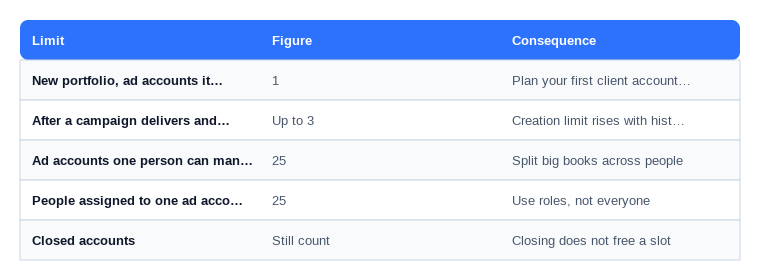
Meta states the following (Ad account limits, Add an ad account to your business portfolio):
| Limit | Figure | Consequence |
|---|---|---|
| New portfolio, ad accounts it can create | 1 | Plan your first client account carefully |
| After a campaign delivers and a payment is made | Up to 3 | Creation limit rises with history |
| Ad accounts one person can manage | 25 | Split big books across people |
| People assigned to one ad account | 25 | Use roles, not everyone |
| Closed accounts | Still count | Closing does not free a slot |
Meta also says that if you reach the manage-limit you must remove yourself, or have someone with full control remove your access, from accounts you no longer use. People with full control can see the business portfolio’s creation limit in Meta Business Suite, in Settings under Business info, below Ad account creation limit (How to view your business portfolio’s ad account creation limit).
Which of the three ways should I use to add an account?
Meta gives three options: create a new ad account, claim an existing one, or request to share one that belongs to another business, for example your client’s, which stays in their portfolio while access is shared with yours. For clients the usual best option is for them to create the account in their own portfolio and share it with you; see Who should own a client’s Meta ad account?. Creating accounts in your own portfolio uses your creation limit and, Meta says, the account then permanently belongs to that portfolio and cannot be deleted or transferred.
What do I set when I create one?
When you create an account in Meta Business Suite, you enter the ad account name, time zone and currency. Choose carefully: reporting windows and billing follow them, and mismatched time zones are a common reason for ad and store numbers not matching (Why do Meta and my store report different purchase counts?). Meta lets you choose whether the account is for your own business or for another business or client. Pick the second if you plan to use it on a partner’s behalf. Then add payment info now or later, and agree who pays; see Should the agency or the client pay for Meta ads?.
How do I plan accounts for a growing book?
- Count client accounts and divide by 25 to see how many people you need as managers.
- Keep each person under the cap with headroom for new clients.
- Have each client create their own account where possible, saving your creation limit for cases where you must.
- Assign people to the accounts they need, not to everything.
- Review each quarter; remove people from accounts they no longer touch.
- Do not create a spare account for a client “in case”; closed accounts still count.
For the access side see What Meta access should each agency team member have?, and for the first audit Agency Checklist to Onboard a New Meta Ads Client.
What does an agency’s first month look like under these limits?
Illustrative plan for a new agency with a fresh portfolio. Week one: one client creates their own ad account and shares it, so your creation limit is untouched. Week two: you create your own test account in your portfolio to practise tracking and reporting, using the single slot. Week three onward: each new client creates their account in their portfolio; you ask to be added as a partner. After your own account delivers and takes payment, Meta says the creation limit can rise to 3, which you keep for clients who cannot manage a portfolio. At each step, record who owns what in a simple sheet: client, ad account ID, portfolio that owns it, who has admin, who pays, and the date you were added.
The sheet protects you in a dispute and in an audit. It also makes the 25-per-person limit visible before you hit it, because you can count assignments by person at a glance.
What if I am at the limit?
Free capacity by removing yourself from accounts you no longer use, or have a full-control person remove your access. Ask the client to create the account instead. Build up delivery and payment history in your portfolio to raise the creation limit. Do not buy or borrow accounts from others; Meta’s rules tie accounts to the portfolio that owns them, and shortcuts create trouble in an audit. Use the Meta ads audit checklist to check each inherited account.
Can software help?
Bach.ai works per brand; the Agency plan covers up to 20 brands, which sits below Meta’s 25-per-person cap, so a team of two or three can cover a book. It does not create ad accounts; that is a Meta Business Suite step. See the pricing page for the Agency plan.
FAQ
Can I create ad accounts in bulk?
Meta’s limit starts at 1 for a new portfolio and rises to 3 with delivery and payment, so bulk creation is not available at the start.
Does closing an account free a slot?
No. Meta says a closed ad account does not leave the portfolio and still counts toward the limit.
Can I change the time zone or currency later?
Treat them as fixed. They are set at creation; check Meta’s current guidance before assuming you can change them.
Where do I see my creation limit?
In Meta Business Suite, Settings, Business info, under Ad account creation limit, if you have full control.
Sources: Meta Business Help Center, Ad account limits, Add an ad account to your business portfolio, How to view your business portfolio’s ad account creation limit (checked 25 Nov 2026); Bach.ai capabilities from our features page and pricing.