What Is Google StoreBot Doing in My Checkout?
What is Google StoreBot and why is it in my checkout?
StoreBot is Google's crawler for shopping pages. It walks product pages, carts and checkout without buying, filling forms with machine learning to read prices, shipping, coupons, availability and payment options, and uses that to verify what you submit to Merchant Center. Allow it, and correct its data with structured data and Merchant Center, which take precedence.
A visitor called Google StoreBot adds a product to the cart, fills in an address and leaves at the payment step. In your analytics it looks like an abandoned checkout. It is a Google crawler, and what it learns about your prices, shipping and coupons shows up in your listings. This guide covers what Google says about it, read on 25 November 2026.
What is StoreBot?
Google describes it as a search-engine program that automatically crawls web pages to gather and analyse data. It goes through product pages and checkout processes, using machine learning to fill in forms with information such as shipping addresses, and compiles information on price, shipping, payments and more. It crawls certain types of pages, including product details pages, cart pages and checkout pages. If your logs show a user identified as StoreBot-Google, or a user with first name Google and last name StoreBot moving through checkout without buying, that is likely the crawler.
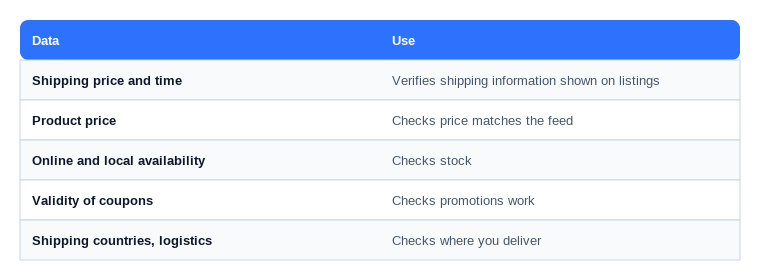
What does it collect?
| Data | Use |
|---|---|
| Shipping price and time | Verifies shipping information shown on listings |
| Product price | Checks price matches the feed |
| Online and local availability | Checks stock |
| Validity of coupons | Checks promotions work |
| Shipping countries, logistics | Checks where you deliver |
| Payment methods, secure address or payment | Checks checkout trust |
| Shopping framework, affiliate domains, contact information, meta information | Describes the store |
Google says the information is used to enhance the user experience and bring more relevant customers, to verify what you share through Merchant Center and to help keep your data accurate and up to date. It also feeds automations that update price, availability and condition from your pages; see Merchant Center automatic item updates.
How do I correct what it reads?
Add accurate structured data to your pages and to Merchant Center. Google says this takes precedence over what the crawler extracts. A mismatch is the usual reason a listing shows an old price or a surprise shipping cost. Test your checkout as a guest with an address from a country you ship to, with a coupon you advertise, and compare the totals with your feed. See shipping settings and promotions.
Should I block it?
Google says allowing the crawler access to your pages is highly encouraged. It lists options for preventing StoreBot from crawling if you have no Merchant Center account and a reason to block it. If you do use Merchant Center, blocking risks inaccurate or missing data and product crawl issues. Google’s crawl issues page lists blockers: robots.txt disallowing Googlebot, firewalls, geo-restrictions or private IPs. It adds that you must allow crawling from the US because Google often operates from there. See why a Shopping campaign gets no impressions.
What should I do with my analytics?
Filter StoreBot sessions out of abandonment reports, so they do not inflate cart abandonment. Do it by user agent or by the name patterns Google lists, and keep a note of the filter. Do not treat these sessions as customers in remarketing audiences, and do not send them recovery emails; if a form accepts a fake address, make sure your system does not send mail to it. Check that bot sessions do not reserve stock for long.
How do I run a StoreBot-style check myself?
Once a month, behave like the crawler. Pick five products, including one on sale and one with a variant. Add each to the cart from the product page, enter a shipping address for each country you serve, apply a coupon you advertise and go as far as the payment page. Write down the product price, shipping price and delivery time at each step and compare them with your feed and your Merchant Center shipping settings. Check that the cart does not add surprise fees, that coupons work for everyone and that the page loads quickly on mobile. Any gap between this check and your feed is a gap StoreBot will also see, and fixing it on the site or in Merchant Center removes a cause of mismatches and disapprovals.
What if StoreBot causes problems for my store?
If the crawler creates stock holds, test orders or noise in your email system, fix the cause on your side rather than blocking it: release holds on abandoned carts quickly, exclude the crawler’s sessions from notifications and filter them from analytics. If your checkout requires a login or blocks automated sessions, Google may be unable to read shipping and payment data, which can leave listings with less information. In that case, supply structured data and Merchant Center settings for shipping and returns, which Google says take precedence. Keep a note of any intentional blocks so nobody removes or adds one by accident.
Where does Bach.ai fit?
Bach.ai is our product. With your store connected it compares ad-reported revenue with real orders, so crawler sessions do not distort the truth about sales. On an active paid plan any supported Google Ads change waits for your approval, by default.
FAQ
Is StoreBot a real customer?
No. Google says it is a crawler that goes through checkout without making a purchase.
What does it look for?
Shipping price and time, product price, availability, coupon validity, countries and payment methods, among other things.
Should I block it?
Google encourages allowing access if you use Merchant Center. Blocking can cause inaccurate data.
What if its data is wrong?
Add structured data to your pages and Merchant Center data; Google says these take precedence.
Sources
Sources, each opened and read on 25 Nov 2026: Google Help pages, About the Google StoreBot crawler; Product crawl issues; Allow Merchant Center to update product information automatically. Menu names and limits change, so check the page before you act.