How to Group Product Variants With Item Group ID
How do I group product variants in Google Merchant Center?
Submit each size and colour as its own product with a unique ID, and give every variant of the same product the same item group ID. It is required for free listings of variants and for Shopping ads in listed countries, including the US and UK. Match grouping to how your product page lets shoppers choose variants.
A T-shirt in three sizes and three colours is one product to a shopper and nine to a feed. If Google cannot tell they belong together, your listings compete with each other, filters show duplicates and variants may be disapproved. The item group ID is the fix, and the rules are simple. This guide follows Google’s Merchant Center pages, read on 25 November 2026.
What does item group ID do?
Google says it groups product variants: a group of similar products that differ only in details such as colour and size for apparel, or memory size, display size, processor and graphics options for electronics. When products share an item group ID, Google can show the product and its variants as a group instead of separately.
When is it required?
Google says it is required for free listings for product variants, and for Shopping ads for product variants targeting these countries: Brazil, France, Germany, Japan, the United Kingdom and the United States. Treat it as required for any store with variants, whatever the country.
What are the format and rules?
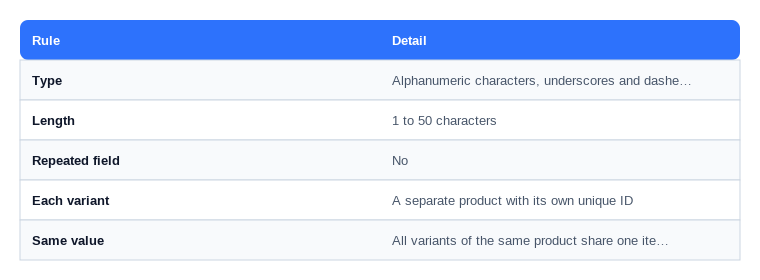
| Rule | Detail |
|---|---|
| Type | Alphanumeric characters, underscores and dashes; ASCII recommended |
| Length | 1 to 50 characters |
| Repeated field | No |
| Each variant | A separate product with its own unique ID |
| Same value | All variants of the same product share one item group ID |
Google’s example: a T-shirt with 9 variants, 3 sizes and 3 colours, is submitted as 9 separate products, each with the same item group ID. A sample value is AB12345.
How do I align it with my website?
Google says to align grouping with your landing page experience: if shoppers can choose between variants on a single landing page, submit all those versions with the same item group ID, so the grouping accurately reflects the shopping experience. If every variant has its own URL, keep the grouping but make sure each product’s landing page opens on that variant. Variants must also be distinguishable: Google says to add distinguishing details to the title, for example Google T-Shirt, Red, and to submit them through attributes such as colour, size or age group. See how to write product titles.
What is the variant option attribute?
Google’s size page says that as of May 2026 it added a new variant option attribute that lets you explicitly identify the variant-identifying properties of your product, and improves how variants are shown. If size is a variant-identifying property, Google recommends providing it using both the variant option attribute and the size attribute, so its systems understand your products and variants better. The size you submit also affects how variants are shown and lets products appear in results filtered by size. Check your feed tool or platform for support before editing by hand.
What mistakes should I look for?
- One item group ID for the whole catalogue, which merges unrelated products.
- A different item group ID per variant, which splits them.
- Item group IDs that change when the platform re-exports, which resets history.
- Missing colour or size attributes on variants, so shoppers cannot tell them apart.
- A parent product submitted alongside its variants as a separate item.
- A variant whose landing page does not open on the right option.
Check a sample of products in Diagnostics and the Shopping tab after changes, and compare with your platform’s product export. For GTINs per variant see how to fix a missing GTIN; for category-specific attribute rules see Google product category versus product type.
How do I audit variants in my feed?
Export your feed to a spreadsheet and group by item group ID. Check each group for three things: every row has a distinct size or colour value, so variants can be told apart; every row has its own product ID and, where applicable, its own GTIN; and each landing page URL opens the right variant. Look for groups with only one row where you expect several, which suggests missing variants, and groups with dozens of rows, which suggests an ID applied to unrelated items. Sort by price within a group; large gaps between variants may indicate a grouping error. Repeat after every platform update or app change, since export logic can change quietly.
Where does Bach.ai fit?
Bach.ai is our product. With a Shopify store connected it reads products and orders, so you can see which variants sell. It does not edit feeds. On an active paid plan any supported Google Ads change waits for your approval, by default.
FAQ
Do I need it for a product with no variants?
No. It is for products that come in variants such as size or colour.
Can the ID be the SKU?
It can be any consistent alphanumeric value of 1 to 50 characters shared by all variants. Use something stable.
What happens without it?
Variants may show as separate products, and for free listings and Shopping ads in listed countries it is required.
Does it change my campaign structure?
Product groups are built on products and attributes, so grouped variants appear as a family in listings, while campaigns can still use product type and custom labels.
Sources
Sources, each opened and read on 25 Nov 2026: Google Help pages, Item group ID; Title and structured title; Size. Menu names and limits change, so check the page before you act.