Google Ads Not Spending Budget? 10 Fixes (2026)
Why is my Google Ads campaign not spending its budget?
Most under-spending traces to one of ten causes Google lists: a billing or account issue, dates, disapproved ads, weak assets, bid targets too low, a small budget, narrow targeting, campaign overlap, broken conversion tracking or auction pressure. Check them in that order, and wait three business days before judging a new campaign.
A Google Ads campaign that shows “Eligible” but spends a fraction of its daily budget is not broken in one place. Google’s own troubleshooting guide lists ten separate causes, and they sit at different layers: the account, the ad, the bid, the audience and the tracking. This guide walks them in the order that rules out the cheapest fixes first, so you do not rewrite a bid strategy when the real problem is a disapproved ad.
For the Meta equivalent, read why Facebook ads are not spending their budget. The Google checks below follow the same logic: confirm the campaign is allowed to serve, then confirm it can win auctions.
How long should you wait before calling it a problem?
Google says a new campaign can need time to serve, because automated bidding has to learn and new or edited ads go through a one to two day policy review. If an ad still has no impressions after three business days, review the causes below (Google Ads Help). Google also advises against frequent changes to bids, budgets and bidding strategies, and says to allow at least one to two conversion cycles after a change before assessing performance.
That matters because the most common mistake is a fix made on day two that resets the very learning you were waiting for.
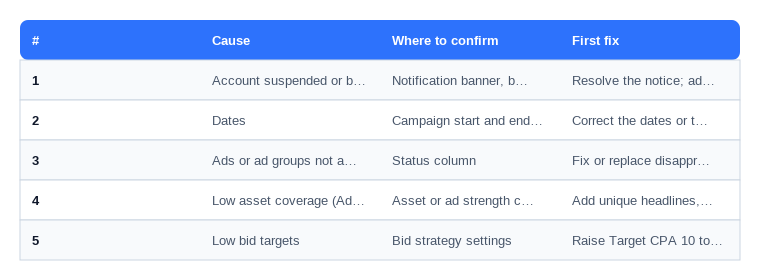
Which of the 10 causes does your campaign have?
The table maps each cause to the screen where you confirm it and the first fix Google suggests.
| # | Cause | Where to confirm | First fix |
|---|---|---|---|
| 1 | Account suspended or billing issue | Notification banner, billing page | Resolve the notice; ads cannot run until then |
| 2 | Dates | Campaign start and end dates | Correct the dates or the report date range |
| 3 | Ads or ad groups not active, or policy issues | Status column | Fix or replace disapproved ads |
| 4 | Low asset coverage (Ad Strength) | Asset or ad strength column | Add unique headlines, descriptions and images |
| 5 | Low bid targets | Bid strategy settings | Raise Target CPA 10 to 20%, or lower Target ROAS |
| 6 | Low budget | Campaign status “Limited by budget” | Raise the daily budget, for example by 20% |
| 7 | Targeting too narrow | Audience, location, match types | Broaden one setting at a time |
| 8 | Overlap with other campaigns | Keywords and targeting across campaigns | Consolidate or separate the overlap |
| 9 | Conversion tracking problems | Goals, Conversions, Summary | Repair tracking so bidding has data |
| 10 | Auction dynamics | Auction insights | Improve ad rank, or accept the competition |
Source for every row: Google Ads Help, how to fix campaigns not running or low traffic, read 24 Nov 2026.
What to check first: is the campaign allowed to serve?
Start with the three causes that stop delivery completely.
- Open the Google Ads account and read the notification banner. A suspension or a billing issue stops every ad until it is resolved.
- Go to Campaigns and check the start and end dates. Your campaign shows no impressions outside its active dates, and a report date range that predates the launch looks like zero spend.
- Look at the Status column for each ad group, asset group and ad. Disapproved ads do not serve, and a campaign with all ads disapproved appears under Recommendations.
Only when all three are clean is it worth tuning bids and budgets.
Is the budget or the bid the real limit?
Two causes look similar and need opposite fixes.
Low budget. Google states that with a low budget your ads may not serve as often. Its guideline is a daily budget of at least 10 times your expected cost per click, or 2 to 3 times your Target CPA. If the campaign status reads “Limited by budget”, a modest increase, for example 20%, can lift impression volume.
To act on that status, follow Google’s own path: Campaigns, filter icon, Status, check Limited by budget, Apply, then select the chart icon beside the campaign and choose a recommended average daily budget or enter your own (Fix “Limited by budget” status). Google does not show a recommendation when you rarely meet your average daily budget or the campaign has limited data.
Low bid targets. If the budget is fine and spend is still low, the bid strategy may be too tight to win auctions. Google suggests starting new or low-data campaigns on Maximize Clicks or Manual CPC for 5 to 7 days, then moving to a conversion strategy after roughly 30 or more conversions in 30 days. If a Target CPA or Target ROAS strategy is limited by its target, raise Target CPA by 10 to 20% or lower Target ROAS.
One dated change to know: Google says that from 17 August 2026 it updated how target-based strategies behave when a campaign is limited by budget, which can cause temporary traffic and performance swings on Target CPA and Target ROAS campaigns (About Target ROAS bidding). If your spend changed around that date without any edit from you, check this before blaming your own settings.
Why does narrow targeting starve spend?
Every filter you add shrinks the pool of auctions you can enter. Google’s checklist for this cause has four moves:
- Add phrase or broad match keywords if you only use exact match, and pair them with negative keywords to keep out irrelevant searches.
- Review negative keyword lists so you are not blocking relevant traffic by accident.
- Set audience targeting to “Observation” rather than “Targeting” on new Search campaigns, so audiences add data without limiting reach.
- Widen location targeting from “Presence” only to “Presence or interest” if it is very specific.
If two of your campaigns chase the same keywords, they can also enter overlapping auctions, which splits volume between them (Google Ads Help).
How do broken conversions stop spending?
If a campaign optimizes toward conversions, Google needs enough conversion data to serve it. A conversion tag that stopped firing starves automated bidding, and spend falls without any visible error on the campaign itself. Open Goals, then Conversions, then Summary and read each action’s status, then use Tag Assistant to fire a test conversion. The full walk-through is in why Google Ads conversions dropped.
Can Bach.ai run these checks for you?
Doing these ten checks by hand across several accounts is slow. Bach.ai reads Google Ads accounts alongside Meta, flags budget and bidding limits with a money figure attached, and on a paid plan can, by default, apply a supported change only after you approve it (Auto-Pilot is opt-in). It will not tell you a campaign is healthy when the inputs are missing; a finding with stale or partial data is marked inconclusive. Pricing and access rules are on the pricing page.
What to do next
- Run the three “allowed to serve” checks today.
- If the campaign is “Limited by budget”, raise the budget by one step and wait for one to two conversion cycles.
- If tracking is suspect, fix it before touching bids.
- Compare Meta and Google spend against your plan with the ad spend calculator.
If you want these checks run across both platforms, you can try Bach.ai free for 7 days with no card; applying changes needs a paid plan.
FAQ
How long does a new Google Ads campaign take to start spending?
Newly created or edited ads go through a one to two day review, and automated bidding needs time to optimize. Google advises reviewing the causes only if there are still no impressions after three business days.
Is “Limited by budget” always a problem?
Not always. Google says Maximize conversion value tries to fully spend your average daily budget when no target ROAS is set, so a budget-limited status can be expected there. It is a problem when it caps a campaign that is profitable at the current budget.
Should I raise the budget or lower the target first?
If the status says “Limited by budget”, raise the budget a modest step. If the status is not limited but spend is low, loosen the target by 10 to 20% instead. Change one thing and wait for conversion cycles.
Can disapproved ads cause low spend even if the campaign is active?
Yes. A campaign can be active while every ad in it is disapproved, and disapproved ads do not serve. Check the Status column on each ad and fix the policy issue.
Related: What are the alternatives to managing Google Ads manually?
Sources
Checked 24 Nov 2026: How to fix Google Ads campaigns not running or low traffic; Fix “Limited by budget” status; About Target ROAS bidding.