Can Google Add My Products to Merchant Center?
Can Google add my products to Merchant Center automatically from my website?
Yes. With automated data sources, Google scans your site for product pages, reads their structured data and submits products to Merchant Center, if your store is verified and claimed and your account is not suspended. Products you upload yourself take precedence over automatically found duplicates. You can opt out, and basic product data may still appear in organic search.
A store without a feed can still appear on Google, because Google reads structured data on product pages. Merchant Center’s automatic product submission goes further and imports that data into your account. It is convenient for a small catalogue and a source of duplicates for stores that already upload a feed. This guide follows Google’s pages, read on 25 November 2026.
How does it work?
Google says it automatically finds and adds your products to Merchant Center in three steps: discovering products by scanning your website for product pages; extracting information by reading the structured data on those pages, such as title, price and availability; and submitting to Merchant Center, formatted and delivered to your account, ready for Shopping ads and other marketing methods. Changes on the site, such as a price change or a removed product, are also reflected automatically.
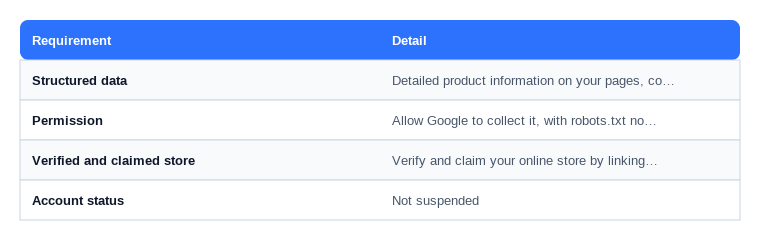
What do I need?
| Requirement | Detail |
|---|---|
| Structured data | Detailed product information on your pages, correctly implemented for all required attributes |
| Permission | Allow Google to collect it, with robots.txt not blocking Googlebot |
| Verified and claimed store | Verify and claim your online store by linking it to your account; see how to verify and claim |
| Account status | Not suspended |
If you do not see the option to add products from your online store when creating a data source, Google says to check structured data, account status and robots.txt.
Where do I find the products?
Under Settings, Data sources, in the Product sources tab, the Found by Google section lists products added automatically. Google says the data sources and Products tabs offer options such as editing countries, stopping management of products, disabling ads for products found by Google and hiding all automatically found products.
What happens if I also upload a feed?
Google says that to avoid duplicates, products already included in other data sources are not added, and if the same product is both found automatically and uploaded, it keeps the version you uploaded and removes the automatic one. So an existing feed is not overwritten. But a feed that omits some products will let the automatic version appear for them, so check Found by Google after you launch a new feed.
What are the two ways products appear?
Google describes two options: automatically through organic search, where structured data on your site shows basic product information in results even if you have no Merchant Center account; and enhanced visibility through automated data sources, where you gain more control and richer product details and can run Shopping ads. Opting out stops Google adding products, though basic information may still appear in organic results based on your structured data, with fewer management options.
What is the StoreBot crawler?
Google uses a crawler called StoreBot that crawls product details pages, cart pages and checkout pages, going through the checkout flow and cataloguing shipping price, product price, availability, coupon validity, shipping time, countries and payment methods. If your logs show StoreBot-Google advancing through checkout without buying, it is likely the crawler. Google says information you provide through structured data and Merchant Center takes precedence over what the crawler extracts, and that allowing the crawler is highly encouraged. See what StoreBot does.
When should a store opt out?
When you maintain a reliable feed and want Merchant Center to hold only that feed; when your structured data is wrong and would create bad listings; or when you run a catalogue with many variants that your feed handles better. Otherwise it can serve as a safety net. Compare Found by Google against your feed monthly, and fix structured data either way. See how to keep prices and stock in sync.
How do I check structured data before relying on it?
Open a few product pages in a structured data testing tool and confirm that name, image, price, currency, availability and brand are present and correct, and that variants expose the right price. Compare the values with your visible page and your feed; mismatches here become mismatches in Google’s listing. Check that pages are indexable and not blocked by robots.txt, that canonical URLs point to the product page and that sale prices appear only when a sale is on. If you use a theme or app that outputs the markup, test after every update, because a small change can remove a field. Fixing structured data helps whether or not you use automated data sources, because Google also uses it for organic product results.
Where does Bach.ai fit?
Bach.ai is our product. With your store connected it reads products and orders to show which items sell. It does not manage Merchant Center data sources. On an active paid plan any supported Google Ads change waits for your approval, by default.
FAQ
Do I need a feed?
Not if you opt into automated data sources and your structured data is complete, but a feed gives more control.
Will it overwrite my feed?
No. Google says it keeps the version you uploaded and removes the automatic duplicate.
Can I stop it?
Yes, by opting out of automated data sources or hiding found products.
Is my site visible without Merchant Center?
Google says structured data can show basic product information in search results even without an account.
Sources
Sources, each opened and read on 25 Nov 2026: Google Help pages, Add products automatically from your online store; About the Google StoreBot crawler; Verify and claim your online store. Menu names and limits change, so check the page before you act.