How Do I Add Negative Keywords in Google Ads?
How do I add negative keywords in Google Ads?
Open the search terms report, tick the queries you do not sell to, choose Add as negative keyword, and save them to a campaign, an ad group or a shared list. Google adds them as exact match by default from that report. Negatives do not match close variants, so add singular and plural forms.
Negative keywords are the cheapest wasted-spend fix in a Google Ads account, because they cost nothing to add and remove clicks that were never going to buy. Google’s help pages describe three places to add them, a report to find them in, and one rule that catches stores out: negatives do not match close variants. This guide walks through each, using Google’s pages fetched on 25 November 2026.
What is a negative keyword, and why does a store need them?
Google says negative keywords let you exclude search terms from your campaigns so you can focus on the keywords that matter to your customers. Its example is an optometrist who sells eyeglasses and adds “wine glasses” and “drinking glasses”. A store has the same problem in its own words: a shoe brand might not want “shoe repair” and a furniture brand might not want “free plans”.
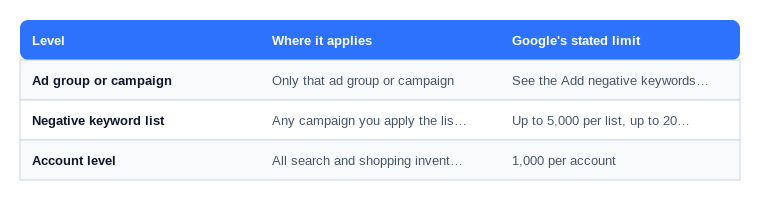
Where can I add negative keywords?
| Level | Where it applies | Google’s stated limit |
|---|---|---|
| Ad group or campaign | Only that ad group or campaign | See the Add negative keywords page |
| Negative keyword list | Any campaign you apply the list to | Up to 5,000 per list, up to 20 lists per account |
| Account level | All search and shopping inventory in relevant campaign types | 1,000 per account |
Google also notes that for Performance Max you can add account-level negative keywords. Check the current list help page before you rely on numbers, since limits are revised.
How do I find which searches to exclude?
Google suggests the search terms report as the source. It shows actual terms that a significant number of people searched for and that triggered your ad. Look for searches that are related to what you sell but are not exactly it.
- Open Campaigns, then the Insights and reports menu, then Search terms.
- Sort by cost, so the expensive terms come first.
- Tick the terms with spend and no sale that you would never want to sell to.
- Click Add as negative keyword.
- Choose ad group, campaign or an existing or new negative keyword list, then save.
Google notes that by default, negative keywords added to a Search campaign from this report are added as negative exact match. To change the match type, use the match-type symbols. Its page for using the search terms report for negative ideas has the current click path.
Do negative keywords match plurals and misspellings?
No, and this is the rule that most often surprises people. Google says negative keywords will not match to close variants or other expansions. Its example: if you exclude the negative broad match keyword “flowers”, ads are not eligible when a user searches “red flowers”, but can still serve for “red flower”. For a store, add both singular and plural forms and the common misspellings you see in the report.
A second rule protects you from a self-inflicted outage. Google says to make sure negative keywords do not overlap with your regular keywords, because that will cause your ad not to show. If a campaign stops spending after you add a batch, check the overlap first, then the causes in Why is Google Ads not spending my budget?.
What changes on Display and Video campaigns?
Negatives are looser there. Google says negative keywords are not as precise on the Display Network, so your ad may still occasionally appear on pages containing the terms, and that for Display and Video campaigns all negative keywords are treated as broad match. For those campaigns Google points to site category options and content exclusions as the best way to avoid unrelated sites or videos.
How often should I review the list?
Google gives no schedule. A practical routine is to review the search terms report at each budget review and after each new product launch, because new products bring new unrelated searches. Do not add a negative from a single click; wait until a term has spent enough to matter relative to your target cost per sale. Our break-even maths is on the ROAS and margin pages.
What about Shopping and Performance Max traffic?
Shopping has its own help page on negative keywords, and Performance Max supports account-level negatives as noted above. If you run Performance Max, read Performance Max vs Search campaigns for e-commerce first, because what you can control differs by campaign type. For how Google’s bidding then treats the traffic you keep, see Target ROAS vs Maximize conversion value.
Bach.ai is our product. It audits Google Ads and Meta accounts and can propose changes; on a paid plan a supported change is applied only after you approve it by default (Auto-Pilot is opt-in), and the free trial does not apply changes. Wasted search spend is one of the things its audit looks at, and the estimate is not guaranteed savings. The Meta Ads audit checklist shows the same review logic for Meta.
FAQ
Should I use exact, phrase or broad match for negatives?
Start with exact for terms from the report, since Google adds them that way by default from that report. Use phrase or broad only when a whole family of searches should be excluded, and check you are not blocking a term you sell.
How many negative keywords can I have?
Google’s list page states up to 5,000 per list and 20 lists per account, and 1,000 at account level. These limits can change, so check the page when you plan a bulk upload.
Will negative keywords lower my conversions?
They can if they overlap with keywords you want. Google warns an overlap stops the ad showing. Review a new batch against your active keywords before saving.
Do negatives work the same on Display?
No. Google says all negative keywords on Display and Video are treated as broad match and are less precise than on Search.
Sources, read on 25 November 2026: About negative keywords; About negative keyword lists; Add negative keywords to campaigns; Get negative keyword ideas using the search terms report.