How Do I Bulk Create Ads in Meta Ads Manager?
How do I bulk create ads in Meta Ads Manager?
Open Ads Manager on desktop, download the import template or export existing ads as a spreadsheet, fill in campaign, ad set and ad rows, and upload it. Meta lists a roughly 2MB file limit and says some features are unsupported, so review every row in Ads Manager before publishing.
Building fifty ads one at a time is slow and error-prone. Meta gives you two built-in ways to scale it: a spreadsheet import and duplication. Both save time and both can copy a mistake fifty times, so the checks matter as much as the clicks.
How does bulk import work?
Meta says advertisers can bulk import ads to Meta Ads Manager on desktop by uploading an Excel spreadsheet with campaign, ad set and ad information. You can download a template to upload new ads or export your existing ad details as a spreadsheet, and Ads Manager also lets you bulk import images (How to bulk upload and import ads). The page describes it as ideal for advertisers who manage many objects or who prefer to edit ads in Excel, and gives a file limit of about 2MB.
Meta also warns that some advertising features may be unsupported when you export and import ads. Always read the unsupported list before you rely on a round trip for an existing campaign.
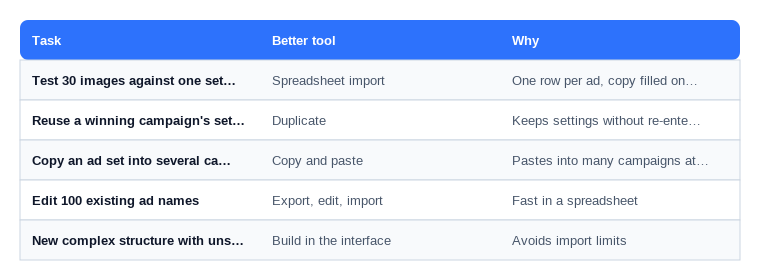
When should I use import, and when duplication?
| Task | Better tool | Why |
|---|---|---|
| Test 30 images against one set of copy | Spreadsheet import | One row per ad, copy filled once |
| Reuse a winning campaign’s settings | Duplicate | Keeps settings without re-entering |
| Copy an ad set into several campaigns | Copy and paste | Pastes into many campaigns at once |
| Edit 100 existing ad names | Export, edit, import | Fast in a spreadsheet |
| New complex structure with unsupported features | Build in the interface | Avoids import limits |
On duplication, Meta says you can duplicate multiple campaigns, ad sets or ads into an original, existing or new campaign from the Campaigns table, or use copy and paste, where you can see insights such as results, impressions and spend to decide where to paste (How to duplicate ad campaigns).
What are the steps?
- In Ads Manager on desktop, download the import template, or export the ads you want to base the new ones on.
- Fill one row per campaign, ad set and ad, using a naming pattern you can search later.
- Add image or video file names, and bulk import the creative assets.
- Keep the file under Meta’s size limit; split it by campaign if it is too large.
- Upload the spreadsheet and read every error the import shows.
- Open the imported campaigns and check budgets, audiences, placements, URLs and tracking in the interface.
- Publish in draft or paused state first where possible, then turn on a few ads before the rest.
What should I check after import?
Check budgets and bid strategy at the right level, the destination URL and UTM parameters on a sample of ads (see What UTM parameters should Facebook ads use?), the pixel or dataset attached, and that the creative preview looks right in each placement. A spreadsheet will happily upload a wrong URL on every row.
How many ads is too many?
More ads is not always better. Meta documents a significant-edit rule: adding a new ad to an ad set sends it back into the learning phase (Significant edits). Importing many new ads into a live ad set therefore resets learning. Add them to a new ad set or campaign for a test, and read How many creative variants should I test at once on Meta? before you scale the count.
What mistakes do spreadsheets make easy?
A spreadsheet repeats whatever you paste into it. Four mistakes recur: an old UTM string copied down every row, a budget entered at ad set level when you meant campaign level, a creative file name with a typo so the wrong asset attaches, and mixed currencies across client accounts. Protect against each with a short pre-upload review: filter the sheet by each column and read the unique values. A column that should hold one value and shows three is the bug.
Name rows so you can find them later: client, objective, audience, concept and date in a fixed order. How should I name my ad creative files? sets out a pattern that survives a year of tests.
Is there a faster way for agencies?
If you run the same structure for many clients, keep one template per structure, a naming convention and a short review list. The Meta ads audit checklist works as the review list for a first import into a new account. Meta’s Marketing API and ads AI connectors can also create ads, but those need developer or tool setup and the same checks.
Can software help?
Bach.ai does not bulk-build campaigns from a spreadsheet; it audits an account and proposes fixes you approve. For creative production, Pro includes 50 and Agency 200 creative generations a month per the pricing page. Use the spreadsheet import for structure, and use an audit afterwards to see whether the new ads helped or split your budget too thin.
FAQ
Can I bulk import on mobile?
Meta describes bulk import for Ads Manager on desktop. Use a desktop browser.
What is the file size limit?
Meta’s page lists a file limit of about 2MB. Split large files by campaign.
Will a duplicated ad keep its dynamic creative setting?
Meta says ads generated with dynamic creative can be duplicated, but you cannot apply dynamic creative to duplicated ads that were not originally generated that way.
Does importing reset learning?
Adding a new ad to an ad set is a significant edit and can send it back into learning. Import new ads into new ad sets when you can.
Sources: Meta Business Help Center, How to bulk upload and import ads, How to duplicate ad campaigns, Significant edits and learning phase (checked 25 Nov 2026); Bach.ai capabilities from our features page and pricing.