How to Calculate Margin ROAS From Shopify Costs
How do I calculate margin ROAS from Shopify product costs?
Add a cost per item to every product in Shopify, then read gross profit by product from the profit reports for the same dates as your ad spend. Margin ROAS equals gross profit divided by ad spend. A result of 1.0 is break-even on product margin; ordinary ROAS multiplied by gross margin gives the same figure.
ROAS tells you how much revenue each ad dollar produced. It says nothing about how much of that revenue was left after you paid for the product. A 3.0 ROAS on a product with a 30% gross margin returns 0.9 of margin per ad dollar, a loss before shipping, fees or returns. Margin ROAS fixes that by measuring gross profit per ad dollar, and Shopify already holds most of the inputs if you have recorded your product costs.
For the full cost stack that moves your break-even beyond product cost, read how to compute break-even ROAS from true margin. This guide covers the Shopify mechanics.
What is margin ROAS, exactly?
Margin ROAS = gross profit ÷ ad spend. It equals ROAS × gross margin, where gross margin is gross profit ÷ net sales. Break-even on product margin is 1.0, because one dollar of gross profit has paid for one dollar of ads. Anything below 1.0 loses money on the product before any other cost.
Illustrative: a store spends $10,000 on ads and Meta reports a 3.0 ROAS, or $30,000 of revenue. At a 40% gross margin that is $12,000 of gross profit, so margin ROAS is 12,000 ÷ 10,000 = 1.2. At a 30% margin it is 0.9. The ad account looks identical in both cases; the business does not.
How do you get the cost into Shopify?
Shopify’s profit reports rely on a cost per item you record on each product and variant. Shopify states that profit is reported only for products and variants that had a cost recorded at the time they were sold, so a cost added today does not repair last month’s report (Profit reports).
- In Shopify admin, open each product and enter a cost per item on every variant. Use the landed product cost, not the retail price.
- Check that variants with different costs, such as sizes or bundles, each have their own value.
- Note the date you finished. Orders before that date will lack cost data in the profit reports.
Where do you read gross profit?
- In Shopify admin, go to Analytics, then Reports.
- Click the Category filter and select Profit Margin to show only profit reports.
- Open Gross profit by product, or by product variant, and set the date range to match your ad spend dates.
- Read gross profit for the products you advertise.
Shopify notes that the Gross margin in profit reports is based on net sales, which takes into account discounts and refunds in the period, whereas the margin shown on the product details page uses the full price. It also warns that net sales in the sales report and in the profit report can differ, because profit counts only products with a recorded cost.
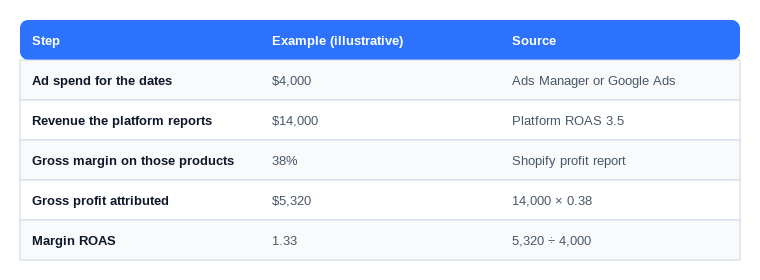
How do you calculate it for one campaign?
| Step | Example (illustrative) | Source |
|---|---|---|
| Ad spend for the dates | $4,000 | Ads Manager or Google Ads |
| Revenue the platform reports | $14,000 | Platform ROAS 3.5 |
| Gross margin on those products | 38% | Shopify profit report |
| Gross profit attributed | $5,320 | 14,000 × 0.38 |
| Margin ROAS | 1.33 | 5,320 ÷ 4,000 |
The weak point is attribution: the $14,000 is the platform’s claim. If the platform overstates, margin ROAS does too. Cross-check against store revenue, as in why Meta and Google claim more sales than Shopify. For a product-level view, take gross profit per product from Shopify and compare with the spend on ads for that product.
What costs does margin ROAS leave out?
It stops at gross profit. Shipping, payment fees, returns and fulfilment come after it, which is why 1.0 is a floor and not a target. Hidden fulfillment costs that reset your break-even ROAS and how returns and refunds change true ROAS show the next layers. Set a target above 1.0 that covers them.
Can you bid on margin instead of revenue?
Google says you define the value you maximize when you set up conversion tracking, such as sales revenue or profit margins (About Maximize conversion value bidding). If you feed profit as the conversion value, Maximize conversion value and Target ROAS optimize toward margin. Feed it carefully: products with no recorded cost would show zero profit and be treated as worthless. See Target ROAS or Maximize conversion value.
Where does Bach.ai help?
Bach.ai connects Shopify read-only from Starter and shows margin ROAS where your product costs are available, beside the revenue each platform reports. Where costs are missing it shows the figure as unavailable rather than assuming a margin. It never changes your store, and on a paid plan it applies a Meta or Google Ads change, by default, only after you approve it (Auto-Pilot is opt-in).
What to do next
Fill in cost per item for your top 20 products by ad spend, wait for new orders, and read Gross profit by product once a week against ad spend. See the ad spend calculator for budget sizing. A free 7-day trial needs no card; Google Ads and Shopify connections are included in the 7-day trial and from Starter (pricing).
FAQ
Is margin ROAS the same as POAS?
They are the same idea: profit on ad spend. Definitions vary on whether profit is gross or after other costs, so state which one you use. Write the definition next to the number in your reports so a colleague reading it later knows exactly what the figure includes.
What is a good margin ROAS?
At least 1.0 to cover product cost. The right target is higher, set by your shipping, fees, returns and overhead. No published average replaces your own cost stack. Work out your shipping, fees and returns first, then set the target above 1.0 by enough to leave room for them.
Why is Shopify’s profit lower than my estimate?
Profit is reported only for products with a recorded cost at the time of sale, and gross margin is based on net sales after discounts and refunds. If your estimate used list prices or products without a recorded cost, the reported profit will come out lower than your number.
Does margin ROAS work for bundles?
Only if each bundle variant has its own cost per item. Otherwise Shopify cannot compute the profit. Record a cost for each bundle variant before you rely on the margin ROAS figure, or the bundle sales will be missing from the profit total.
Sources
Shopify’s help site blocked automated fetching on 24 Nov 2026, so the Shopify claims above were read from an Internet Archive copy of the Profit reports page dated 3 Nov 2026 and have not been re-verified live. Checked 24 Nov 2026: About Maximize conversion value bidding.