What Is Google Ads Quality Score? Does It Matter?
What is Google Ads Quality Score and does it matter?
Quality Score is a 1-10 diagnostic shown per keyword that compares your ad quality with other advertisers. Google's help page says it is not an input in the ad auction and should not be treated as a KPI. Use its three components to find weak ads or landing pages, then judge results on conversions and revenue.
Quality Score is the number in the Keywords table that people most often try to push to 10. Google’s own help page says that is the wrong goal: it calls the score a diagnostic tool, says it is “not a key performance indicator” and says it is “not an input in the ad auction”. For a store, that means the score is a clue about which ad or landing page to fix, never a result to report.
This post reads Google’s pages on Quality Score and Ad Rank, both fetched on 25 November 2026, and turns them into a short routine for an e-commerce account. Menu names and rules change, so confirm on the linked pages before you act.
What does Google say Quality Score actually is?
Google describes Quality Score as a diagnostic tool that gives you a sense of how well your ad quality compares to other advertisers. It is measured on a scale from 1 to 10 and is available at the keyword level. A higher score means your ad and landing page are more relevant and useful to someone searching for your keyword, compared with other advertisers.
Two sentences from the same page matter most. The score should not be “optimized or aggregated with the rest of your data”, and it is “not an input in the ad auction”. Ad Rank is a different thing: Google says Ad Rank decides whether an ad is eligible to show and, if eligible, where it appears relative to other advertisers’ ads, and that it is calculated from factors including competition, the context of the search and your ad quality at that moment.
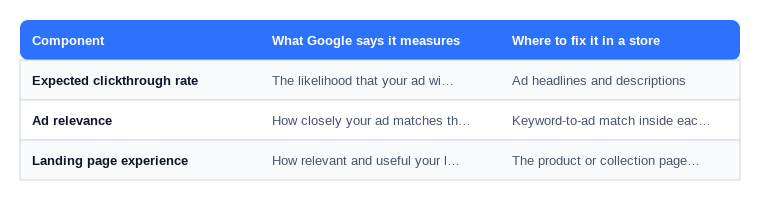
Which three parts make up Quality Score?
| Component | What Google says it measures | Where to fix it in a store |
|---|---|---|
| Expected clickthrough rate | The likelihood that your ad will be clicked when shown | Ad headlines and descriptions |
| Ad relevance | How closely your ad matches the intent behind a search | Keyword-to-ad match inside each ad group |
| Landing page experience | How relevant and useful your landing page is to people who click | The product or collection page the ad opens |
Each component gets a status of “Above average”, “Average” or “Below average”. Google says this compares you with other advertisers whose ads showed for the exact same search over the last 90 days. A component rated Average or Below average “may indicate an opportunity to make improvements”.
How do I check Quality Score in my account?
Google’s page tells you to open the Keywords view and add the Quality Score columns. The exact click path moves between interface updates, so follow the “How to check your Quality Score” section of Google’s Quality Score page. Then read the status of each component per keyword, not only the 1-10 number.
If you see a dash instead of a number, Google says there are not enough searches that exactly match your keyword to determine a score. Its suggested remedies are to find higher-volume keywords with Keyword Planner and to broaden match types so the keyword takes part in more auctions. Google adds that match types do not change how Quality Score is calculated, because it is based on historical impressions for exact searches of your keyword.
How do I improve a low Quality Score?
- Open the Keywords table and sort by impressions, so you fix the keywords that actually show.
- Find the component rated Below average on those keywords.
- If expected clickthrough rate is low, rewrite the headlines to say what the shopper typed, then compare clickthrough after the change.
- If ad relevance is low, split the ad group so each group holds keywords for one product type and one ad that names it.
- If landing page experience is low, send the ad to the specific product or collection page, not the home page.
- Leave the change alone for a full review window before judging it; Google bases the status on a rolling 90-day comparison.
Google’s responsive search ad guidance is useful at step 3. Its best practices page is the place to check headline counts and variation advice, since limits change.
Should I judge my account by Quality Score?
No. A 10 on a keyword that never converts is a cost, and a 5 on a keyword that earns a profit is fine. Google says the score does not feed the auction, so a rising score by itself shows nothing about profit. Judge keywords by conversions, revenue and margin after ad cost, and use Quality Score only to decide where to look first.
A related trap is ad quality that Quality Score does not capture. Google lists devices, location of the user, time of day and assets as factors that “might not be captured by Quality Score”. A keyword can look fine in the table and still lose money on mobile or at night, so read the segment reports too. When Google Ads stops spending at all, the cause is usually something else; see Why is Google Ads not spending my budget?.
How does this fit a Meta and Google budget?
Quality Score is a Search concept. If you split budget between channels, our own comparison of Facebook Ads vs Google Ads for e-commerce covers where Search captures existing demand, and Performance Max vs Search campaigns covers what changes when automation picks the placements. Neither depends on a 10/10 score.
Bach.ai is our product. It audits Google Ads and Meta accounts and, on a paid plan, can apply a supported change after you approve it by default (Auto-Pilot is opt-in); the free trial does not apply changes. It does not raise Quality Score for you and we make no promise about the number. For a full account walk-through, use the Meta Ads audit checklist, then repeat the same logic for Google.
FAQ
Is a Quality Score of 7 good enough?
Google gives no pass mark. It calls the score a diagnostic compared with other advertisers, so read the three component statuses instead. If all three are Average or better and the keyword is profitable, the number needs no action.
Does changing match type change Quality Score?
Not directly. Google says Quality Score is based on historical impressions for exact searches of your keyword, so changing match types will not change it. Broader match can help a keyword gather enough data to get a score at all.
Why does my keyword show a dash?
Google says a dash means there are not enough searches that exactly match your keyword to determine a score. Use higher-volume keywords or broaden match types so the keyword takes part in more auctions.
Is Quality Score the same as Ad Rank?
No. Ad Rank is calculated in each auction to decide eligibility and position. Quality Score is a diagnostic shown in your account and, per Google, is not an auction input.
Sources, read on 25 November 2026: About Quality Score for Search campaigns; About Ad Rank; Best practices for creating effective responsive search ads.