Do I Still Pick a Country for Lookalike Audiences?
Do I still pick a country when creating a lookalike audience?
No. Meta says you no longer select an audience location when creating a lookalike. It uses the ad set's location settings to find people similar to your source, and the estimated audience size shows only when the lookalike is used in an ad set. Existing lookalikes are not affected.
Older lookalike guides tell you to pick a country and a percentage. Meta changed that, and it affects how you plan lookalikes for a store that sells in several markets. This guide uses Meta’s pages on creating lookalike audiences, the location update and how lookalikes work, read on 25 November 2026. Meta may change the flow again, so check Audiences.
What exactly changed?
Meta’s page says: you no longer select audience location when creating a lookalike. New lookalikes therefore do not show an estimated audience size in Audience Manager; you see the estimated size when you use the lookalike in an ad set. Meta uses the ad set’s location settings to find people similar to your source audience, which it says gives its system more opportunities to find people likely to respond. Existing lookalike audiences are not affected.
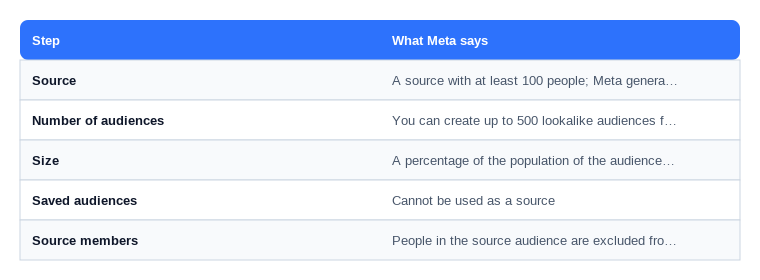
What do I still choose?
| Step | What Meta says |
|---|---|
| Source | A source with at least 100 people; Meta generally recommends 1,000-5,000 |
| Number of audiences | You can create up to 500 lookalike audiences from a single source |
| Size | A percentage of the population of the audience location, chosen with a slider |
| Saved audiences | Cannot be used as a source |
| Source members | People in the source audience are excluded from the lookalike |
Meta explains that smaller percentages match the source more closely while larger percentages create a bigger, broader audience, and that quality matters: an audience made from your best customers may give better results than one including all customers. The source questions are in What makes a good lookalike audience source? and What is the minimum source audience size for a Meta lookalike?.
How do I create one now?
- Open Audiences, then Create audience, then Lookalike audience.
- Create a new source or select one.
- Choose the number of audiences and the audience size percentage.
- Select Create audience.
- Watch the Status: Populating (up to 3 days, and you can start running ads with it right away, though its size will grow), Audience not created (the source may have been too small) or Ready.
- Add it to an ad set and set the ad set’s location to the market you want.
How do I handle several countries?
Because the ad set’s location sets where the lookalike looks, one lookalike can serve several ad sets in different markets. Build one ad set per market, apply the same lookalike and compare cost per purchase by market. This keeps budgets separate and prevents Meta from putting most of the money in one country; for location settings see How does location targeting work in Meta Ads?. Whether the percentage still matters under Advantage+ is in Does Advantage+ lookalike ignore my lookalike percentage?.
What should I check after it is ready?
Check the estimated audience size inside the ad set, as Meta says that is where it appears now; see What does estimated audience size mean in Meta Ads?. Check that the source was refreshed recently, particularly if it is a customer list that goes outdated after 30 days, as described in How do I create a customer list audience on Meta?. And compare against a broad audience; the test method is in Broad vs narrow audience test.
Which sources make the best seeds for a store?
Meta says an engagement custom audience can be a source for a lookalike, and its lookalike page says an audience made from your best customers may beat one that includes everyone. For a store that means three candidates: a list of repeat or high-spend buyers, a purchasers audience from the pixel, and an engagement audience of video viewers. Build each as its own lookalike at the same percentage, run them in separate ad sets with the same creative, and compare cost per purchase after a few weeks. Meta recommends a source of 1,000 to 5,000 people, so a store with few buyers may need a broader seed such as all purchasers over a longer window. Refresh customer-list seeds, because a list not updated in over 30 days is marked outdated, and write down the seed, percentage and date of every lookalike you build so that a later change in results can be traced back to the audience that caused it.
Bach.ai is our product. Its audit reads your Meta ad sets and flags audience saturation, ranking findings by estimated recoverable spend. On a paid plan a supported change is applied on Meta or Google Ads only after you approve it by default (Auto-Pilot is opt-in); the free trial does not apply changes, and recoverable-spend figures are estimates, not guarantees. For a hands-on review, use the Meta Ads audit checklist.
FAQ
Do old lookalikes still use their country?
Meta says existing lookalike audiences will not be affected by the change.
Why is there no audience size in Audiences?
Meta says new lookalikes do not show an estimated size there; the size appears when you use the lookalike in an ad set.
How long does a lookalike take to populate?
Meta says Populating can take up to 3 days, and you can start running ads with it right away while its size grows.
Can I use a saved audience as a source?
No. Meta says saved audiences cannot be used as a lookalike source.
Sources, read on 25 November 2026: Create a lookalike audience; About lookalike audiences; About engagement custom audiences.