What Are Campaign, Ad Set and Ad in Meta Ads?
What is the difference between a campaign, ad set and ad?
A campaign holds the objective, an ad set holds the audience, placements, budget and schedule, and an ad holds the creative, format and identity. Meta says all ads in one ad set share the same audience, placement, budget and schedule, so splits you want to compare belong in separate ad sets.
Every Meta ad lives in a three-level tree, and most account mistakes are a setting placed at the wrong level. Meta’s help center says ad creation is organised into campaign, ad set and ad, and that a campaign contains one or more ad sets, each of which contains one or more ads. This guide turns that into a layout for an online store and lists what Meta says you cannot edit after publishing. All facts come from Meta’s help pages, read on 25 November 2026.
What does each level control?
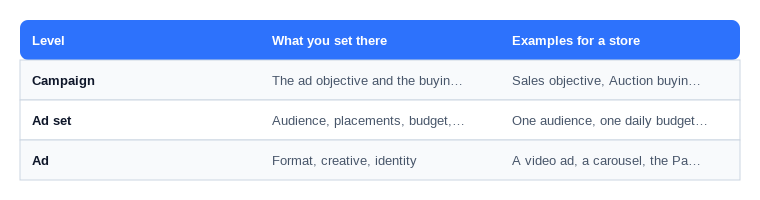
| Level | What you set there | Examples for a store |
|---|---|---|
| Campaign | The ad objective and the buying type | Sales objective, Auction buying type |
| Ad set | Audience, placements, budget, schedule | One audience, one daily budget, Instagram and Facebook placements |
| Ad | Format, creative, identity | A video ad, a carousel, the Page and Instagram account shown |
Meta states that at the ad set level all ads “share the same audience, placement, budget, and schedule settings”. At the ad level you choose single image or video, carousel or collection, the images, videos, text, headlines and links, and which Facebook Page and Instagram account represent your business.
Which objective should the campaign have?
Meta’s objectives page lists six simplified objectives: Awareness, Traffic, Engagement, Leads, App promotion and Sales. It describes Sales as finding people likely to purchase your goods or services, for example through an e-commerce site, and says you can also optimise for other actions such as someone adding an item to a cart. For a store whose goal is orders, Sales is the match; the other objectives optimise for other results.
Meta also says to keep your business goal in mind first, since your goals may change as the business grows. If you want a different objective later, you cannot edit it on a published campaign, as covered below.
How many ad sets and ads should one campaign have?
Meta gives no number. Its own example is one campaign with two ad sets, one for ages 18-30 and one for ages 31-50, each with different ads, to see which combination performs best. For a store, a clean start is one campaign per objective and a small number of ad sets, each with a clear reason to exist: a different audience, a different placement set or a different budget. Fewer ad sets gives each more data; our notes on that trade-off are in Should I run fewer ad sets on a small budget?.
- Create the campaign and choose the Sales objective.
- Create one ad set for your main audience with a budget you can sustain.
- Add two or three ads that differ in one thing, such as the hook, so you can read the result.
- Publish, then wait before editing; changes can restart learning.
- Add a second ad set only when it tests a different audience or placement.
If you cannot decide between budget at campaign or ad set level, read Is CBO or ABO better for my account?.
What can I not change after publishing?
Meta’s editing page is explicit on three points. You cannot change your published campaign objective; you can stop the campaign and create a new one. The conversion location of a published ad set cannot be edited either. And for an ad in an Awareness campaign, you cannot change the Page, though you can duplicate the ad set, change the Page and publish.
It also says that once you change any element of a published campaign, the new version replaces the old one, with no option to reverse and no way to tell the metrics from before and after the edit. Editing certain details may restart the learning phase or cause the ad to be re-reviewed. Read What resets the Meta learning phase before you edit a live ad set.
Where does the budget live?
Either level, depending on a setting. Meta’s edit page says you can change an ad set budget amount “so long as budget optimization is off”, and that turning on Advantage+ campaign budget moves the control to the campaign. If you see one ad set take most of the budget, the cause is usually the budget setting, not the structure; see Why is Meta spending my whole budget on one ad set?.
How does Bach.ai relate to this structure?
Bach.ai is our product. Its audit reads your Meta account at each level, flags issues such as audience saturation and ad sets stuck in Learning limited, and ranks findings by estimated recoverable spend, which is an estimate and not a guarantee. On a paid plan, supported changes are applied on Meta only after you approve them by default (Auto-Pilot is opt-in, and the free trial does not apply changes). For a manual walk-through of the same review, use the Meta Ads audit checklist.
FAQ
Can one ad set have more than one ad?
Yes. Meta says a single ad set can contain one or more ads, and all ads in it share the same audience, placement, budget and schedule settings.
Where do I choose the audience?
At the ad set level. Meta lists audience, placements, budget and schedule as the ad set controls, so ads inside the set cannot have different audiences.
Can I change the objective of a live campaign?
No. Meta says you cannot change a published campaign objective. Stop the campaign and create a new one with the objective you want.
Does editing a live ad set hurt performance?
It can. Meta says editing certain details may restart the learning phase or trigger a new review, and that there is no way to separate before and after metrics.
Sources, read on 25 November 2026: What are the advertising levels in Meta Ads Manager?; How to choose the right ad objective; How to edit ad campaigns in Meta Ads Manager.