Do I Have to Label Google Ads Assets Made With AI?
Do I have to label Google Ads assets made with AI?
Google says AI regulations in places such as the European Union, India, New York, California, South Korea and Vietnam require disclosures on ads with certain AI-generated or edited assets, and it provides an AI label setting. The setting does not guarantee compliance, so take legal advice for each market where you advertise.
Google Ads can generate images and, in some campaign types, whole asset groups. That raises a practical question for every advertiser: when does AI-made creative need a label? Google gives a partial answer, and says plainly that it is not legal advice.
What does Google say about labelling?
Google’s page on generated images states that AI regulations in the European Union, India, New York, California, South Korea and Vietnam require that ads with certain AI-generated or edited assets include disclosures or labels that inform consumers the ads were made with AI. You can add labels directly to creatives, or use the AI label setting in Google Ads, Display & Video 360, Campaign Manager 360, Merchant Center and Ads Editor (About generated images in Google Ads). Google says these labels will not violate its policies against text overlays and watermarks, and that use of the AI label setting does not guarantee compliance with specific regulations: seek legal guidance.
The companion page explains the setting: it lets you disclose assets as AI generated or edited, and ads containing assets you designate will include a disclosure in the “How this ad was made” section of the My Ad Center panel (Use AI content label settings and disclosures). Google notes laws in some regions may require you to label ads that use certain AI-created or AI-edited assets, and that you can apply your own label.
What tools generate assets?
Google lists generative tools for images, an image editor with bulk edits and prompt assistance, creative enhancements in Demand Gen, and building a Performance Max asset group with generative AI (Generative AI tools in Google Ads). Some features are limited by country or beta status, so check eligibility in your account.
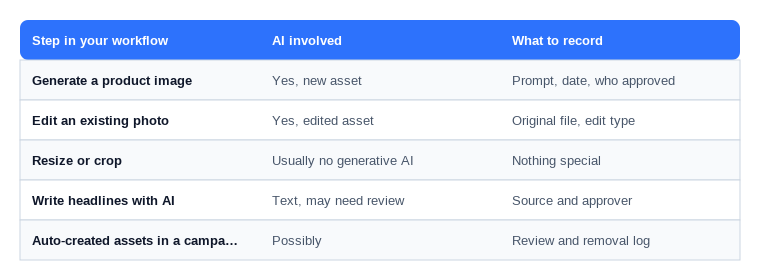
| Step in your workflow | AI involved | What to record |
|---|---|---|
| Generate a product image | Yes, new asset | Prompt, date, who approved |
| Edit an existing photo | Yes, edited asset | Original file, edit type |
| Resize or crop | Usually no generative AI | Nothing special |
| Write headlines with AI | Text, may need review | Source and approver |
| Auto-created assets in a campaign | Possibly | Review and removal log |
How do I decide whether to label?
- List every market you advertise in, using the account’s targeting.
- Check each market’s rules, starting with the regions Google names.
- List each asset made or meaningfully edited with AI.
- Where a rule may apply, apply the AI label setting or your own label.
- Keep a record of which assets were labelled and why.
- Ask a lawyer for any market where the answer is unclear.
For Meta, the picture is different: see Do I have to disclose AI-generated content in Meta ads?. Do not assume one platform’s setting covers the other.
What can go wrong with generated assets?
Four things recur. A generated image shows a product feature that does not exist, which can breach advertising policy and lead to a refund request. A generated image shows people in a way that does not suit your brand. A model-written line states a claim you cannot support. And a team member forgets which assets were AI-made, so nobody labels them. Each is cheap to prevent: compare every generated image to the real product, have a named person approve each asset, and keep the register above up to date.
Treat AI assets as drafts. A first pass from a tool saves time on options, not on judgement. When a client is involved, tell them which assets were AI-assisted and get written agreement, especially where the client’s markets have disclosure rules. In an agency, make the register part of the monthly report so the client sees it.
What about quality and brand safety?
A label does not fix a bad image. Review every generated asset for accuracy, product fidelity and claims. How do I stop AI ad creative from looking fake? lists checks that apply on any platform. For policy risk see Does Google penalise AI-generated ad copy?. Keep the Meta ads audit checklist creative section handy as a review template.
How do I keep a record?
Keep a simple register: asset name, tool, prompt or edit type, date, approver, markets, label applied and campaign. It takes a minute per asset and answers a regulator, a client or a platform review. Store the original file before editing.
Can software help?
Bach.ai drafts next-angle creative ideas and, on Pro and Agency, includes creative generations per month per the pricing page. It does not set Google’s AI label for you, and nothing it produces removes your duty to check the rules where you advertise.
FAQ
Does the AI label hurt performance?
Google’s pages I fetched make no performance claim either way. Test it on your own account if you have a choice.
Is the label required everywhere?
No. Google names specific regions and says laws in some regions may require it. Check where you advertise.
Does the label make my ad compliant?
No. Google says use of the setting does not guarantee compliance with specific regulations.
Can I apply my own label?
Yes. Google says you can add labels directly to creatives or apply your own label.
Sources: Google Ads Help, About generated images in Google Ads, Use AI content label settings and disclosures, Generative AI tools in Google Ads (checked 25 Nov 2026); Bach.ai capabilities from our features page and pricing.