Can I Control the Text Google AI Writes for Ads?
How do I control the text Google AI writes for my ads?
Turn on text customization, then add text guidelines to the campaign: up to 25 excluded terms and up to 40 messaging restrictions. Google applies them to existing generated assets too, so any that break the rules stop serving. Review the asset report weekly and remove anything off brand.
When text customization is on, Google AI writes headlines and descriptions from your content. That is fast, and it is also how a claim you never approved ends up under your brand name. Google has a beta control for it, with clear limits.
What are text guidelines?
Google describes text guidelines as an experimental, campaign-level feature that lets you refine your brand’s message for assets made exclusively with text customization, and control the output of assets Google AI creates automatically when text customization is on (Use text guidelines with Performance Max and Search campaigns (beta)). It works for Performance Max campaigns and for Search campaigns with AI Max enabled. Text customization must be switched on first, text guidelines are supported in all languages in Google Ads, and they can also be viewed and edited in Google Ads Editor and the Google Ads API.
Text customization is the setting formerly called automatically created assets, part of AI Max asset optimisation (About AI Max experiments); see What is Google AI Max for Search? for the wider feature.
What can I restrict?
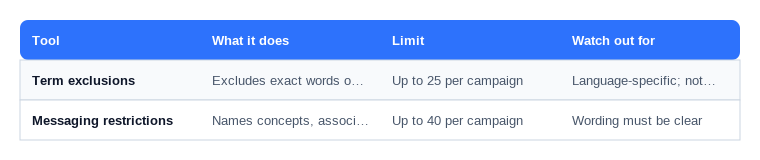
Google gives two tools:
| Tool | What it does | Limit | Watch out for |
|---|---|---|---|
| Term exclusions | Excludes exact words or phrases from all generated text | Up to 25 per campaign | Language-specific; not case sensitive |
| Messaging restrictions | Names concepts, associations or styles to avoid, or a tone to follow or avoid | Up to 40 per campaign | Wording must be clear |
Google’s examples of term exclusions include “Cheap”, “Unlimited”, “Low cost” and “A better choice than Competitor”. Two limits to know: term exclusions are language-specific, so excluding the English “Cheap” does not stop a Japanese equivalent, and they cannot prevent assets with prices; a “$” exclusion will not block “Shoes for less than $50”. For prices, use a messaging restriction such as “Don’t generate assets with prices”.
What happens to assets already running?
Google states that term exclusions and messaging restrictions also apply to existing Google-optimised text assets. Existing assets that do not comply will stop serving and be marked removed. So adding a guideline changes live ads the moment you save it; expect a change in what is shown and a short period of re-optimisation. Make the edit outside a launch week and log it.
How do I set it up?
- Open the campaign and confirm text customization is on.
- Open the text guidelines section for the campaign type.
- List the words your legal or brand team must never see: guarantees, “cheap”, competitor names, medical claims.
- Add them as term exclusions, up to 25.
- Add messaging restrictions for concepts: no price claims, no comparisons, no urgency pressure, a formal tone.
- Save, then review the asset report after a week.
- Record the guidelines, date and approver in your client file.
What should I check weekly?
Google’s AI Max reporting advises regularly reviewing text customization and removing anything that does not align with your brand (About reporting in AI Max for Search). Use the asset report, and read headline and landing-page combinations. If you see wording that a guideline should have blocked, add it. Treat the list as a living document, not a setting you configure once.
What should the guideline list contain?
Start from the claims you cannot make. For a skincare brand that might be “cure”, “guaranteed results” and “doctor recommended” unless you can prove them. For a retailer it might be price promises you cannot always honour, such as “lowest price”. Add words your trademark owner objects to, competitor names your legal team has not cleared, and urgency language you do not want, like “last chance” when it is not true. Then add a messaging restriction about tone: for example, formal and factual, no exclamation marks, no comparison to rivals.
Keep each rule specific and testable. “Be professional” cannot be checked; “Do not claim medical benefits” can. Review the list quarterly with whoever owns brand and legal sign-off, and add every wording you remove from the asset report so the list improves over time. In an agency, hold a master list per client and keep the version history, so a handover does not lose it.
Is this enough for compliance?
No. Guidelines reduce risk; they do not remove it. For regulated products, a person must read what runs. For AI disclosure rules, see Do I have to label Google Ads assets made with AI?. The same logic applies on Meta, where Can AI check my ad against Meta’s policies before I submit? sets out the limits of any AI pre-check. Run the Meta ads audit checklist creative review across both.
Can software help?
Bach.ai reviews connected Google Ads accounts and ranks findings by estimated recoverable spend; changes it proposes wait for your approval by default on a paid plan. It does not write or restrict Google’s generated text; text guidelines are set inside Google Ads.
FAQ
Does it work on every campaign type?
Google describes it for Performance Max and for Search campaigns with AI Max enabled. It is a beta, so availability may vary.
Will it block every unwanted word?
No. Google says term exclusions are language-specific and cannot prevent assets with prices.
Can I use it with text customization off?
No. Google says text customization must be on to use text guidelines.
How many rules can I add?
Up to 25 term exclusions and up to 40 messaging restrictions per campaign.
Sources: Google Ads Help, Use text guidelines with Performance Max and Search campaigns (beta), About AI Max experiments, About reporting in AI Max for Search campaigns (checked 25 Nov 2026); Bach.ai capabilities from our features page.